Stoppable and Non-Stoppable Data Streams#
Key Terms
A non-stoppable stream runs continuously. A non-stoppable source can't be paused by the flow-control logic of the generated FPGA design. A typical example is a camera that keeps sending pixels. As a contrast, a stoppable stream can pause when the next operator isn't ready. A buffer between camera and downstream processing often turns a non-stoppable stream into a stoppable one.
Therefore, after a camera, place a buffer. For absorbing camera bursts, prefer a DRAM operator: LineBuffer on imaFlex, or ImageBuffer on microEnable 5. Use ImageFifo (FPGA-internal memory) only for small decoupling, for example a short delay before SYNC. If you use ImageFifo on a non-stoppable stream, combine it with the Overflow operator, or use ImageFlowControl instead. See Memory Elements Tutorial topic.
For the formal rules behind link connections, see Infinite Sources / Connecting Cameras in the User Manual. For operator shapes and how modules pause or hold back data flow, see Operator Types and Synchronization Tutorial topic.
Stoppable and Non-Stoppable Streams#
The generated FPGA pipeline controls data flow between modules. A module can pause its input when it is not ready to accept more data. Downstream modules can therefore slow the stream for a limited time. VisualApplets does not apply that flow control in the editor; the built applet on the FPGA does.
A stream is stoppable when flow control can hold it back without breaking the design. A stream is non-stoppable when the source can't be stopped by flow control. The source keeps delivering data even if the next module is busy.
Non-stoppable streams are also called infinite sources. The name refers to flow control, not to unlimited image size. The stream has no internal buffer that lets the generated FPGA design pause the source.
Non-Stoppable Sources in a VisualApplets Design#
Camera operators are the most common non-stoppable sources. They receive pixels from the camera and forward them on the output link. They have no buffer that can absorb backpressure, and they can't command the camera to stop the transfer.
In contrast, stoppable sources include operators such as CreateBlankImage and CoefficientBuffer.
Connecting Non-Stoppable Sources#
All O-type and P-type operators can sit downstream of a non-stoppable source. The infinite-source property propagates through these operators in the design until a module converts the stream into a controllable stream.
Only some M-type operators accept a non-stoppable source directly. These are mainly memory operators such as LineBuffer, ImageBuffer, ImageFifo, and FrameBuffer. Whether a specific M-type operator accepts an infinite source is documented in the operator help and in the Operator Reference.
If you connect a non-stoppable source to an M-type operator that doesn't accept infinite sources, Design Rules Check Level 2 reports an infinite source error. Fix the error before you build the applet.
See Operator Types and Synchronization Tutorial topic for M-type, O-type, and P-type behavior and for flow-control rules.
You have two options to control an infinite source:
- With a buffer operator such as
LineBuffer,ImageBuffer, orImageFifo - With the
Overflowoperator.
For a camera path, Basler recommends a DRAM buffer (LineBuffer or ImageBuffer) as the default. Use ImageFifo only for small decoupling tasks. See the Key Terms box at the start of this topic and Memory Elements Tutorial topic.
Info
The Overflow operator in the Synchronization library cuts frames that can't be processed. This leads to different frame lengths, and not all operators downstream can handle this. Do not confuse this operator with arithmetic overflow (a result that no longer fits the bit width; see Bit Arithmetic Tutorial topic) or with the Overflow status parameter on buffer operators (the buffer is full; see Memory Elements Tutorial topic).
The Overflow operator doesn't buffer data itself. Therefore Basler recommends that you always use the Overflow operator together with a buffer operator.
Using Buffer Operators#
Buffer operators turn a non-stoppable stream into a controllable stream. They accept data on the input even when downstream modules aren't ready to take more data. They store data internally and forward it when downstream modules are ready.
Typical decoupling operators include LineBuffer, ImageBuffer, ImageFifo, and other memory operators that support infinite sources. Place a DRAM buffer (LineBuffer or ImageBuffer) directly after the non-stoppable source when you need to absorb camera bursts and when downstream processing or DmaToPC must apply flow control. Use ImageFifo only when the required buffer is small.
Info
The ImageFifo operator buffers only small portions of an image. As a result, there is a significant risk of FIFO overflow, which is not internally detected or handled.
If you want to use an ImageFifo operator to buffer a non-stoppable stream, Basler recommends that you use the ImageFifo together with a preceding Overflow operator. This ensures proper handling of incoming data and prevents uncontrolled overflow conditions.
As an alternative to combining the Overflow operator with a memory operator, you can use the ImageFlowControl operator for safer and more robust handling. It combines the buffering functionality of the ImageFifo with integrated overflow handling.
A typical acquisition path looks like this:
Camera → LineBuffer or ImageBuffer (DRAM) → further processing → DmaToPC
For small decoupling only, you can use ImageFifo instead of the DRAM buffer, preferably together with Overflow, or use ImageFlowControl.
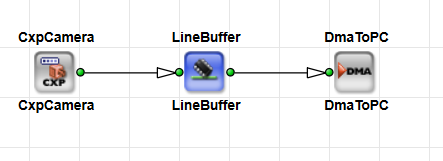
Without the buffer, DmaToPC or another operator that pauses its input can't throttle the camera stream. The design fails DRC or risks deadlock on hardware.
When using a buffer operator to control infinite sources, you must set the InfiniteSource parameter of the buffer operator to ENABLED.
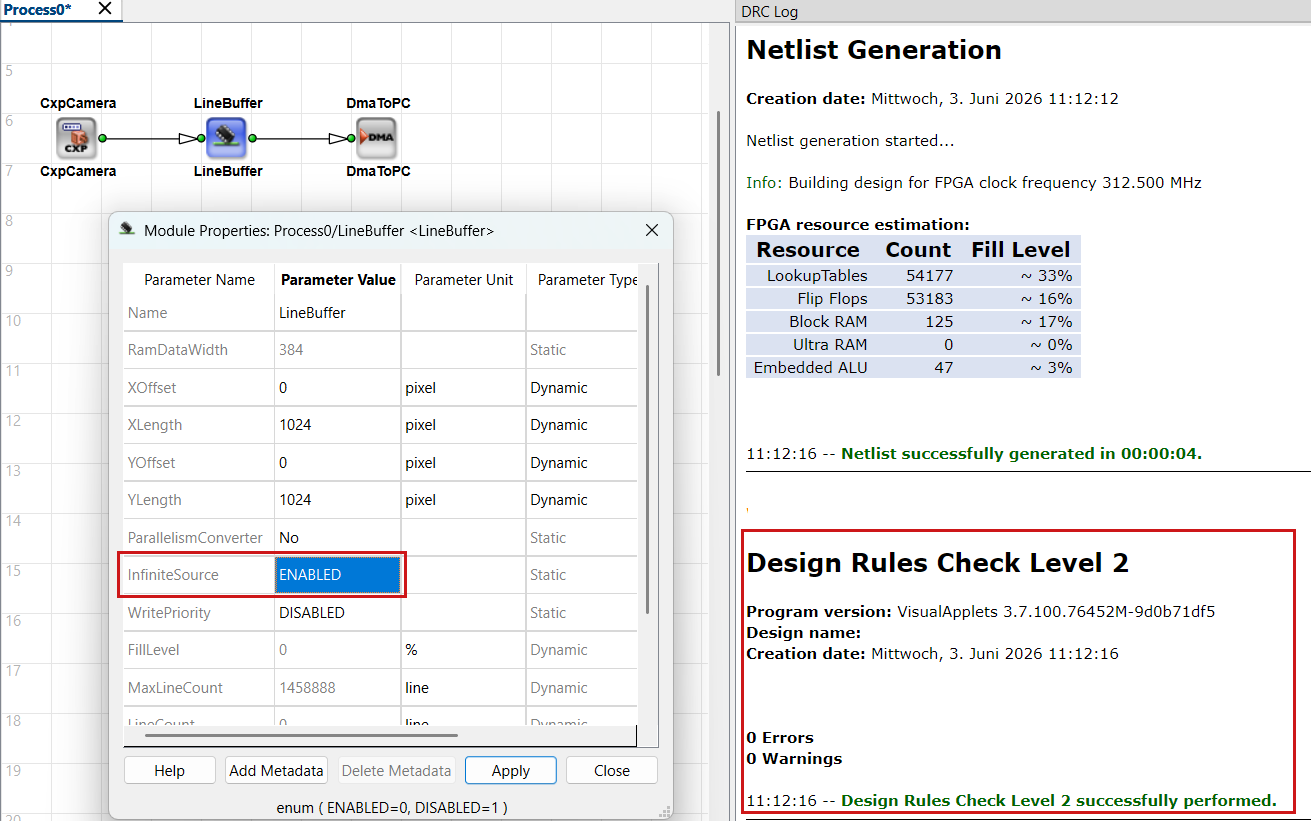
If the InfiniteSource parameter of the buffer operator is set to DISABLED, DRC Level 2 fails:
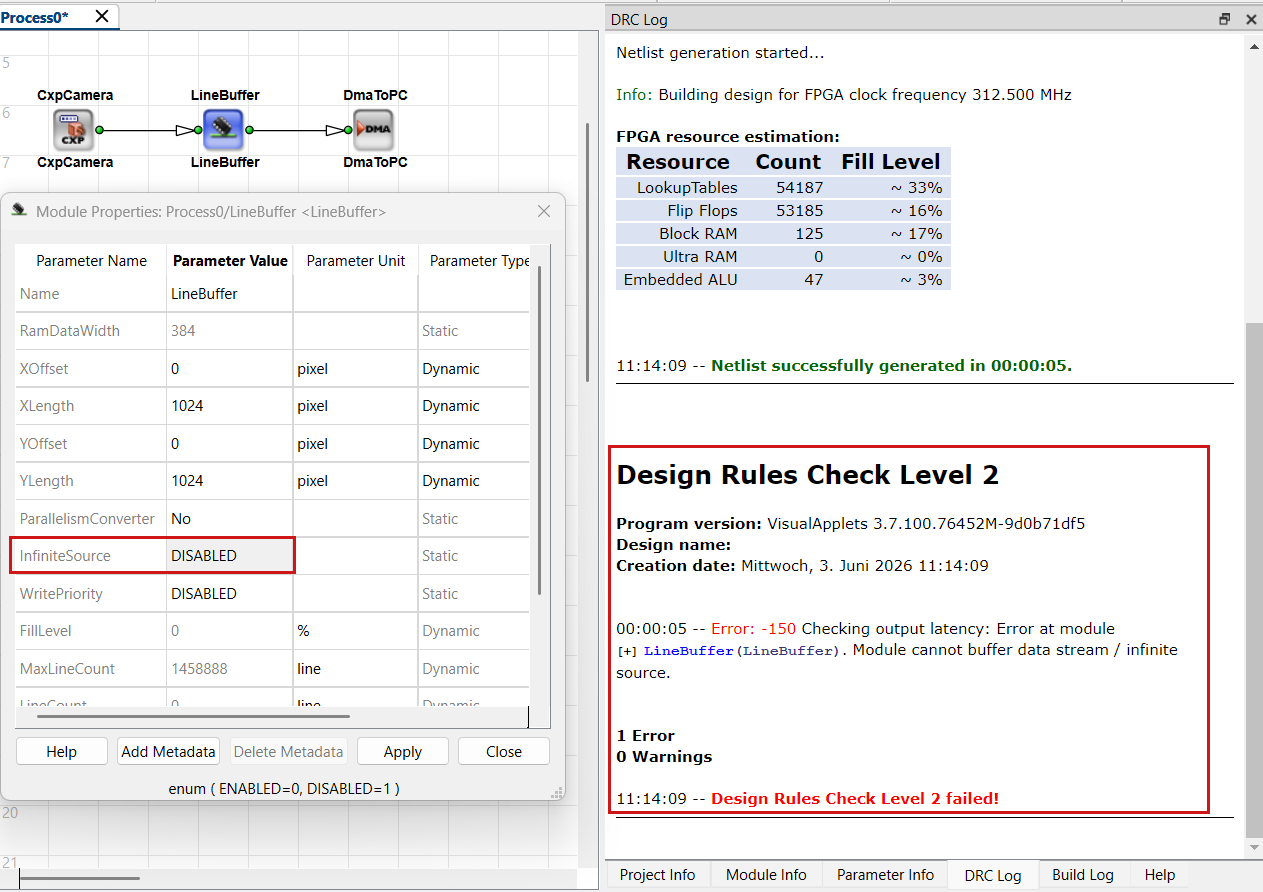
For buffer sizing, FillLevel, and RAM usage, see Memory Elements Tutorial topic.
Setting the InfiniteSource Parameter#
Many buffer operators expose the parameter InfiniteSource. Set it to ENABLED when the operator input connects to a non-stoppable source. Set it to DISABLED when the input comes from a stoppable stream.
Follow these rules:
- Set
InfiniteSourcetoENABLEDonly when the module input actually connects to a non-stoppable source. - Set
InfiniteSourcetoDISABLEDon buffer operators that receive data from a stoppable stream. - If you are unsure, set
DISABLEDfirst. Run Design Rules Check Level 2 and adjust modules that the check flags.
To change module parameters, open Module Properties with a double-click on the module. Apply parameter changes with Apply. See Parameterization Tutorial topic for link properties and module parameters.
Using the Overflow Operator When Downstream Processing Can Pause#
The Overflow operator decouples a non-stoppable incoming 2D stream from processing that may block temporarily. It doesn't have an internal buffer on its own, therefore Basler recommends that you always use the Overflow operator together with a buffer operator. When the buffer fills because output data is blocked, the Overflow operator cuts the current frame, marks it as corrupted, and can skip further frames until the output accepts data again.
Use Overflow when the source can't be stopped and downstream operators may pause the data flow for longer than a line or frame buffer can cover.
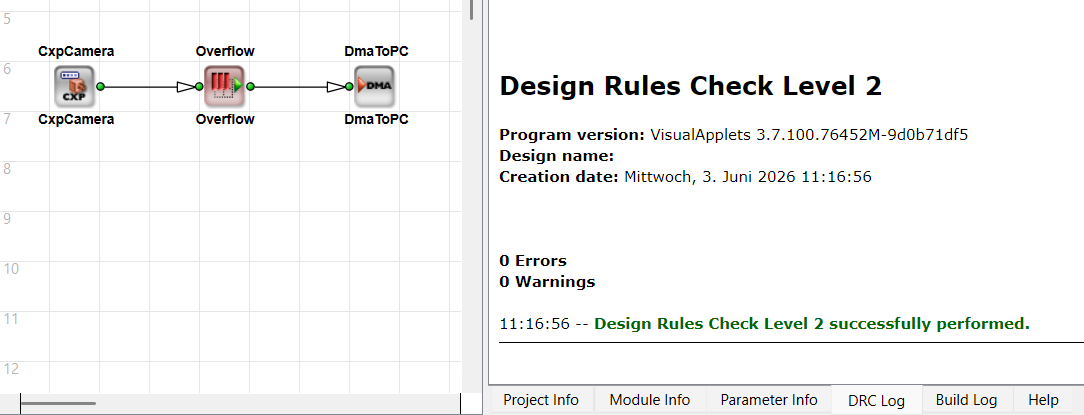
When you place the Overflow operator between a non-stoppable source and a memory operator such as FrameBuffer, set the InfiniteSource parameter on that memory operator to DISABLED. The Overflow operator already handles overflow from the non-stoppable stream. Enabling InfiniteSource on the memory module in that topology is wrong and triggers DRC errors.
The Overflow operator can produce non-rectangular frames when it cuts a frame. Verify that downstream operators tolerate shortened last lines. See the operator description Overflow in the Operator Reference.
Info
As an alternative to combining the Overflow operator with a memory operator, you can use the ImageFlowControl operator for safer and more robust handling. It combines the buffering functionality of the ImageFifo with integrated overflow handling.
Verifying Your Design with DRC#
Run Analysis → Design Rules Check Level 2 after you wire sources, buffers, and DMA paths. Level 1 also runs automatically before simulation and build.
DRC Level 2 checks extended rules and estimates FPGA resources. It reports infinite-source errors when a non-stoppable source feeds an M-type operator that doesn't accept infinite sources, or when InfiniteSource settings don't match the actual connection.
Read the DRC log and fix highlighted modules or links. For the full workflow, see From Empty Design to Running Applet Tutorial topic.
Typical Pipeline Examples#
Camera to DMA Through a Buffer#
- Place a camera operator as the source.
- Insert
LineBufferorImageBufferon the image path (orImageFifoonly for small decoupling; see above). - Set
InfiniteSourcetoENABLEDon the buffer. - Connect processing operators and
DmaToPC. - Run DRC Level 1 and Level 2, then simulate or build.
Without step 2 and step 3, DRC Level 2 reports an infinite-source error on the illegal connection.
Non-Stoppable Source with Overflow and Buffer#
- Connect the non-stoppable source to
Overflow. - Connect
OverflowtoImageFifo,LineBuffer, or another buffer operator. - Set
InfiniteSourcetoDISABLEDon the buffer afterOverflow. - Connect further processing and run DRC Level 2. Confirm that no infinite-source or
InfiniteSourcemismatch remains.
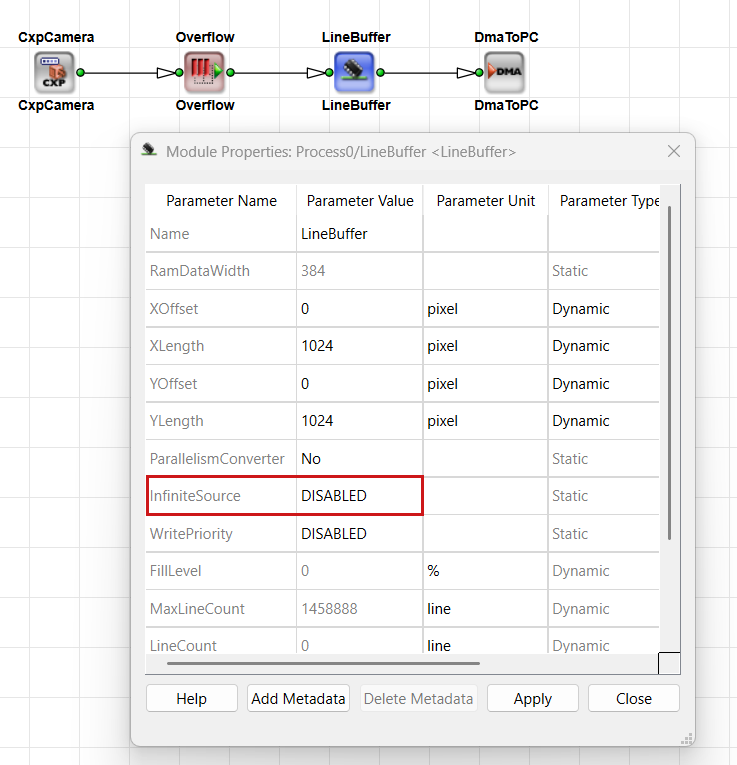
Overflow cuts or skips frames when its output is inhibited. The following buffer stores data for downstream processing that may pause. Without that buffer, Overflow alone cannot decouple a non-stoppable source from pausing downstream modules.
Related Topics#
- Rules of Links — Infinite Sources / Connecting Cameras in the User Manual — formal connection rules
- Operator Types and Synchronization Tutorial topic — M-type operators and blocking
- Memory Elements Tutorial topic — buffer operators and
InfiniteSource - Parameterization Tutorial topic —
InfiniteSourceand related module parameters - Pipeline Concept Tutorial topic — flow control, blocking, and backpressure
- From Empty Design to Running Applet Tutorial topic — DRC, simulation, and build