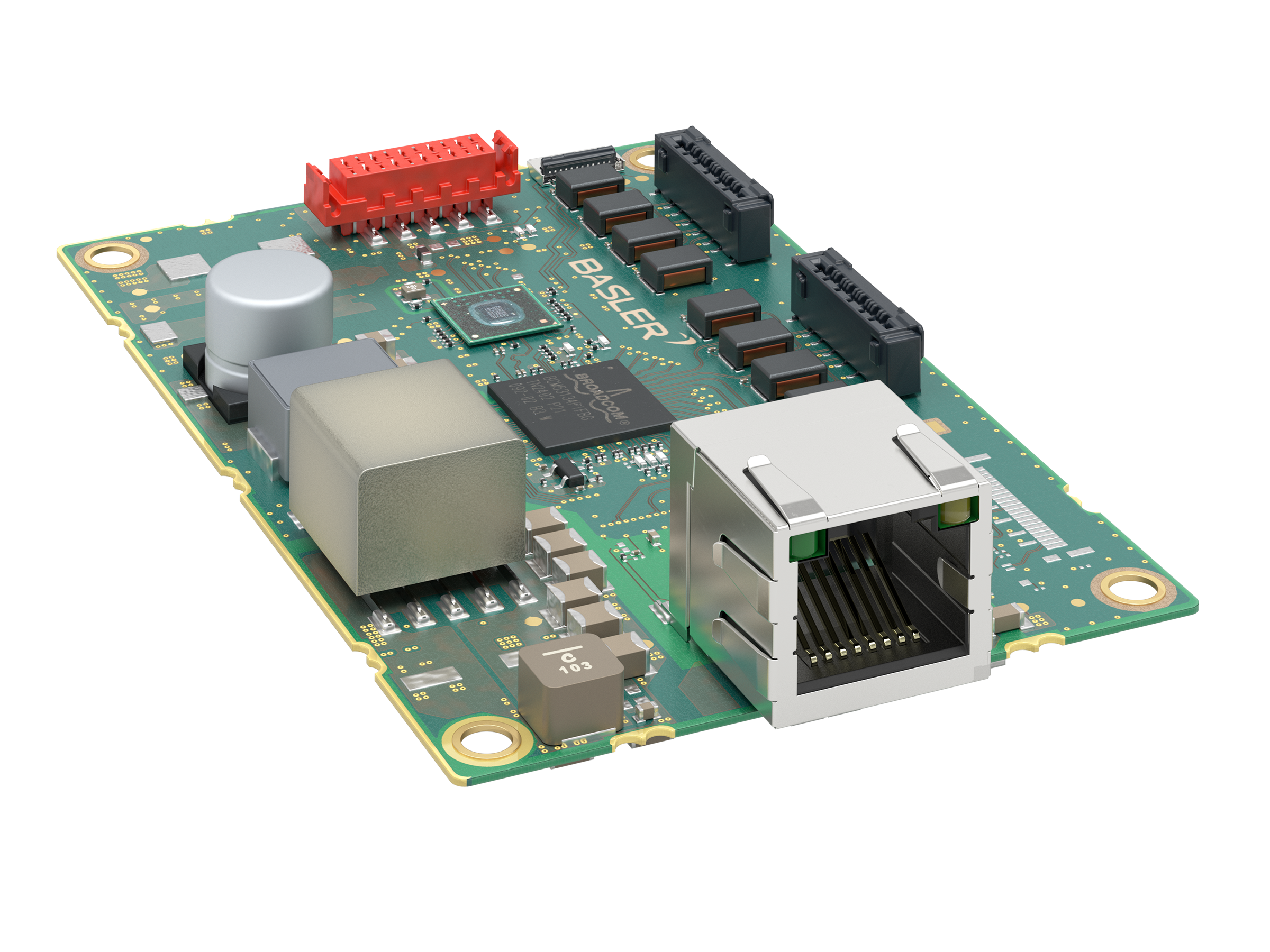
Switch dart M, GigE, 2 Port, PoE+#
Info
If you use a Basler dart M GigE camera module with a Basler dart M GigE switch, the dart M GigE switch is used instead of the Interface Board dart M GigE RJ45 PoE.
If a dart M GigE switch is used, the I/O circuit is located on the switch; see the Circuit Diagram (dart M GigE Switches) topic.
Key Features#
- Connects dart M GigE camera modules in a LAN for high-speed data transfer
- Can be used with all Basler dart M GigE camera modules
- Power over Ethernet (PoE and PoE+)
- 5 V power supply for connecting additional electronic components via the I/O Connector
- Up to 1 Gbit/s bandwidth
- Up to two dart M GigE camera modules on one switch can be accessed with just one data cable
- GPIOs of camera module accessible via I/O connector on switch
- Supports jumbo frames
Specifications#
General Specifications#
| Specification | Switch dart M, GigE, 2 Port, PoE+ |
|---|---|
| Order Number | 109789 |
| Number of Ports | 2 |
| I/O Lines | 2 general purpose input (GPI) lines 2 general purpose output (GPO) lines 2 general purpose (GPIO) lines |
| Interface | GigE, 1000 Mbit/s |
| Power Supply | PoE+: IEEE 802.3at (PoE+) and PoE: IEEE 802.3af |
| Power Consumption | Depends on the use case. See Power Consumption For Different Use Cases. |
| Size | 56.0 x 85.0 x 20.7 mm |
| Weight | <50 g |
| Supported Standards | IEEE 802.3 IEEE 802.3at (PoE+) IEEE 802.3ab (1000BASE-T Gigabit Ethernet) IEEE 802.3u (100BASE-TX Fast Ethernet) IEEE 802.3x (Full-duplex flow control) |
| Conformity | CE (includes RoHS), UKCA, FCC, KC |
| Maximum Packet Size | Up to 9720 Bytes |
Jumbo Frames
- If you increase the packet size above 1 500 Bytes in the camera, you must enable the Jumbo Frames support on all network devices. Otherwise, streaming may fail due to blocked packets.
- If you want to use the maximum packet size for jumbo frames, set the network adapter to its maximum value as described in the Network Configuration (GigE Cameras) topic. Also set the
GevSCPSPacketSizeparameter to its maximum size. Bear in mind that all Basler dart M GigE cameras only support a packet size of up to 8192 Bytes.
Mechanical Specifications#
Dimensions and Mounting Points#
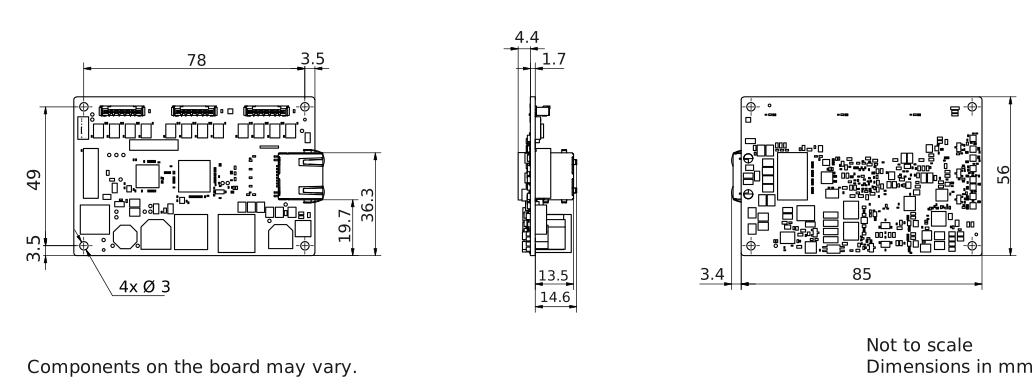
→ Download the CAD/technical drawing for the switch.
Environmental Requirements#
Temperature Measurement Points#
Temperature and Humidity#
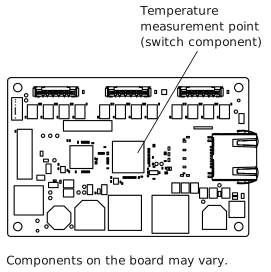
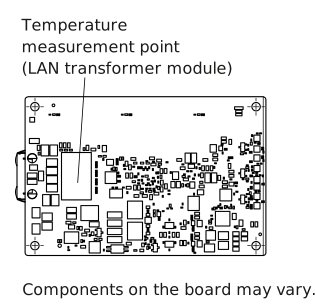
| Device temperature during operation | 0–70 °C (32–158 °F) (switch component) 0–85 °C (32–185 °F) (LAN transformer module) See temperature measurement points. |
| Device temperature during storage | 0–80 °C (32–176 °F) |
| Humidity | 20–80 %, relative, non-condensing |
Basler dart M GigE switches are delivered without a housing.
WARNING – Burns Hazard
During operation, the components of the GigE switch generate higher temperatures. Touching the switch and its components while the switch is turned on may cause burns.
Take measures to ensure that the hot components of the switch cannot be touched during operation (e.g., mounting the switch into a housing).
Notice – Temperatures outside the specified range may damage the dart M GigE switch.
Operating the switch at temperatures outside of the range given in the specification table causes the following problems:
- The the dart M GigE switch itself may get damaged.
- The lifetime of the switch components decreases.
Ensure the temperature of the switch component stays below 70 °C (158 °F)!
Ensure the temperature of the LAN transformer module stays below 85°C (185 °F) when using PoE!
Provide sufficient heat dissipation. See Temperature Measurement Points.
Electrical Requirements#
Notice – Missing EMI protection may lead to faulty switch behavior.
Operating the switch without a protection against electromagnetic interference (EMI) may lead to a faulty behavior of the switch.
Take measures to prevent EMI problems, e.g., mount the switch into a housing.
For further information, see Avoiding EMI and ESD Problems.
Power Supply#
Power supply via Power over Ethernet (PoE and PoE+): Power must comply with the IEEE 802.3at (PoE+) or IEEE 802.3af (PoE) specification.
Info
The Switch dart M, GigE, 2 Port, PoE+ is designed as a PoE+ PD (PoE powered device). The maximum power consumption of all components together, i.e., the switch, all connected cameras and other attached equipment, must be less than 25.5 W in total (when PoE+ is used) or less than 12.95 W in total (when PoE is used). This power must not be exceeded.
The power consumption of the switch depends on traffic and temperature. Due to the maximum current rating of the camera port connector, the maximum power consumption of each port must be less than 6 W.
See the Power Consumption for Different Use Cases table for more details.
Power Consumption for Different Use Cases#
The following table shows typical power consumption values for different use cases.
| Use Case | Power Consumption (W) |
|---|---|
| Switch without dart M camera module; connected to LAN | 1.1 |
| Switch with 2 dart M camera modules; no image captured | 6.0 |
| Switch with 2 dart M camera modules; images captured; max. bandwidth | 8.0 |
| Switch with 2 dart M camera modules; images captured; max. bandwidth; external load 7.5 W via the 5 V power supply output | 16.4 |
Info
If the power consumption of the dart M GigE switch in your use case approaches ~12 W or higher, Basler recommends using PoE+ with more power.
General Purpose I/O Lines#
NOTICE: Applying incorrect electrical signals to the GPIO lines can severely damage the board.
Make sure to apply appropriate input or output signal voltages as specified below.
Operation as Input#
| Voltage | Description |
|---|---|
| 30 VDC | Absolute maximum. This voltage must never be exceeded. Doing so may damage the board and voids the warranty. |
| 0–24 VDC | Safe operating range. The minimum external pull-up voltage is 3.3 VDC. |
| 0–0.8 VDC | Indicates a logical 0 (with inverter disabled). |
| >0.8–2.0 VDC | Region where the logic level transition occurs; the logical state is not defined in this region. |
| >2.0 VDC | Indicates a logical 1 (with inverter disabled). |
- Input current (high-level): <100 μA
- Input current (low-level): <5 mA sink current from the GPIO input line without exceeding 0.8 VDC.
Operation as Output#
| Voltage | Description |
|---|---|
| 30 VDC | Absolute maximum. This voltage must never be exceeded. Doing so may damage the board and voids the warranty. |
| 3.3–24 VDC | Safe operating range |
| <3.3 VDC | Unreliable GPIO output |
- Internal pull-up resistor: ≈650 Ω, with open collector. Many applications will have to provide an additional pull-up resistor.
- Residual voltage ("on" state): ≈0.4 VDC at 50 mA and 25 °C (77 °F) housing temperature. Actual residual voltage depends on operating temperature, load current, and production spread of electronic components.
- Leakage current: <60 µA. Actual leakage depends on operating temperature and production spread of electronic components.
- Maximum load current: 50 mA
- Minimum load current: Not specified. Consider the following:
- Leakage current will have a stronger effect when load currents are low.
- Propagation delay of the output increases as load currents decrease.
- Higher-impedance circuits tend to be more susceptible to EMI.
- Higher currents cause higher voltage drops in long cables.
For more information about the I/O lines, see the I/O Control section.
Cable Requirements#
Ethernet Cable#
- Use a high-quality Ethernet cable. Use of shielded Cat 5e or better cables with S/STP shielding is recommended.
- Use either a straight-through (patch) or a cross-over Ethernet cable.
- Proximity to strong magnetic fields should be avoided.
- Basler recommends using Ethernet cables from the Basler cable portfolio.
I/O Cable#
- The I/O cable must have a cross-section of at least 0.09 mm² (close to AWG28).
- The I/O cable is used to supply power.
- A maximum cable length of 10 m must not be exceeded.
- Recommended connector: TE 1-338095-0 (crimp type) or WR-MM 690157001072 (ribbon type)
- Close proximity to strong magnetic fields should be avoided.
- Basler recommends using dart M I/O cables.
Flat Field Cable (FFC)#
Basler recommends using dart Flexible Flat Cables.
NOTICE – Wrong orientation of the FFC cable may damage the electronics.
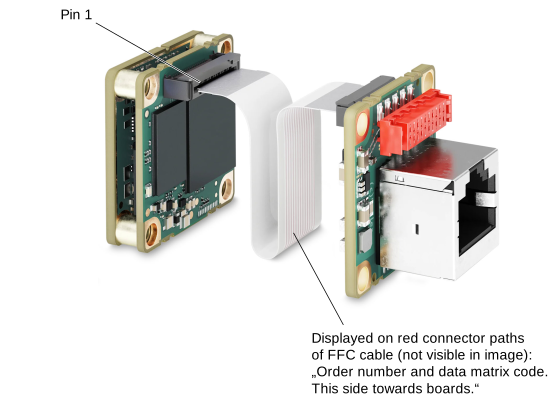
The ends of the FFC cable are not specific, i.e., you can connect each end either to the camera module connector or to the connector of the dart M GigE switch. But it's important that you make sure to insert the cable in the correct orientation, i.e., the red conducting paths of the FFC cable must face the boards as shown in the following image. The image illustrates an interface board example, but the same principle applies to the switch.
Physical Interface#
Connectors#
Ethernet Connector#
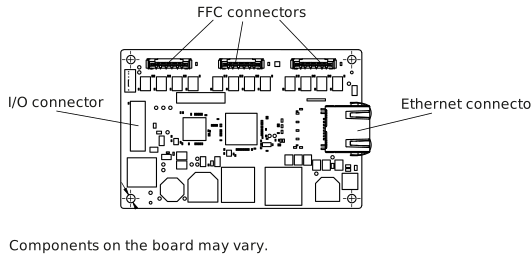
- 100/1000 Mbit/s Ethernet connection to the switch
- Power over Ethernet (PoE+)
- 8-pin RJ45 jack 8-pin
NOTICE – Mechanical stress on the Ethernet connector may damage the switch.
If mechanical stress is applied to the Ethernet connector (RJ45 jack), provide strain relief for the cable to prevent mechanical damage to the dart M GigE switch.
For information about how to avoid mechanical stress, see the Providing Strain Relief for the RJ45 Connector section in the Mounting Instructions topic.
FFC Connector#
- 20-pin Hirose FH67 (FH67-20S-0.5SV) FFC/FPC connector
- Provides an interface to the dart M GigE camera module via the dart FFC (Flexible Flat Cable).
I/O Connector#
- 10-pin female connector: WR-MM 10 pin (690367291076). For more information, see I/O Connector Pinout
- 5 V Power Supply for External Electronics via pins 1 to 4 of the I/O connector
I/O Connector Pinout
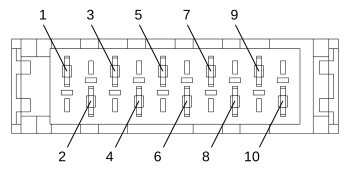
| Pin | Description |
|---|---|
| 1 | Ground for I/O lines and 5 V OUT |
| 2 | 5 V OUT; 1.5 A (max. 7.5 W) |
| 3 | Ground for I/O lines and 5 V OUT |
| 4 | 5 V OUT; 1.5 A (max. 7.5 W) |
| 5 | General purpose I/O (GPIO) line CAM 2 |
| 6 | General purpose I/O (GPIO) line CAM 1 |
| 7 | General purpose output (GPO) line for CAM 2 |
| 8 | General purpose output (GPO) line for CAM 1 |
| 9 | General purpose input (GPI) line for CAM 2 |
| 10 | General purpose input (GPI) line for CAM 1 |
Info
Be aware that pin 1 to 4 of the I/O connector can only be used as 5 V power supply for external components. Do not use them as external power supply, as it is used for the AUX power variants of the switch.
5 V Power Supply for External Electronics#
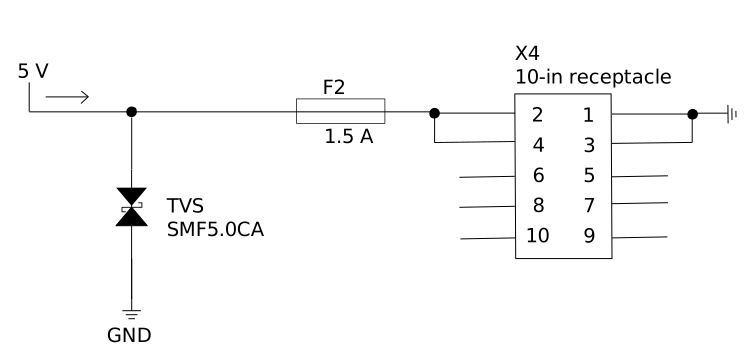
The I/O connector of the dart M GigE PoE+ switch provides 5 V power supply that you can use for connecting external electronic components to your system, e.g., a pattern projector for stereo use cases. The 5 V OUT is secured via a 1.5 A fuse and a suppressor diode; see the following circuit diagram.
NOTICE – A too high load may damage the switch.
Take the following into account when designing your system:
- Ensure that the load on the external 5 V output does not exceed 7.5 W. Exceeding this limit will cause the fuse on the switch to trip, rendering the switch inoperable.
- Also make sure that the sum of all loads/consumers on the switch (max. 2 dart M GigE camera modules + external load on the 5 V output) plus the switch itself does not exceed the maximum power that the Ethernet card (NIC) installed in the computer can provide via PoE.
For further information, see the Power Consumption table.
Status LEDs#
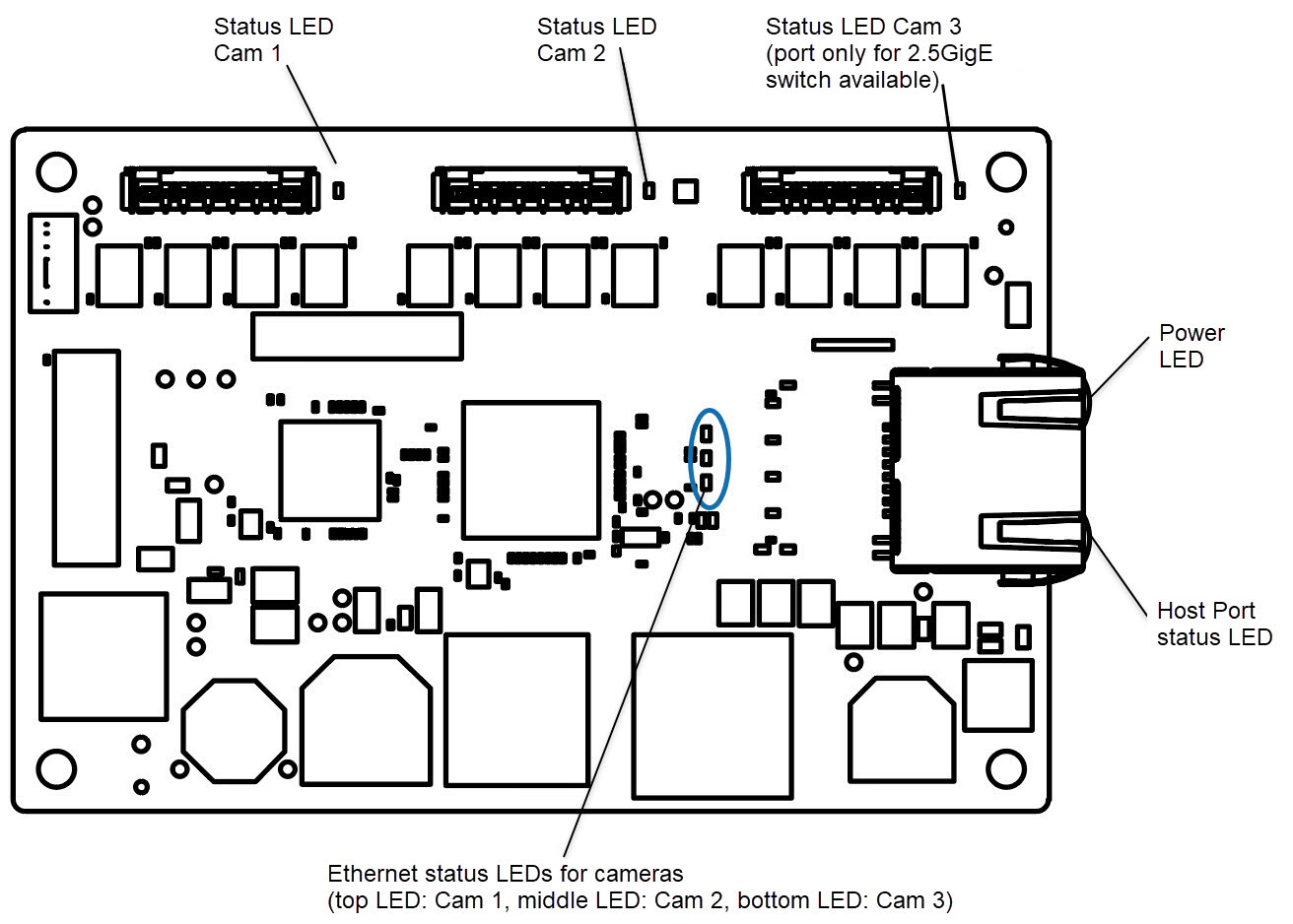
The following status LEDs are on the dart M GigE switch:
Camera Status LEDs
The camera status LEDs (Status LED Cam 1 to 3 in the figure above) indicate the status of the connected Basler dart M GigE camera module.
For information about the different camera statuses, see the LED States table in the dart M Interface Description topic.
Power LED
| LED State | Meaning |
|---|---|
| Off | No power |
| Solid green | Powered, Ethernet connection established |
Host Port Status LED
| LED State | Meaning |
|---|---|
| Solid orange | Link between host computer and GigE switch established |
| Flashing orange | Indicates activity between host computer and GigE switch |
Ethernet Port Status LEDs
For each camera module connected via the FFC connector to the dart M GigE switch, the corresponding Ethernet port status LED indicates the following:
| LED State | Meaning |
|---|---|
| Off | Camera module not connected to switch |
| Solid green | Camera module connected to switch |
| Flashing green (larger intervals/pulsating) | Camera module connected to switch Connection to pylon software established |
| Flashing green (very quick pulses) | Camera module connected to switch Connection to pylon software established Image capture has been started. |
Further Information#
- For information about the different dart M GigE camera models, refer to the Basler dart M overview topic.
- See the dart M Cameras section in the Hardware Installation (GigE Cameras) topic.
- See dart M Interface Description topic.
- See Circuit Diagrams (dart M GigE Switches) topic.
- See also further Basler dart M Accessories.
- See Network Configuration (GigE Cameras)
- See Network-Related Parameters