Image Acquisition and I/O Control (Stereo ace)#
The input line allows you to control the camera, e.g., to trigger image capture at particular points in time. The output line allows you to retrieve information about the camera, e.g., when an image capture is in progress.
I/O Lines#
Stereo ace cameras provide one opto-coupled input line and one output line:
Out2is preconfigured as the output line of the Stereo ace camera.In1is preconfigured as the input line of the Stereo ace camera.Out1is an internal line for triggering the projector. It can't be used as an output line.
You can't change the line mode of the I/O lines.
Opto-Coupled Input Line#
The following diagram shows a typical circuit using the opto-coupled input line:
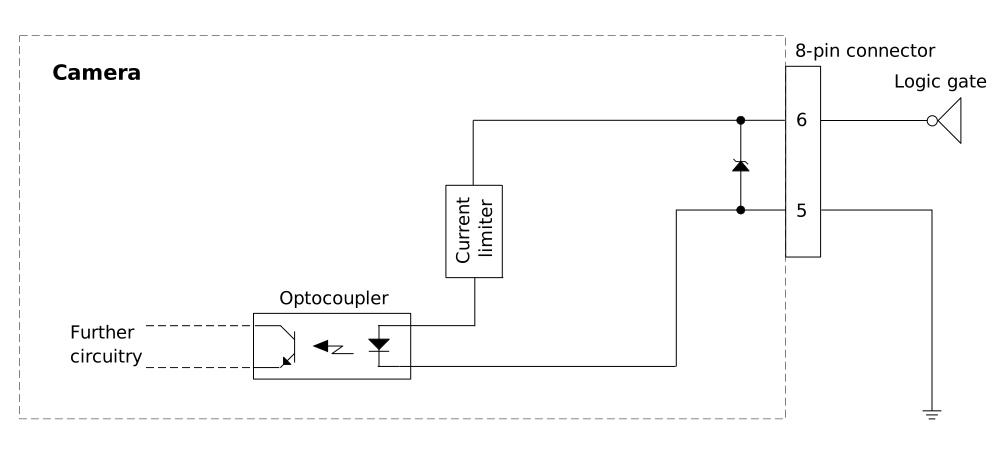
The input line is connected to pin 6. Pin 5 is connected to ground.
General Purpose Output Line#
NOTICE: Applying incorrect electrical signals to the camera's GPO line can severely damage the camera.
Before you connect any external circuitry to the GPIO line, use the Line Mode feature to configure the line for input or output.
Make sure to apply appropriate input or output signal voltages as specified below.
The following diagram shows a typical circuit using the output line:
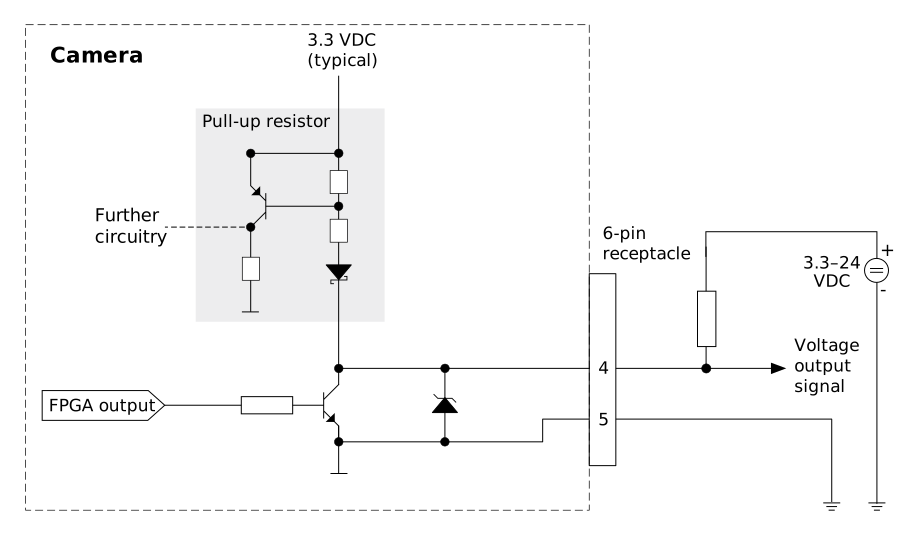
The output line Out2 is connected to pin 4. Pin 5 is connected to ground.
Electrical Requirements#
Input Line#
| Voltage | Description |
|---|---|
| 30 VDC | Absolute maximum voltage This voltage must never be exceeded. Doing so may damage the camera and voids the warranty. |
| 0–24 VDC | Safe operating range |
| 0–1.0 VDC | Logical 0 |
| >2.2 VDC | Logical 1 |
- Minimum current: 5 mA
- Typical current: 5–15 mA
Debouncing of the signal is not implemented. Therefore, you have to ensure that the electrical signal on the input line is clean (e.g., by using a PLC output or applying a low-pass filter).
Output Line#
| Voltage | Description |
|---|---|
| 30 VDC | Absolute maximum voltage This voltage must never be exceeded. Doing so may damage the camera and voids the warranty. |
| 3.3–24 VDC | Safe operating range |
| <3.3 VDC | Unreliable GPIO output |
- Internal pull-up resistor: ≈650 Ω, with open collector. Many applications will have to provide an additional pull-up resistor.
- Maximum current: 50 mA
- Leakage current: <60 µA
I/O Cable#
Basler recommends using the Power-I/O Cable M12, M, 8P/Open. The cable documentation includes the pinout and color coding for the I/O lines.
Features and Configuration#
The DigitalIOControl feature category contains various features for configuring and monitoring I/O line operation.
Line Selector#
The Line Selector feature allows you to select the I/O line that you want to configure. To select a line, set the LineSelector parameter to the desired I/O line, e.g., Line1.
Line Status#
To determine the status of an I/O line:
- Set the
LineSelectorparameter toIn1for the input line orOut2for the output line. - Get the value of the
LineStatusparameter.
A value of false (0) means that the line status was low at the time of polling. A value of true (1) means that the line status was high at the time of polling.
Line Source (Output Line Only)#
The output line Out2 can be configured to provide different signals via the LineSource parameter. This allows you to monitor the status of the camera or to control external devices.
To configure the line source:
- Set the
LineSelectorparameter toOut2. - Set the
LineSourceparameter to one of the following values:Low: The line is always low.High: The line is always high.ExposureActive: The line is enabled during the exposure of each frame.ExposureAlternateActive: The line is enabled during the exposure of every second frame.
You can use the ExposureActive signal to monitor whether the camera is currently exposing.
Line Inverter#
The LineInverter parameter inverts the electrical signal level of an I/O line, i.e., its line status from high to low or vice versa.
To enable the line inverter:
- Set the
LineSelectorparameter to the desired I/O line. - Set the
LineInverterparameter totrueto invert the electrical signal level of the I/O line selected or tofalseto disable inversion.
Example: If the input line In1 is configured as a trigger input source, inverting the signal level means that the trigger will come at the falling edge of the trigger signal instead of on the rising edge.
For the output line Out2, the level of the selected output signal is inverted.
Free Run and Trigger Operation#
The camera can be operated in free run and in triggered mode.
In free run, the camera is triggered internally according to the frame rate configured (default value or as specified via the AcquisitionFrameRate parameter).
While in free run mode, you can synchronize the triggering of multiple cameras using the Precision Time Protocol feature.
In triggered mode, an external trigger source is used to trigger the camera, e.g., via software trigger or via hardware trigger (using input line In1).
The trigger is always a FrameTrigger, i.e., it triggers the acquisition of a single frame in the current operating mode.
Free Run Image Acquisition#
To enable free run image acquisition:
- Set the
TriggerSelectorparameter toFrameStart. - Set the
TriggerModeparameter toOff.
Triggered Image Acquisition#
Info
New trigger signals are ignored until the camera is ready to accept another trigger. The minimum interval between two trigger signals depends on the acquisition frame rate.
Software Trigger#
To enable image acquisition via software trigger:
- Set the
TriggerSelectorparameter toFrameStart. - Set the
TriggerSourceparameter toSoftware. - Set the
TriggerModeparameter toOn. - Trigger a single frame with
TriggerSoftware.
A single disparity map is now grabbed, processed, and delivered to the client software.
Make sure that the acquisition is started before the software trigger to receive images.
Hardware Trigger#
To enable image acquisition via hardware trigger:
- Set the
TriggerSelectorparameter toFrameStart. - Set the
TriggerSourceparameter toIn1. - Set the
TriggerModeparameter toOn.
Images are triggered on the rising edge ofIn1(if theLineInverterparameter is set tofalse) or the falling edge (if theLineInverterparameter istrue). The image is sent to the host computer after it has been grabbed and processed by the camera.
Make sure that the acquisition is started before the hardware trigger to receive images.