STA-200-547C-082616W#

Specifications#
General Specifications#
| STA-200-547C-082609W | |
|---|---|
| Sensor Type | Sony IMX547-AAQJ-C Progressive scan CMOS Global shutter |
| Sensor Format | 1/1.8" |
| Pixel Size (H x V) | 2.74 x 2.74 µm |
| Mono / Color | Color |
| Resolution (H x V Pixels) | 2472 x 2064 |
| Resolution | 5 MP |
| Measuring Method | Active Stereo |
| Baseline | 200 mm |
| Focal Length | 7.84 mm |
| Field of View Left and Right Camera (H x V) | 46° x 39° |
| Minimum Distance | 0.71 m |
| Measurement Volume | See Measurement Volume |
| Illumination | LED, White 5700 k Random dot 50 % with 195 k bright dots |
| Communication Interface | 2 x Gigabit Ethernet (1000 Mbit/s) |
| Pixel Formats | Intensity Image: Mono8, RGB8 Left and Right Image: Mono8, RGB8 Disparity Image: Coord3D_C16 Confidence Image: Confidence16 Error: Error8 |
| Synchronization | Via hardware trigger Via software trigger |
| I/O Lines | 1 opto-coupled input line 1 general purpose output line (GPO) |
| Camera Power Requirements (Typical) | Cameras supplied via Power over Ethernet and projector supplied via its Power I/O connector: ≈4.2 W (mean) per ace 2 camera 8 W (mean), 18 W (peak) @ 24 VDC for the projector Cameras and projector supplied via Power I/O connector of projector: ≈12.7 W (mean), 23 W (peak) @ 24 VDC |
| Cooling | Passive, no fan |
| Enclosure Rating | IP50 (EN60529) |
| Size (W x H x L) | 245 x 70 x 158.5 mm |
| Weight | <1700 g |
| Features | See the Features topic. |
| Conformity | Certifications: CE, FCC, UKCA, KC Vision Standards: GigE Vision, GenICam, GenTL Hazardous Substances: RoHS, REACH |
| Software | pylon Software Suite (version 8.1 or higher) pylon Supplementary Package for Stereo ace |
| Operating System | Windows 10 Windows 11 Linux x86_64 (tested under Ubuntu 18.04, 20.04, and 22.04) Linux ARM |
| Programming Languages | C++, Visual Basic, C#, Python |
| Accessories | Accessories for your camera model |
| Availability and Pricing | See the product page on the Basler website. |
Measurement Volume#
| Distance [mm] | Field of View (Object Size) [mm2] |
|---|---|
| 750 | 430 x 530 |
| 1000 | 630 x 710 |
| 1500 | 1060 x 1060 |
| 2000 | 1500 x 1415 |
| 3000 | 2305 x 2125 |
The field of view (object size) specification is based on the maximum usable intersection of the camera's field of view and the projector's field of illumination.
Measurement Accuracy#
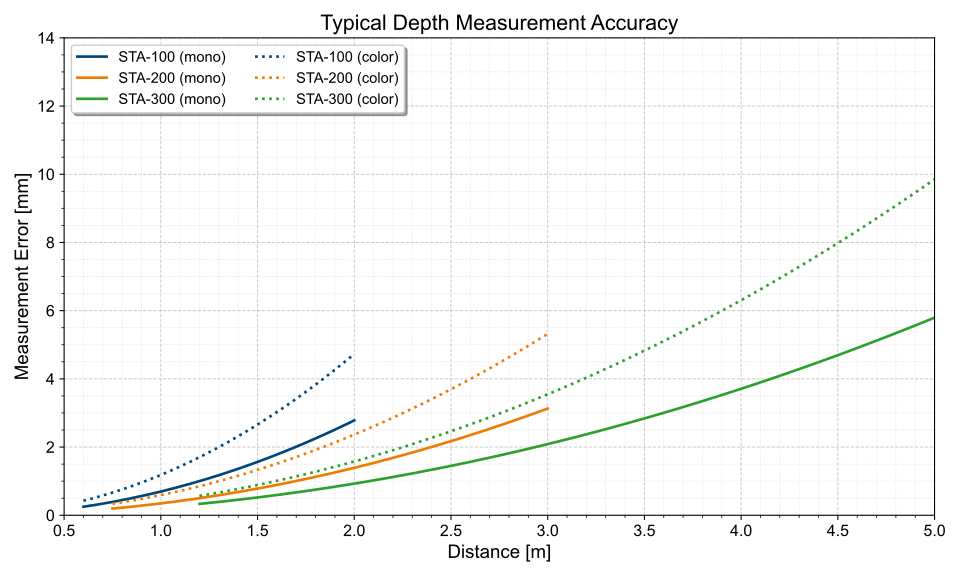
Mechanical Specifications#
Camera Dimensions and Mounting Points#
The following graphic shows the camera's dimensions and mounting points as well as the location of the laser aperture and the beam angle of the laser. Note that the camera's field of view is different from the angles depicted here.
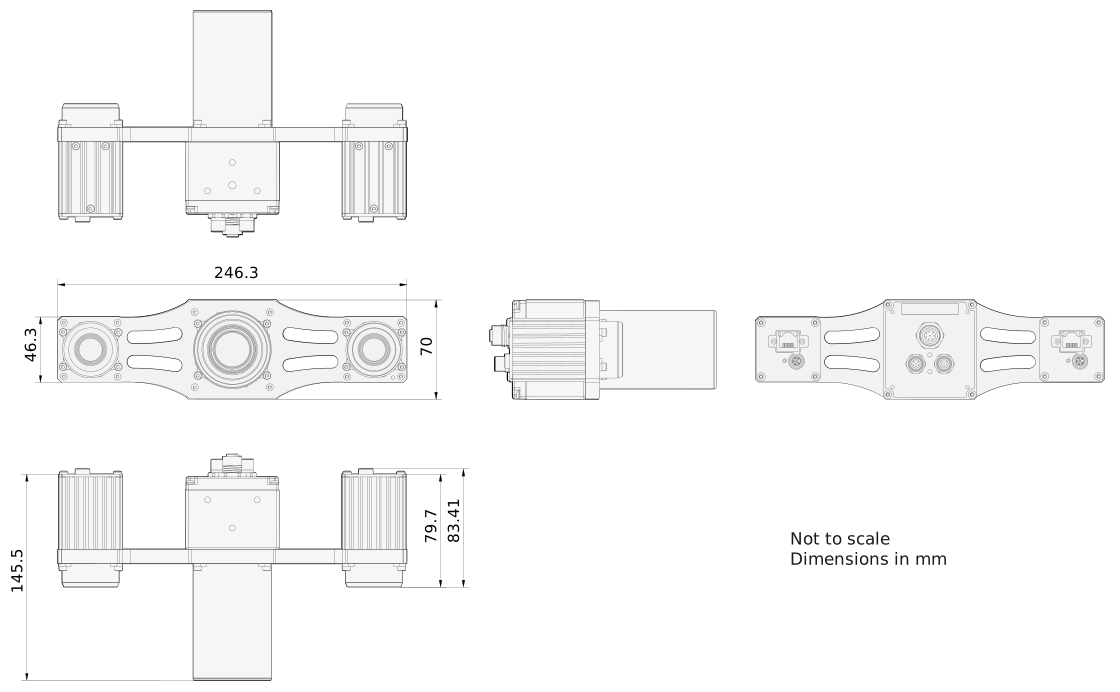
→ Download the CAD/technical drawing for your Basler camera.
Assembly Instructions
When mounting the camera, observe the following:
- Make sure that the camera is attached securely to a suitable mounting body using the mounting bracket and the three screws provided in the camera package.
- Ensure a thread engagement of at least 5 mm and no more than 6 mm.
For more information, see Hardware Installation.
Stress Test Results#
→ See Stress Test Results.
Coordinate System of the Camera#
The Stereo ace camera uses a right-handed coordinate system with the y-axis pointing down. The origin of the coordinate system is in the optical center of the left camera's lens. This creates an offset from the front of the camera housing that may need to be taken into account when interpreting the depth data.
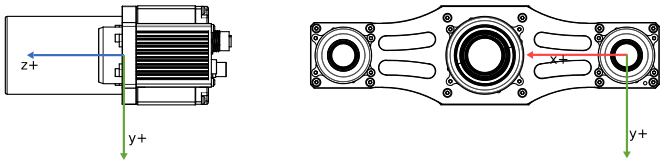
Due to mechanical tolerances of the sensor, the lens, and their position to each other, there are small variations in the exact origin for each individual device.
Info
Many common point cloud processing tools, e.g., MeshLab and CloudCompare, also use right-handed coordinate systems, but with the y axis pointing up. Because of this difference in the orientation of the y axis, these tools show point clouds produced by the Stereo ace camera backwards and upside down.
To make the point clouds compatible with these tools, they need to be rotated along the x axis by 180°. This is equivalent to multiplying the y and z values by -1. This is illustrated in the Save Point Cloud sample that is included in the pylon Supplementary Package for Stereo ace.
Alternatively, you can use the Save Depth and Image Data feature of the pylon 3D Viewer, which allows you to have this rotation done automatically when saving a point cloud to file. By selecting the Invert z-axis check box (enabled by default), the point clouds will be made compatible with the aforementioned tools.
For more information about this feature, see Saving Depth and Image Data.
Requirements#
Hardware Requirements#
- Basler STA-200-547C-082609W camera
- 2 M8 6-pin to M8 6-pin cables (included in camera package)
- Mounting bracket with three M5 x 10 socket screws (included in camera package)
- Power supply
- 2 GigE cables
- Customer computer with a GigE-compatible network adapter or a pre-installed Basler industrial computer
- NVIDIA GPU with compute capability 3.5 or higher recommended (e.g., RTX 3050, RTX 3060, RTX 4060, or similar)
Software Requirements#
-
Operating system
- Windows 10, Windows 11
- Linux x86_64 (tested under Ubuntu 20.04, 22.04, and 24.04)
- AArch64 Linux (binaries built with Linaro gcc 7.3.1 toolchain; tested under Linux for Tegra)
-
pylon Software Suite
This includes all necessary drivers as well as useful tools. - pylon Supplementary Package for Stereo ace
The supplementary package is an extension to the pylon Software Suite and provides support for Basler Stereo ace cameras. It is available for Windows and Linux operating systems and includes the following:- pylon 3D Viewer
- pylon C++ Instant Camera class for Stereo ace cameras
- Stereo-specific C++, C#, VB, and Python programming samples
Electrical Requirements#
WARNING – Electric Shock and Fire Hazard / Risque d'électrocution et d'incendie
Power supplies and electrical circuits that don't meet the necessary requirements may cause electric shock or fire or both. Serious injury or death may occur.
- You must use power supplies that meet the Safety Extra Low Voltage (SELV) and Limited Power Source (LPS) or the Electrical Source 1 (ES1) and Power Source 2 (PS2) requirements.
- All electrical circuits connected to the opto-coupled I/O lines must meet the Electrical Source 1 (ES1) and Power Source 1 (PS1) requirements.
Les blocs d'alimentation et les circuits électriques qui ne répondent pas aux exigences requises peuvent provoquer une électrocution ou un incendie, voire les deux. Des blessures graves ou la mort peuvent survenir.
- Vous devez utiliser des blocs d'alimentation conformes aux exigences de Très Basse Tension de Sécurité (TBTS) et Source d'Alimentation Limitée (LPS) ou aux exigences de Source Électrique 1 (ES1) et Source d'Alimentation 2 (PS2).
- Tous les circuits électriques connectés aux lignes E/S optocouplées doivent respecter les exigences de Source Électrique 1 (ES1) et Source d'Alimentation 1 (PS1).
WARNING – Injury Hazard / Risque de blessure
Not securing the camera properly may cause serious injuries or death and damage the camera.
Due to the size and weight of the camera, there is a risk of causing serious injuries or death and damaging the camera if the camera falls from a certain height.
- Make sure that the camera is attached securely to a suitable mounting body using at least three M5 screws.
- Ensure a thread engagement of at least 5 mm and no more than 6 mm.
See the topic about your camera model for mounting points and screw hole sizes.
Une mauvaise fixation de la caméra peut entraîner des blessures graves, voire mortelles, et endommager la caméra.
En raison de la taille et du poids de la caméra, il existe un risque de blessures graves, voire mortelles, et d'endommager la caméra si elle tombe d'une certaine hauteur.
- Assurez-vous que la caméra est solidement fixée à un support de montage approprié à l'aide d'au moins trois vis M5.
- Assurez-vous que le filetage est d'au moins 5 mm et ne dépasse pas 6 mm.
Vous trouverez de plus amples informations quant aux points de montage et à la taille des fixations dans la rubrique relative au modèle de votre caméra.
NOTICE – Incorrect voltage can damage the camera.
You must supply camera and I/O power within the safe operating voltage ranges specified below.
Do not use negative voltage for an I/O line.
Camera Power#
Power must be supplied to the camera via the Power I/O connector of the projector. For information about the connector pin assignments, see Connector Pinout. The left and the right camera can also receive power via PoE.
| Voltage Requirements | Max. Power Consumption |
|---|---|
| 24 VDC (±10 %) | <15 W mean @ 24 VDC Typical: 12.7 W mean @ 24 VDC, 5.5 fps, 5 ms exposure time <30 W peak @ 24 VDC Typical: 23 W peak @ 24 VDC, 5.5 fps, 5 ms exposure time |
For more information about supplying power, see Choosing a Power Supply.
Environmental Requirements#
Temperature and Humidity#
| Housing temperature during operation | -10–60 °C (14–140 °F) |
| Humidity during operation | 20–80 %, relative, non-condensing |
| Storage temperature | -20–70 °C (-4–158 °F) |
| Storage humidity | 20–80 %, relative, non-condensing |
Cable Requirements#
Ethernet Cable#
- Use a high-quality Ethernet cable. Use of shielded CAT 5e or better cables with S/STP shielding is recommended.
- Use either a straight-through (patch) or a cross-over Ethernet cable.
- As a general rule, applications with longer cables or applications in harsh EMI conditions require higher category cables.
- Proximity to strong magnetic fields should be avoided.
- Basler recommends using Ethernet cables from the Basler cable portfolio.
Power and I/O Cable#
- The cable must be shielded.
- The cable must have a cross-section of at least 0.25 mm² (close to AWG24).
- Maximum recommended cable length: 10 m
- Camera-side connector: M8, 6-pin, male, coding A-standard, according to IEC 61076-2-104
- Close proximity to strong magnetic fields should be avoided.
- If you are supplying power to the camera via Power over Ethernet, this cable is still required to supply power to the projector. You can also use the cable to connect to the I/O lines.
- Basler recommends using cables from the Basler Accessories range:
Physical Interface#
Camera Connectors and LEDs#
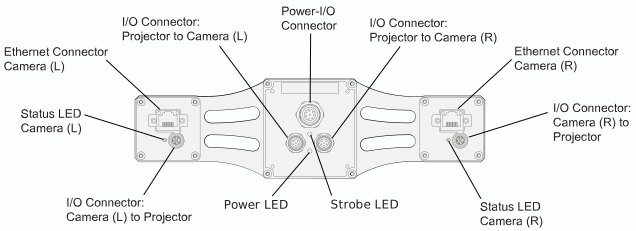
Ethernet Connector#
- 2 x 8-pin RJ45 connectors
- Used to provide a 1000 Mbit/s Ethernet connection to the cameras
- Recommended mating connector: 8-pin RJ45 plug (snap-in or with locking screws)
Power Connector#
- M12 8-pin A-coded female connector
- Used to provide power to the camera
- Recommended mating connector according to IEC 61076-2-101 standard: 8-pin A-coded male
Status LED#
Indicates camera operation (LED lit = camera operating).
LED States#
Cameras#
| LED State | Meaning |
|---|---|
| Off | No power |
| Solid green | Powered, network connection established |
| Flashing green (3x short – 3x long – 3x short) repeatedly until error is corrected | System error (e.g., internal error) |
| Flashing green (3x long) repeatedly until error is corrected | User error (e.g., temperature error) |
| Alternating: Bright green / off | Link down (powered, but no GigE connection) |
| Alternating: Bright green / dark green | Allocating IP address |
| Solid green with a periodical, short dark phase | Network conflict |
Projector#
| Power LED State | Strobe LED State | Meaning |
|---|---|---|
| Off | Off | No power |
| Solid green | Off | Powered, camera ready for use |
| Solid green | Flashing red | Powered, Illumination active |
Connector Pinout#
Power Connector#
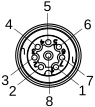
| Pin Number | Power I/O Connector | Wire Colors of Recommended Power I/O Cables |
|---|---|---|
| 1 | Camera Power VCC | White |
| 2 | Camera Power Ground | Brown |
| 3 | Camera Power Ground | Green |
| 4 | General Purpose output line (Out2) | Yellow |
| 5 | Ground for opto-coupled I/O input line | Gray |
| 6 | Opto-coupled I/O input line (In1) | Pink |
| 7 | Camera Power VCC | Blue |
| 8 | Reserved, do not connect | Red |
Info
Always connect both Power VCC and Power GND pins.
Precautions#
→ See Safety Instructions (Stereo ace).
Installation#
→ See Camera Installation (Stereo ace).
Features#
→ See Stereo ace Features.