Use Case 3 - Simple Light#
Involved Components#
| Component | Type | Order Number | Description |
|---|---|---|---|
| Camera | Hardware | Depends on camera model, see https://www.baslerweb.com/en/products/ | ace 2, boost R, or racer 2 S camera |
| Power-I/O Cable M8 6p/open | Hardware | 2200000315, 2200000296 | M8 6p/open cable of 5 or 10 m length |
| Power Supply 24 V | Hardware | 2200000958 | Power supply for board and camera |
| Driver Board 2x2 | Hardware | 2200002796 | Breakout and light driver board for Basler components |
| Flash-Light Without Internal Controller (4 A max.) | Hardware | - | For example, 24 V LED-Panel Connect +24 V and GND to LightB connector on the board (drivers) Control via Line 3 |
| pylon Software Suite | Software | - | Software for configuring the camera |
Connection Overview#
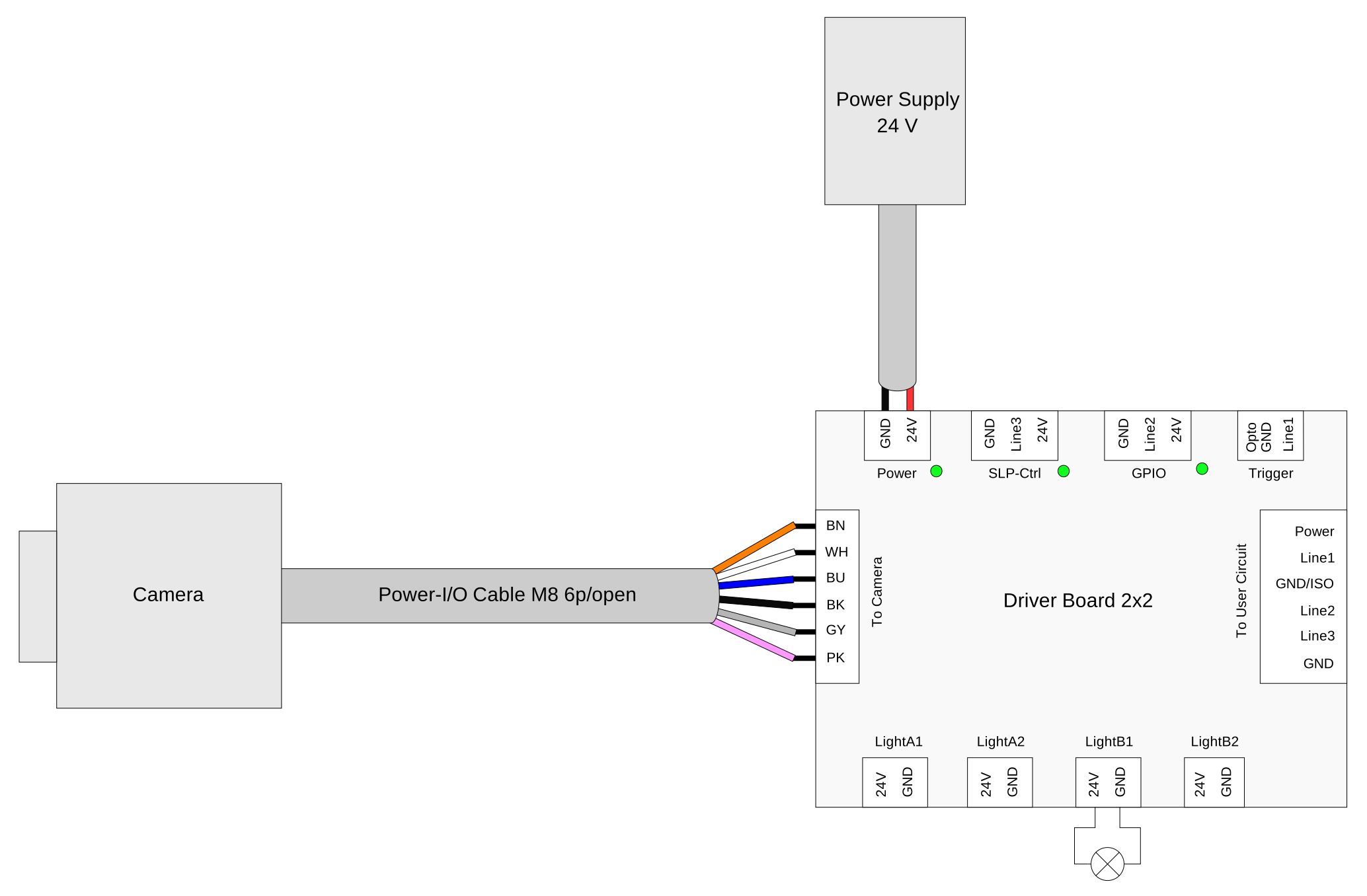
Application#
Purpose#
This use case describes light control via Line 3. Synchronize a light (e.g., 24 V LED panel without internal control) with the camera's exposure via Line 3. Line 3 transmits the camera's Flash Window signal. The driver board uses this signal to drive the LightB outputs. The light (e.g., 24 V LED panel without internal control) is powered via the LightB connector (+24 V and GND).
Prerequisites#
- Driver Board 2x2 and fully connected camera (see connection overview)
- pylon Software Suite installed and camera visible in the pylon Viewer
Required Steps#
-
Wire the light to the board:
- Connect the light's +24 V and GND to the LightB connector on the Driver Board 2x2 (driver output).
-
Configure the camera via the pylon Viewer – Light output (Line 3):
- In the Features pane, click the Digital I/O Control category.
- Set the Line Selector to Line 3.
- Set the Line Mode to Output.
- Set the Line Source to Flash Window. This signal goes high when the camera allows flash lighting. The board uses it to drive the LightB outputs.
- Set the Line Inverter to True for Line 3, because the light is low-active. It's on when the line is low.
-
Start image capturing, e.g., continuous or triggered, and check that the light (on LightB) is only on during the flash window.
Expected Results#
Line 3 drives the LightB outputs via the FlashWindow signal (inverted). The light connected to the LightB connector is only on during the flash window. The Line 3 LED reflects the (inverted) flash window.
Troubleshooting#
Common Issues#
| Symptom | Possible Cause | Measures |
|---|---|---|
| The light never turns on or doesn't follow the flash window. | - Light not connected to LightB. - Line 3 not configured correctly. - Line 3 (on rolling shutter) flash window invalid. | - Check wiring: Light +24 V and GND must be connected to the LightB connector on the Driver Board 2x2 (Line 3 only controls the LightB outputs; the light is powered from LightB). - Check configuration and Line 3 LED: In pylon Viewer Digital I/O Control, set the Line Selector to Line 3, set the Line Mode to Output, set the Line Source to Flash Window, set the Line Inverter to True. Observe the Line 3 LED during acquisition (inverted flash window). - On rolling shutter: Get the value of the BslFlashWindowDuration parameter. If it's 0, increase the exposure time (and reduce the ROI height, if needed) so that a valid flash window exists. |
| The light is on but the image remains dark (e.g., light is on outside the exposure window). | - Line Inverter for Line 3 is wrong. The light is on when the camera isn't exposing. | - In pylon Viewer Digital I/O Control, for Line 3 set the Line Inverter to True (low-active light: light on when line is low). If the light is on when it should be off during exposure, toggle the Line Inverter and verify with the Line 3 LED and image brightness. |
Further Steps#
Use Case 3 and Use Case 2 - Trigger System can be combined to get both triggered image acquisition and synchronized flash lighting.