dmA2448-23gm#
Specifications#
General Specifications#
| dmA2448-23gm | |
|---|---|
| Resolution (H x V Pixels) | 2472 x 2064 (full resolution) 2448 x 2048 (default resolution) |
| Resolution | 5 MP |
| Sensor Type | Sony IMX547-AAMJ-C Progressive scan CMOS Global shutter |
| Sensor Format | 1/1.8" |
| Effective Sensor Diagonal | 8.8 mm |
| Pixel Size (H x V) | 2.74 x 2.74 µm |
| Spectrum | Visible |
| Frame Rate | 32.6 fps (at default settings) 37.2 fps (max.) See also the Basler Frame Rate Calculator (baslerweb.com). |
| Product Family | dart M |
| Mono / Color | Mono |
| Image Data Interface | Fast Ethernet (100 Mbit/s) Gigabit Ethernet (1000 Mbit/s) |
| Image Data Stream Protocol | GVSP |
| Pixel Formats | See Pixel Format. |
| Synchronization | Via hardware trigger Via software trigger Via free run |
| Exposure Time Control | Via hardware trigger Programmable via the camera API |
| Camera Power Requirements | ≈2.9 W (typical) @ 5 VDC |
| I/O Lines | 1 general purpose input line 1 general purpose output line When using a Basler dart M Interface Board or a dart M GigE Switch: 1 general purpose input line (opto-coupled for dart M Interface Board) 1 general purpose output line 1 general purpose I/O (GPIO) line |
| Lens Mount | C-mount, C-mount, S-mount and CS-mount available as accessories |
| Size (L x W x H) | 27.3 x 27.3 x 13.9 mm |
| Weight | <14 g |
| Conformity | CE (includes RoHS), UKCA, EAC, FCC, KC, GenICam, GigE Vision, REACH Certificates for your camera model For more information, see the Compliance section of the Basler website. |
| Software | Basler pylon Software Suite (version 6.0 or higher) Available for Windows, Linux x86, Linux ARM, macOS, and Android |
| Accessories | dart M GigE Switches or dart M Interface Boards dart Camera Mounts dart M Screw Kit for Mount Attachment dart Flexible Flat Cables dart I/O Cable Heat Sink for dart See also the Suitable Products section on the Basler website. |
| Availability and Pricing | See the product page on the Basler website. |
Spectral Response#
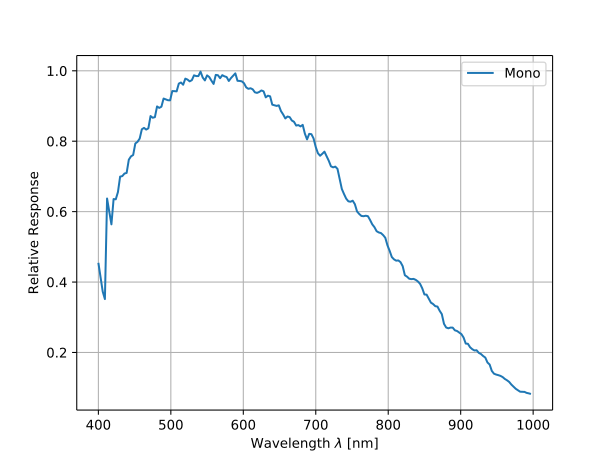
The spectral response curve excludes lens characteristics.
Mechanical Specifications#
Dimensions and Mounting Points#
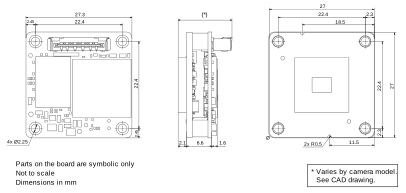
– > Download the CAD/technical drawing for your Basler Camera.
Info
If you use a camera mount, different dimensions apply. For more information, see dart M Camera Mounts.
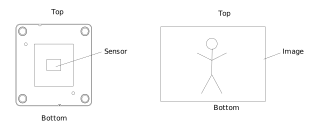
The top and bottom of the image sensor, as shown in the image above, correspond to the top and bottom of the delivered image (see below).
Mounting Instructions#
→ See Mounting Instructions.
Stress Test Results#
→ See Stress Test Results.
Requirements#
Environmental Requirements#
Temperature and Humidity#
| Description | Temperature |
|---|---|
| Device temperature during operation | 0–75 °C (32–167 °F)a |
| Device temperature during storage | -20–80 °C (-4–176 °F) |
| Humidity | 20–80 %, relative, non-condensing |
-
Temperature measured at the temperature measurement point, i.e., at the hottest point on the board. This point is significantly hotter than the other parts on the board.
Heat Dissipation#
CAUTION – Temperatures outside of the specified range may cause burns or lead to a camera shutdown.
Operating the camera module at temperatures outside of the range given in the camera specification causes the following problems:
- The camera module gets hot and may cause burns when touching it.
- Operating the camera module without heat dissipation may lead to a shutdown of the camera module in order to protect its electrical components.
- The camera module's lifetime decreases.
Ensure sufficient heat dissipation.
→ See Providing Heat Dissipation.
→ See the How to Effectively Provide Heat Dissipation for dart M Camera Modules application note.
Electrical Requirements#
For information about the camera power requirements, see the General Specifications table above.
→ If you want to connect the camera module to Basler hardware, see dart M Interface Boards or dart M GigE Switch.
→ If you want to connect the camera module to custom hardware, see dart M Interface Description.
Physical Interface#
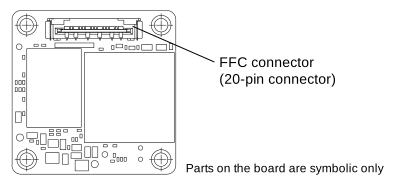
FFC Connector#
The FFC connector provides an interface to a dart M Interface Board or to a dart M GigE Switch via the dart M FFC cable.
NOTICE – Wrong orientation of the FFC cable may damage the electronics.
The ends of the FFC cable are not specific, i.e., you can connect each end either to the camera module connector or to the connector of the interface board or of the dart M GigE switch. But it's important that you make sure to insert the cable in the correct orientation, i.e., the red conducting paths of the FFC cable must face the boards as shown in the following image. The image illustrates an interface board example, but the same principle applies to the switch.
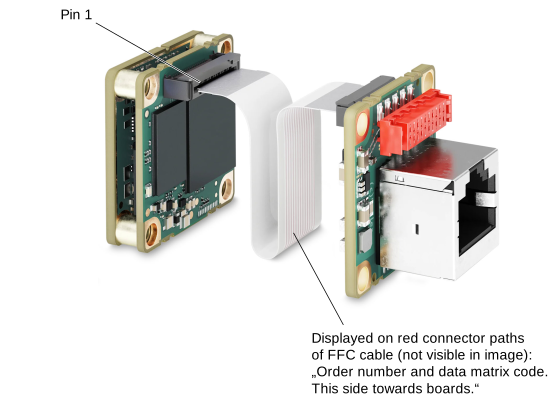
You can also connect custom hardware. For more information, see dart M Interface Description.
I/O Pinout#
→ If you want to connect the camera module to Basler hardware, see dart M Interface Boards or dart M GigE Switch.
→ If you want to connect the camera module to custom hardware, see dart M Interface Description.
Precautions#
→ See Safety Instructions (dart Cameras).
Installation#
→ See Camera Installation.
Features#
→ See Features.