Functional Specifications#
Vendor Identifier (VID) and Product Identifier (PID)#
| STM-501u | STM-502u | STM-951u | STM-952u | STM-951g | STM-955g | |
|---|---|---|---|---|---|---|
| Model | G40155-170 | G40155-180 | G40055-170 | G40055-180 | G40055-570 | G30056-370 |
| PID | 0x0800 | 0x0803 | 0x0804 | 0x0807 | 0x080E | 0x0815 |
| VID | 0x2BC5 | 0x2BC5 | 0x2BC5 | 0x2BC5 | 0x2BC5 | 0x2BC5 |
Platform and System Requirements#
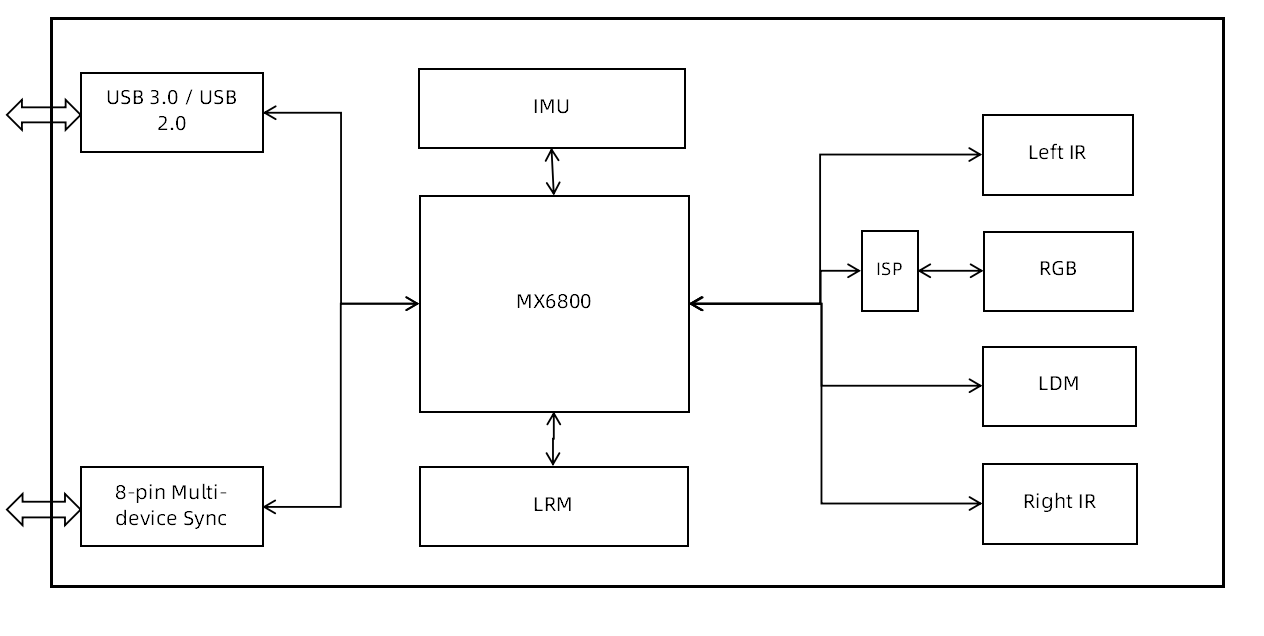
Cameras of the Stereo mini series connect to the host computer using USB or Ethernet, which is compatible with various platforms and system requirements.
USB#
| x86/x64 | ARM | |
|---|---|---|
| OS | Windows 10/11 Ubuntu 20.04 / 22.04 | Ubuntu 20.04 / 22.04 |
| USB | USB 3.0 | USB 3.0 |
| CPU | Quad-core, 2.9 GHz | Quad-core, A57 |
| Reference model | Intel i3 10100 / Intel i5 8400 | NVIDIA Jetson Orin Nano / Raspberry Pi 5 |
| RAM | Windows: 8 GB RAM and above Ubuntu: 4 GB RAM and above | 4 GB RAM and above |
GigE#
STM-951g#
| x86/x64 | ARM | |
|---|---|---|
| OS | Windows 10/11 Ubuntu 20.04 / 22.04 | Ubuntu 20.04 / 22.04 |
| Ethernet | Gigabit Ethernet | Gigabit Ethernet |
| CPU | Quad-core, 2.9 GHz | Cortex-A78AE |
| Reference model | Intel i7 10700 | NVIDIA AGX Orin / Orin NX / Orin Nano |
| Network Adapters | Intel ® Corporation Ethernet Connection (14) I219-LM (rev 11) | RTL8111/8168/8411 PCI Express Gigabit Ethernet Controller (rev 15) |
| RAM | Windows: 8 GB RAM and above Ubuntu: 4 GB RAM and above | 8 GB RAM and above |
STM-955g#
| x86/x64 | ARM | |
|---|---|---|
| OS | Windows 10/11 Ubuntu 20.04 / 22.04 | Ubuntu 20.04 / 22.04 |
| Ethernet | Gigabit Ethernet | Gigabit Ethernet |
| CPU | Quad-core, 2.9 GHz | Quad-core, A57 |
| Reference model | Intel i7 10700 | NVIDIA AGX Orin / Orin NX / Orin Nano |
| Network Adapters | Intel ® Corporation Ethernet Connection (14) I219-LM (rev 11) | RTL8111/8168/8411 PCI Express Gigabit Ethernet Controller (rev 15) |
| RAM | Windows: 8 GB RAM and above Ubuntu: 4 GB RAM and above | 8 GB RAM and above |
Camera System Framework#
USB#
GigE#
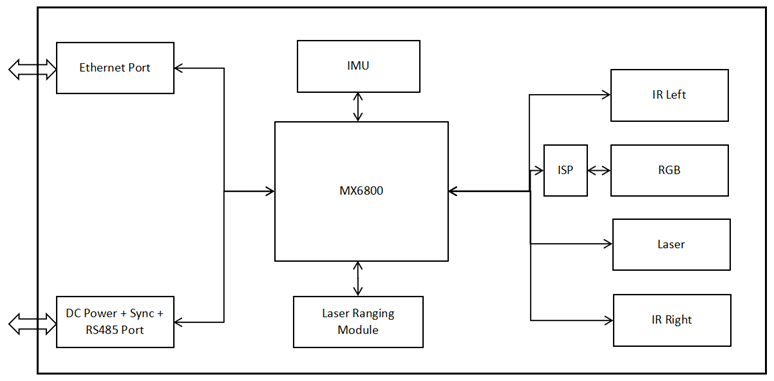
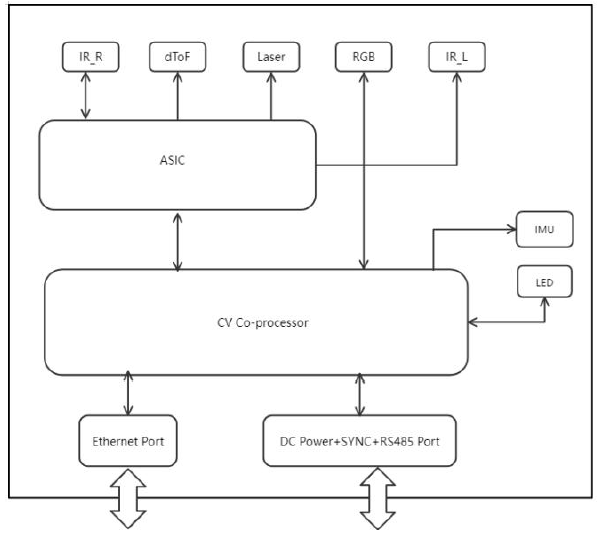
Image Data Stream#
USB#
USB cameras of the Stereo mini series provide high-quality, multi-resolution depth stream data as well as high-definition color stream data. The camera outputs depth stream data in Y16 format. The color stream data output by the camera is in MJPEG/YUYV format. The SDK supports output in MJPEG/YUYV/RGB8/BGR8/RGBA8/BGRA8/Y16 formats. The camera outputs IR image data in Y8 format, and the SDK also supports outputting data in Y16/Y12 formats at maximum resolution.
Output Data Streams (USB3.0): STM-501u and STM-502u#
| Data Format | Aspect Ratio | Resolution | Frame Rate | |
|---|---|---|---|---|
| Depth | Y16 | 16:10 | 1280 x 800 640 x 400 424 x 266 | 6, 10, 15, 30 |
| Depth | Y16 | 16:9 | 1280 x 720 848 x 480 640 x 360 480 x 270 424 x 240 | 6, 10, 15, 30 6, 10, 15, 30, 60 6, 10, 15, 30, 60, 90 6, 10, 15, 30, 60, 90 6, 10, 15, 30, 60, 90 |
| Depth | Y16 | 4:3 | 640 x 480 | 6, 10, 15, 30, 60, 90 |
| Depth | Y16 | Other | 848 x 100 | 100 |
| IR | Y8 | 16:10 | 1280 x 800 640 x 400 424 x 266 | 6, 10, 15, 30 |
| IR | Y8 | 16:9 | 1280 x 720 848 x 480 640 x 360 480 x 270 424 x 240 | 6, 10, 15, 30 6, 10, 15, 30, 60 6, 10, 15, 30, 60, 90 6, 10, 15, 30, 60, 90 6, 10, 15, 30, 60, 90 |
| IR | Y8 | 4:3 | 640 x 400 | 6, 10, 15, 30, 60, 90 |
| IR | Y8 | Other | 848 x 100 | 100 |
| RGB | MJPEG & YUYV | 16:9 | 1920 x 1080 1280 x 720 960 x 540 848 x 480 640 x 360 424 x 240 320 x 180 | 6, 10, 15, 30 6, 10, 15, 30, 60 6, 10, 15, 30, 60 6, 10, 15, 30, 60 6, 10, 15, 30, 60 6, 10, 15, 30, 60 6, 30, 60 |
| RGB | MJPEG & YUYV | 4:3 | 640 x 480 320 x 240 | 6, 10, 15, 30, 60 6, 30, 60 |
Output Data Streams (USB2.0): STM-501u and STM-502u#
| Data Format | Aspect Ratio | Resolution | Frame Rate | |
|---|---|---|---|---|
| Depth | Y16 | 16:10 | 1280 x 800 640 x 400 424 x 266 | 6 6, 10, 15, 30 6, 10, 15, 30 |
| Depth | Y16 | 16:9 | 1280 x 720 848 x 480 640 x 360 480 x 270 | 6 6, 8, 10 6, 10, 15, 30 6, 10, 15, 30, 60 |
| Depth | Y16 | 4:3 | 640 x 360 | 6, 10, 15, 30 |
| IR | Y8 | 16:10 | 1280 x 800 640 x 400 424 x 266 | 6 6, 10, 15, 30 6, 10, 15, 30 |
| IR | Y8 | 16:9 | 1280 x 720 848 x 480 640 x 360 480 x 270 | 6 6, 8, 10 6, 10, 15, 30 6, 10, 15, 30, 60 |
| IR | Y8 | 4:3 | 640 x 480 | 6, 10, 15, 30 |
| RGB | MJPEG | 16:9 | 1920 x 1080 1280 x 720 | 8 6, 10, 15 |
| RGB | MJPEG & YUYV | 16:9 | 424 x 240 | 6, 15, 30, 60 |
| RGB | MJPEG & YUYV | 4:3 | 640 x 480 | 6, 15, 30 |
Output Data Streams (USB3.0): STM-951u and STM-952u#
| Data Format | Aspect Ratio | Resolution | Frame Rate | |
|---|---|---|---|---|
| Depth | Y16 | 16:10 | 1280 x 800 640 x 400 424 x 266 | 5, 10, 15, 30 |
| Depth | Y16 | 16:9 | 1280 x 720 848 x 480 640 x 360 480 x 270 424 x 240 | 5, 10, 15, 30 5, 10, 15, 30, 60 5, 10, 15, 30, 60, 90 5, 10, 15, 30, 60, 90 5, 10, 15, 30, 60, 90 |
| Depth | Y16 | 4:3 | 640 x 480 | 5, 10, 15, 30, 60, 90 |
| Depth | Y16 | Other | 848 x 100 | 100 |
| IR | Y8 | 16:10 | 1280 x 800 640 x 400 424 x 266 | 5, 10, 15, 30 |
| IR | Y8 | 16:9 | 1280 x 720 848 x 480 640 x 360 480 x 270 424 x 240 | 5, 10, 15, 30 5, 10, 15, 30, 60 5, 10, 15, 30, 60, 90 5, 10, 15, 30, 60, 90 5, 10, 15, 30, 60, 90 |
| IR | Y8 | 4:3 | 640 x 480 | 5, 10, 15, 30, 60, 90 |
| IR | Y8 | Other | 848 x 100 | 100 |
| RGB | MJPEG & YUYV | 16:10 | 1280 x 800 640 x 400 | 5, 10, 15, 30, 60 5, 10, 15, 30, 60, 90 |
| RGB | MJPEG & YUYV | 16:9 | 1280 x 720 848 x 480 640 x 360 480 x 270 424 x 240 | 5, 10, 15, 30, 60 5, 10, 15, 30, 60 5, 10, 15, 30, 60, 90 5, 10, 15, 30, 60, 90 5, 10, 15, 30, 60, 90 |
| RGB | MJPEG & YUYV | 4:3 | 640 x 480 | 5, 10, 15, 30, 60, 90 |
Output Data Streams (USB2.0): STM-951u and STM-952u#
| Data Format | Aspect Ratio | Resolution | Frame Rate | |
|---|---|---|---|---|
| Depth | Y16 | 16:10 | 1280 x 800 640 x 400 424 x 266 | 5 5, 10, 15, 30 5, 10, 15, 30 |
| Depth | Y16 | 16:9 | 1280 x 720 848 x 480 640 x 360 480 x 270 | 5 5, 10 5, 10, 15, 30 5, 10, 15, 30, 60 |
| Depth | Y16 | 4:3 | 640 x 480 | 5, 10, 15, 30 |
| IR | Y8 | 16:10 | 1280 x 800 640 x 400 424 x 266 | 5 5, 10, 15, 30 5 10, 15, 30 |
| IR | Y8 | 16:9 | 1280 x 720 848 x 480 640 x 360 480 x 270 | 5 5, 10 5, 10, 15, 30 5, 10, 15, 30, 60 |
| IR | Y8 | 4:3 | 640 x 480 | 5, 10, 15, 30 |
| RGB | MJPEG | 16:10 | 1280 x 800 | 8 |
| RGB | MJPEG | 16:9 | 1280 x 720 | 5, 10, 15 |
| RGB | MJPEG & YUYV | 16:10 | 640 x 400 | 5, 10, 15, 30 |
| RGB | MJPEG & YUYV | 16:9 | 424 x 240 | 5, 10, 15, 30, 60 |
| RGB | MJPEG & YUYV | 4:3 | 640 x 480 | 5, 10, 15, 30 |
GigE#
GigE cameras of the Stereo mini series provide high-quality, multi-resolution depth stream data, as well as high-definition color stream data.
The STM-951g outputs depth stream data in Y16 format. The color stream data output by the camera is in MJPEG/YUYV format. The SDK supports output in MJPEG/YUYV/RGB8/BGR8/RGBA8/BGRA8/Y16 formats and also supports output in RAW16 format at maximum resolution. The camera outputs IR image data in Y8 format, and the SDK also supports outputting data in Y12 format.
The STM-955g outputs depth data in Y16 or RVL format, color images in I420 or MJPEG format, and IR images in Y8 format. The software SDK also supports RGB/BGR/BGRA formats for color streams.
Output Data Streams (Gigabit Ethernet): STM-951g#
| Data Format | Aspect Ratio | Resolution | Frame Rate | |
|---|---|---|---|---|
| Depth | Y16 | 16:10 | 1280 x 800 640 x 400 424 x 266 320 x 200 848 x 530 | 5, 10, 15, 30 5, 10, 15, 30 5, 10, 15, 30 5, 10, 15, 30 5, 10, 15, 30, 60 |
| Depth | Y16 | 4:3 | 640 x 480 | 5, 10, 15, 30, 60, 90 |
| IR | Y8 | 16:10 | 1280 x 800 640 x 400 424 x 266 320 x 200 848 x 530 | 5, 10, 15, 30 5, 10, 15, 30 5, 10, 15, 30 5, 10, 15, 30 5, 10, 15, 30, 60 |
| IR | Y8 | 4:3 | 640 x 480 | 5, 10, 15, 30, 60, 90 |
| IR | Y16 | 16:10 | 1280 x 800 640 x 400 | 5, 10, 15 5, 10, 15, 30 |
| Color | YUYV | 16:10 | 1280 x 800 848 x 530 640 x 400 | 5, 10, 15, 30 5, 10, 15, 30, 60 5, 10, 15, 30, 60, 90 |
| Color | YUYV | 16:9 | 1280 x 720 640 x 360 | 5, 10, 15, 30 5, 10, 15, 30, 60, 90 |
| Color | YUYV | 4:3 | 640 x 480 | 5, 10, 15, 30, 60, 90 |
| Color | MJPEG | 16:10 | 1280 x 800 848 x 530 640 x 400 | 5, 10, 15, 30, 60 5, 10, 15, 30, 60 5, 10, 15, 30, 60, 90 |
| Color | MJPEG | 16:9 | 1280 x 720 640 x 360 | 5, 10, 15, 30, 60 5, 10, 15, 30, 60, 90 |
| Color | MJPEG | 4:3 | 640 x 480 | 5, 10, 15, 30, 60, 90 |
Output Data Streams (Fast Ethernet): STM-951g#
| Data Format | Aspect Ratio | Resolution | Frame Rate | |
|---|---|---|---|---|
| Depth | Y16 | 16:10 | 1280 x 800 848 x 530 640 x 400 424 x 266 320 x 200 | 5 5, 10 5, 10, 15 5, 10, 15, 30 5, 10, 15, 30 |
| Depth | Y16 | 4:3 | 640 x 480 | 5, 10, 15, |
| IR | Y8 | 16:10 | 1280 x 800 848 x 530 640 x 400 424 x 266 320 x 200 | 5 5, 10 5, 10, 15 5, 10, 15, 30 5, 10, 15, 30 |
| IR | Y8 | 4:3 | 640 x 480 | 5, 10, 15 |
| Color | YUYV | 16:10 | 1280 x 800 848 x 530 640 x 400 | 5 5, 10 5, 10, 15 |
| Color | YUYV | 16:9 | 1280 x 720 640 x 360 | 5 5, 10, 15 |
| Color | YUYV | 4:3 | 640 x 480 | 5, 10, 15 |
| Color | MJPEG | 16:10 | 1280 x 800 848 x 530 640 x 400 | 5, 10, 15, 30 5, 10, 15, 30, 60 5, 10, 15, 30, 60, 90 |
| Color | MJPEG | 16:9 | 1280 x 720 640 x 360 | 5, 10, 15, 30, 60 5, 10, 15, 30, 60, 90 |
| Color | MJPEG | 4:3 | 640 x 480 | 5, 10, 15, 30, 60, 90 |
Info
A single data stream output can support all resolutions and frame rates. However, when simultaneously outputting two, three, or four streams of depth and color stream, some combinations may not be supported due to the actual bandwidth limitations of the camera's Gigabit or Fast Ethernet and the performance of the host device.
Output Data Streams (Gigabit Ethernet): STM-955g#
| Data Format | Aspect Ratio | Resolution | Frame Rate | |
|---|---|---|---|---|
| Depth | Y16 | 16:10 | 1280 x 800 640 x 400 | 5, 10 5, 10, 15, 20 |
| Depth | RVL | 16:10 | 1280 x 800 640 x 400 | 5, 10 5, 10, 15, 20 |
| IR | Y8 | 16:10 | 1280 x 800 640 x 400 | 5, 10, 15, 20 5, 10, 15, 20 |
| Color | I420 | 16:10 | 1280 x 800 640 x 400 | 5, 10, 15, 20 5, 10, 15, 20 |
| Color | I420 | 16:9 | 1280 x 720 640 x 360 | 5, 10, 15, 20 5, 10, 15, 20 |
| Color | I420 | 4:3 | 800 x 600 | 5, 10, 15, 20 5, 10, 15, 20 |
| Color | MJPEG | 16:10 | 1280 x 800 640 x 400 | 5, 10, 15, 20 5, 10, 15, 20 |
| Color | MJPEG | 16:9 | 1280 x 720 640 x 360 | 5, 10, 15, 20 5, 10, 15, 20 |
| Color | MJPEG | 4:3 | 800 x 600 | 5, 10, 15, 20 |
Info
A single data stream output can support all resolutions and frame rates. However, when simultaneously outputting two, three, or four streams of depth and color stream, some combinations may not be supported due to the actual bandwidth limitations of the camera's Gigabit or Fast Ethernet and the performance of the host device.
Field of View#
Definition of Depth Field of View#
The image below shows the depth camera's field-of-view, or the angles that the sensors "see". The IR cameras are used for illustration.
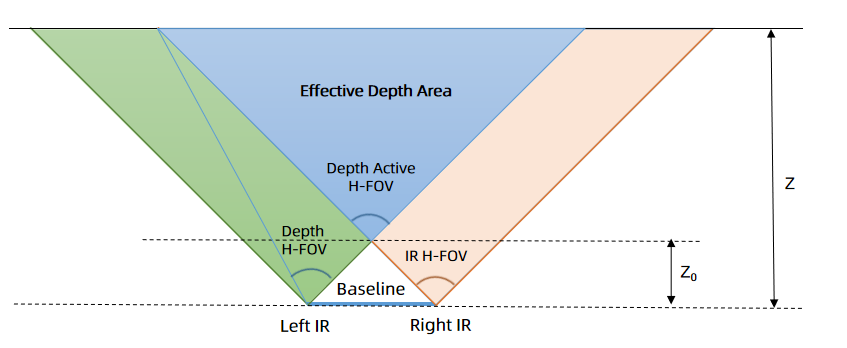
Depth field of view (depth FOV) at any depth (Z) can be calculated using the following equation:
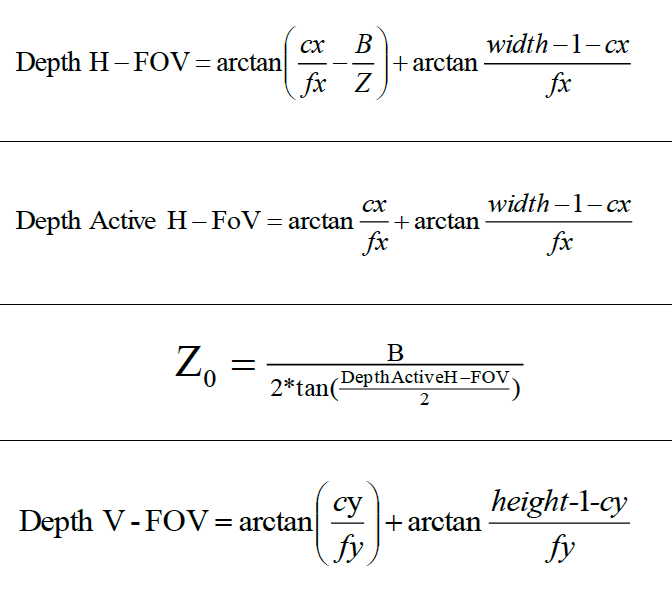
where:
cx = X-direction image coordinates of the principle point of the depth image
fx = Depth camera focal length
cy = Y-direction image coordinates of the principle point of the depth image
fy = Depth camera focal length
width = Depth image width
height = Depth image height
Depth active H-FOV = Left IR H-FOV
Info
- cx, fx, and width parameters are obtained through the intrinsic depth parameters provided by the SDK. The parameter values vary from camera to camera.
- At different depth values, the depth FOV is different. The farther the depth, the greater the depth FOV.
Typical Depth Intrinsics#
The following tables list typical depth intrinsics for Stereo mini cameras.
STM-501u and STM-502u#
Baseline: 50 mm
| Resolution Width x Height (px) | cx (px) | cy (px) | Fx, Fy (px) |
|---|---|---|---|
| 1280 x 800 | 640 | 400 | 620.0, 620.0 |
| 1280 x 720 | 640 | 360 | 620.0, 620.0 |
| 848 x 480 | 424 | 240 | 410.7, 410.7 |
| 848 x 100 | 424 | 50 | 410.7, 410.7 |
| 640 x 480 | 320 | 200 | 372.0, 372.0 |
| 640 x 400 | 320 | 200 | 310.0, 310.0 |
| 640 x 360 | 320 | 180 | 310.0, 310.0 |
| 480 x 270 | 240 | 135 | 232.5, 232.5 |
| 424 x 240 | 212 | 120 | 205.4, 205.4 |
STM-951u and STM-952u#
Baseline: 95 mm
| Resolution Width x Height (px) | cx (px) | cy (px) | Fx, Fy (px) |
|---|---|---|---|
| 1280 x 800 | 640 | 400 | 620.0, 620.0 |
| 1280 x 720 | 640 | 360 | 620.0, 620.0 |
| 848 x 480 | 424 | 240 | 410.7, 410.7 |
| 848 x 100 | 424 | 50 | 410.7, 410.7 |
| 640 x 480 | 320 | 200 | 372.0, 372.0 |
| 640 x 400 | 320 | 200 | 310.0, 310.0 |
| 640 x 360 | 320 | 180 | 310.0, 310.0 |
| 480 x 270 | 240 | 135 | 232.5, 232.5 |
| 424 x 240 | 212 | 120 | 205.4, 205.4 |
STM-951g#
Baseline: 95 mm
| Resolution Width x Height (px) | cx (px) | cy (px) | Fx, Fy (px) |
|---|---|---|---|
| 1280 x 800 | 640 | 400 | 620.0, 620.0 |
| 848 x 530 | 424 | 265 | 410.7, 410.7 |
| 640 x 480 | 320 | 200 | 372.0, 372.0 |
| 640 x 400 | 320 | 200 | 310.0, 310.0 |
| 424 x 266 | 212 | 133 | 205.4, 205.4 |
| 320 x 200 | 160 | 100 | 186.0, 186.0 |
STM-955g#
Baseline: 95 mm
| Resolution Width x Height (px) | cx (px) | cy (px) | Fx, Fy (px) |
|---|---|---|---|
| 1280 x 800 | 640 | 400 | 620.0, 620.0 |
| 640 x 400 | 320 | 200 | 310.0, 310.0 |
Overview of Stream FOV#
USB#
| FOV | Aspect Ratio | Resolutions | STM-501u / STM-502u (H x V) | STM-951u / STM-952u (H x V) |
|---|---|---|---|---|
| Depth FOV Before D2C @ 2 m | 16:10 | 1280 x 800 640 x 400 424 x 266 | 90° x 65° | 90° x 65° |
| Depth FOV Before D2C @ 2 m | 16:9 | 1280 x 720 848 x 480 640 x 360 480 x 270 424 x 240 | 90° x 60° | 90° x 60° |
| Depth FOV Before D2C @ 2 m | 4:3 | 640 x 480 | 81° x 65° | 81° x 65° |
| Depth FOV Before D2C @ 2 m | Other (848 x 100) | 848 x 100 | 90° x 14° | 90° x 14° |
| IR | 16:10 | 1280 x 800 640 x 400 424 x 266 | 91° x 65° | 91° x 65° |
| IR | 16:9 | 1280 x 720 848 x 480 640 x 360 480 x 270 424 x 240 | 91° x 60° | 91° x 60° |
| IR | 4:3 | 640 x 480 | 81° x 65° | 81° x 65° |
| IR | Other (848 x 100) | 848 x 100 | 91° x 14° | 91° x 14° |
| RGB | 16:10 | 1280 x 800 640 x 400 424 x 266 | N/A | 94° x 68° |
| RGB | 16:9 | 1920 x 1080 1280 x 720 960 x 540 848 x 480 640 x 360 480 x 270 424 x 240 320 x 180 | 86° x 55° | 94° x 62° |
| RGB | 4:3 | 640 x 480 320 x 240 | 70° x 55° | 82° x 68° |
| Depth FOV After D2C @ 2 m | 16:10 | 1280 x 800 640 x 400 424 x 266 | N/A | 90° x 65° |
| Depth FOV After D2C @ 2 m | 16:9 | 1920 x 1080 1280 x 720 960 x 540 848 x 480 640 x 360 480 x 270 424 x 240 320 x 180 | 86° x 55° | 90° x 60° |
| Depth FOV After D2C @ 2m | 4:3 | 640 x 480 320 x 240 | 70° x 55° | 81° x 65° |
Info
- STM-501u and STM-502u cameras don't support the resolutions marked in red.
- STM-951u and STM-952u cameras don't support the resolutions marked in blue.
GigE#
| FOV | Aspect Ratio | Resolutions | STM-951g (H x V) |
|---|---|---|---|
| Depth FOV Before D2C @ 2 m | 16:10 | 1280 x 800 848 x 530 640 x 400 424 x 266 320 x 200 | 90° x 65° |
| Depth FOV Before D2C @ 2 m | 4:3 | 640 x 480 | 81° x 65° |
| IR | 16:10 | 1280 x 800 848 x 530 640 x 400 424 x 266 320 x 200 | 91° x 65° |
| IR | 4:3 | 640 x 480 | 81° x 65° |
| RGB | 16:10 | 1280 x 800 848 x 530 640 x 400 | 94° x 68° |
| RGB | 16:9 | 1280 x 720 640 x 360 | 94° x 62° |
| RGB | 4:3 | 640 x 480 | 82° x 68° |
| Depth FOV After D2C @ 2 m | 16:10 | 1280 x 800 848 x 530 640 x 400 | 90° x 65° |
| Depth FOV After D2C @ 2 m | 16:9 | 1280 x 720 640 x 360 | 90° x 60° |
| Depth FOV After D2C @ 2m | 4:3 | 640 x 480 | 81° x 65° |
| FOV | Aspect Ratio | STM-955g (H x V) |
|---|---|---|
| Depth @ 2 m | 16:10 | 90° x 65° |
| Depth @ 2 m | 4:3 | 81° x 65° |
| IR | 16:10 | 91° x 65° |
| IR | 4:3 | 81° x 65° |
| RGB | 16:10 | 94° x 68° |
| RGB | 16:9 | 94° x 62° |
| RGB | 4:3 | 82° x 68° |
| D2C FOV @ 2 m | 16:10 | 90° x 65° |
| D2C FOV @ 2 m | 16:9 | 90° x 60° |
| D2C FOV @ 2m | 4:3 | 81° x 65° |
FOV Illustrations#
STM-501u / STM-502u#
| Aspect Ratio | Depth FOV Before D2C | Depth FOV After D2C |
|---|---|---|
| 16:10 | 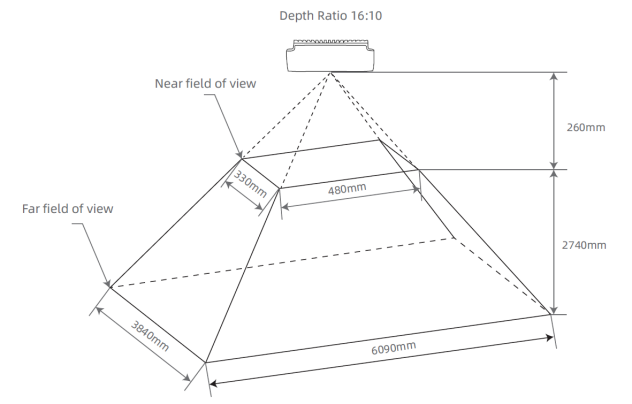 | N/A |
| 16:9 | 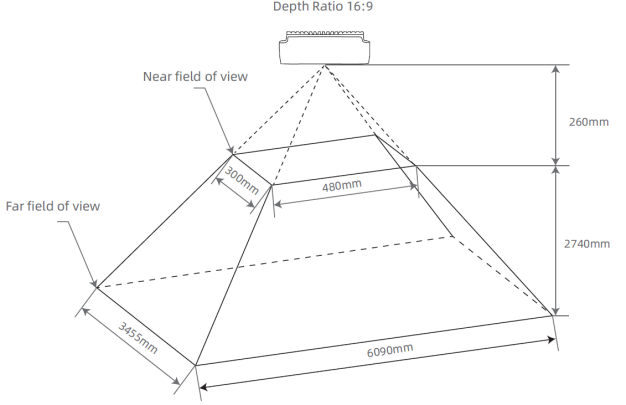 | 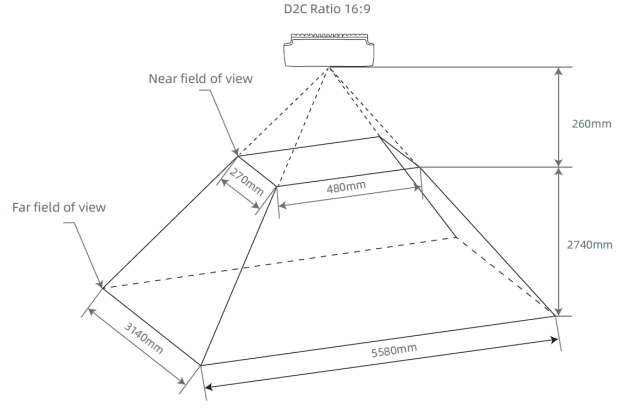 |
| 4:3 | 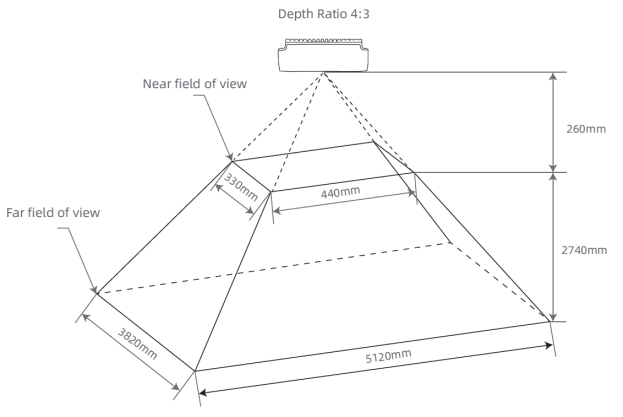 | 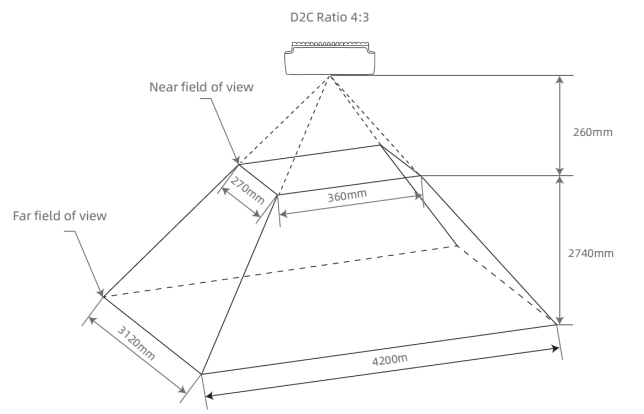 |
STM-951u / STM-952u#
| Aspect Ratio | Depth FOV Before D2C | Depth FOV After D2C |
|---|---|---|
| 16:10 | 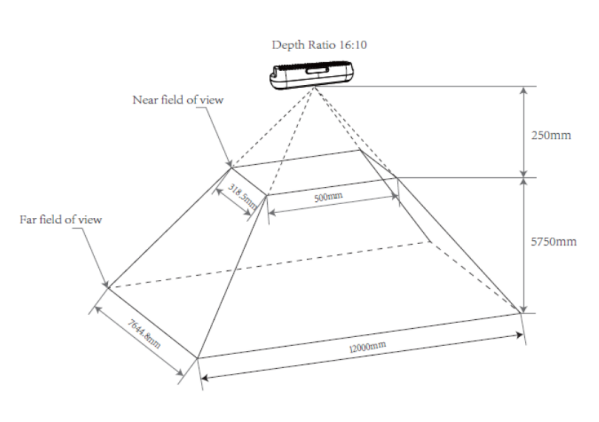 | 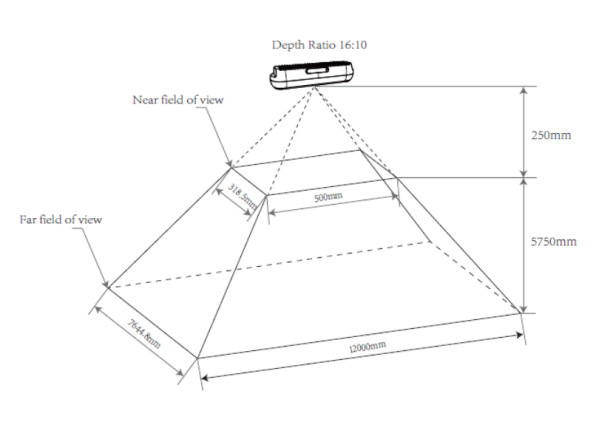 |
| 16:9 | 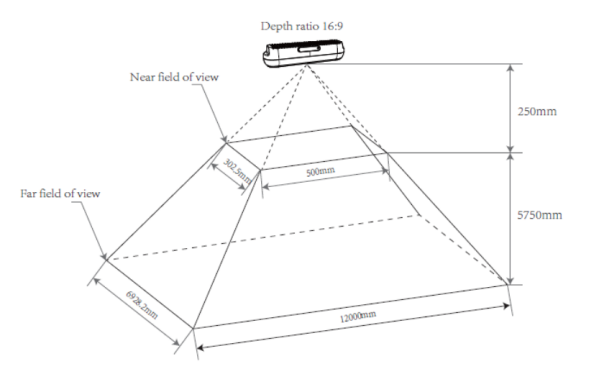 | 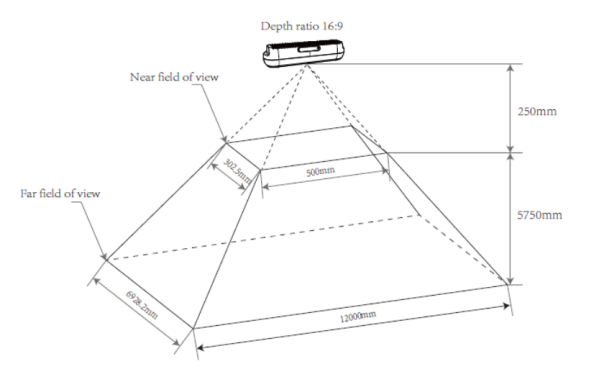 |
| 4:3 | 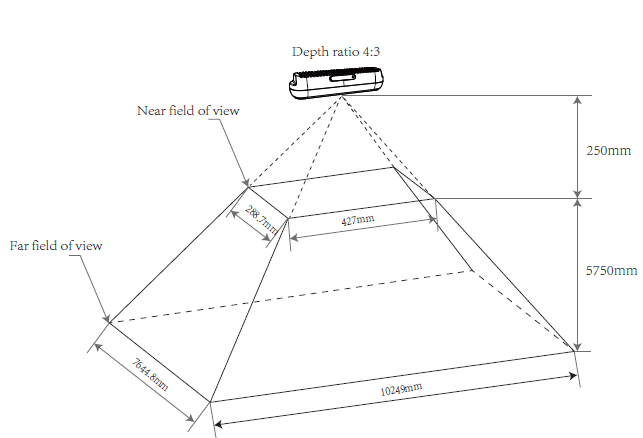 | 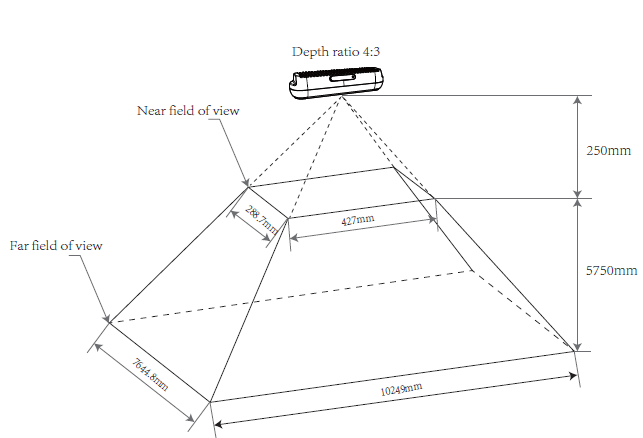 |
STM-951g#
| Aspect Ratio | Depth FOV Before D2C | Depth FOV After D2C |
|---|---|---|
| 16:10 | 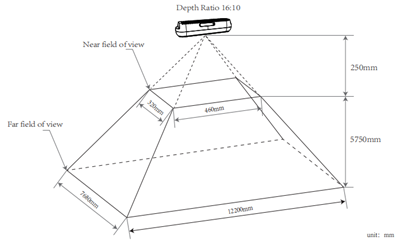 | 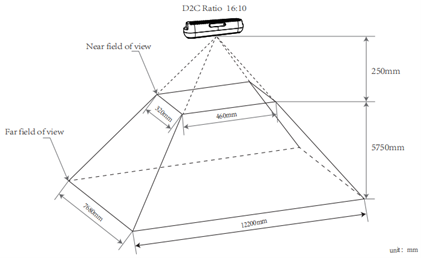 |
| 16:9 | N/A | 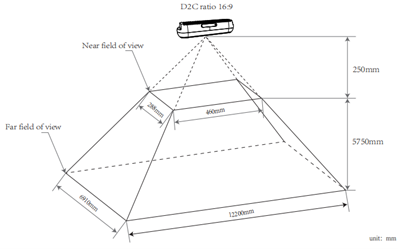 |
| 4:3 | 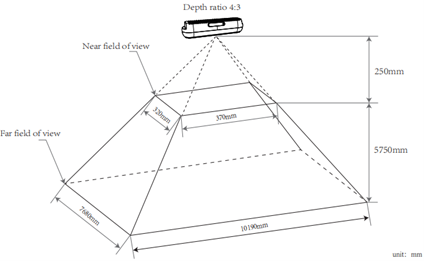 | 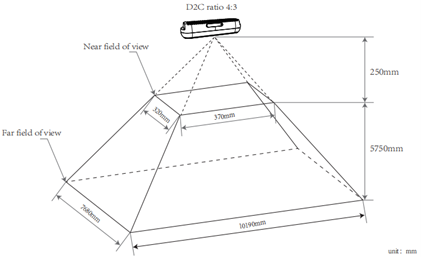 |
STM-955g#
| Aspect Ratio | Depth FOV Before D2C | Depth FOV After D2C |
|---|---|---|
| 16:10 | 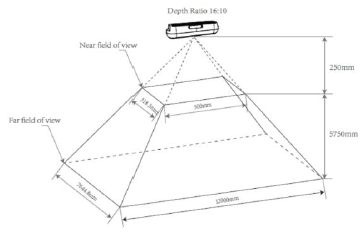 | 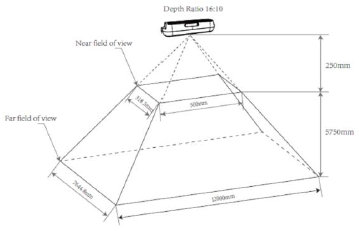 |
| 16:9 | N/A | 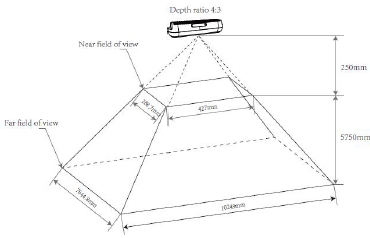 |
| 4:3 | 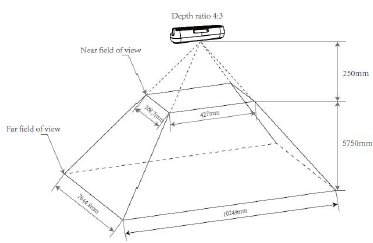 | 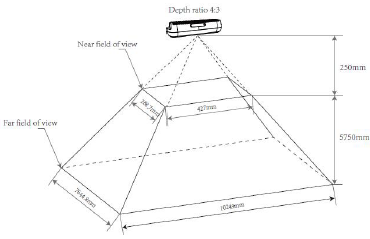 |
Depth to Color Alignment#
Depth to color (D2C), a pixel-by-pixel geometric transformation of a depth image, results in the spatial alignment of a depth image with its corresponding color image through the D2C transformation. This makes it possible to locate any pixel of a color image based on its image coordinates in the depth image after D2C by the same image coordinates.
The depth information of the color pixel can be located in the depth image after D2C by using the same image coordinates. A depth image of the same size as the target color image after D2C is generated, and the image content is the depth data in the color camera coordinate system. In other words, a depth image that has been "taken" using the origin and size of the color camera is reconstructed, where each pixel matches the coordinates of the corresponding pixel of the color camera.
D2C Alignment by Software: STM-501u / STM-502u#
| Depth Image Before D2C | Color Image | Depth Image After D2C | Aspect Ratio |
|---|---|---|---|
| 1280 x 800, 1280 x 720, 848 x 480, 640 x 480, 640 x 400, 640 x 360, 480 x 270, 424 x 266, 424 x 240 | 1920 x 1080 1280 x 720 960 x 540 848 x 480 640 x 360 424 x 240 320 x 180 | 1920 x 1080 1280 x 720 960 x 540 848 x 480 640 x 360 424 x 240 320 x 180 | 16:9 |
| 1280 x 800, 1280 x 720, 848 x 480, 640 x 480, 640 x 400, 640 x 360, 480 x 270, 424 x 266, 424 x 240 | 640 x 480 320 x 240 | 640 x 480 320 x 240 | 4:3 |
D2C Alignment by Hardware: STM-501u / STM-502u#
| Depth Image Before D2C | Color Image | Depth Image After D2C | Aspect Ratio |
|---|---|---|---|
| 848 x 480, 640 x 480, 640 x 400, 640 x 360 | 640 x 360 | 640 x 360 | 16:9 |
| 848 x 480, 640 x 480, 640 x 400, 640 x 360, 480 x 270, 424 x 266, 424 x 240 | 424 x 240 | 424 x 240 | 16:9 |
| 848 x 480, 640 x 480, 640 x 400, 640 x 360, 480 x 270, 424 x 266, 424 x 240 | 320 x 180 | 320 x 180 | 16:9 |
| 848 x 480, 640 x 480, 640 x 400, 640 x 360 | 640 x 480 | 640 x 480 | 4:3 |
| 848 x 480, 640 x 480, 640 x 400, 640 x 360, 480 x 270, 424 x 266, 424 x 240 | 320 x 240 | 320 x 240 | 4:3 |
Info
The depth resolutions of 640 x 400 and 424 x 266 only support color alignment at 30 fps or lower.
D2C Alignment by Software: STM-951u / STM-952u#
| Depth Image Before D2C | Color Image | Depth Image After D2C | Aspect Ratio |
|---|---|---|---|
| 1280 x 800, 1280 x 720, 848 x 480, 640 x 480, 640 x 400, 640 x 360, 480 x 270, 424 x 266, 424 x 240 | 1280 x 800 640 x 400 | 1280 x 800 640 x 400 | 16:10 |
| 1280 x 800, 1280 x 720, 848 x 480, 640 x 480, 640 x 400, 640 x 360, 480 x 270, 424 x 266, 424 x 240 | 1280 x 720 848 x 480 640 x 360 480 x 270 424 x 240 320 x 180 | 1280 x 720 848 x 480 640 x 360 480 x 270 424 x 240 320 x 180 | 16:9 |
| 1280 x 800, 1280 x 720, 848 x 480, 640 x 480, 640 x 400, 640 x 360, 480 x 270, 424 x 266, 424 x 240 | 640 x 480 | 640 x 480 | 4:3 |
D2C Alignment by Hardware: STM-951u / STM-952u#
| Depth Image Before D2C | Color Image | Depth Image After D2C | Aspect Ratio |
|---|---|---|---|
| 848 x 480, 640 x 480, 640 x 400, 640 x 360, 480 x 270, 424 x 266, 424 x 240 | 640 x 400 | 640 x 400 | 16:10 |
| 848 x 480, 640 x 480, 640 x 400, 640 x 360 | 640 x 360 | 640 x 360 | 16:9 |
| 848 x 480, 640 x 480, 640 x 400, 640 x 360, 480 x 270, 424 x 266, 424 x 240 | 480 x 270 | 480 x 270 | 16:9 |
| 848 x 480, 640 x 480, 640 x 400, 640 x 360, 480 x 270, 424 x 266, 424 x 240 | 424 x 240 | 424 x 240 | 16:9 |
| 848 x 480, 640 x 480, 640 x 400, 640 x 360, 480 x 270, 424 x 266, 424 x 240 | 640 x 480 | 640 x 480 | 4:3 |
Info
- The depth resolution of 848 x 480 only supports color alignment at 60 fps or lower.
- The depth resolutions of 640 x 400 and 424 x 266 only support color alignment at 30 fps or lower.
D2C Alignment by Software: STM-951g#
| Depth Image Before D2C | Color Image | Depth Image After D2C | Aspect Ratio |
|---|---|---|---|
| 1280 x 800, 848 x 530, 640 x 480, 640 x 400, 424 x 266, 320 x 200 | 1280 x 800 848 x 530 640 x 400 | 1280 x 800 848 x 530 640 x 400 | 16:10 |
| 1280 x 800, 848 x 530, 640 x 480, 640 x 400, 424 x 266, 320 x 200 | 1280 x 720 640 x 360 | 1280 x 720 640 x 360 | 16:9 |
| 1280 x 800, 848 x 530, 640 x 480, 640 x 400, 424 x 266, 320 x 200 | 640 x 480 | 640 x 480 | 4:3 |
D2C Alignment by Hardware: STM-951g#
| Depth Image Before D2C | Color Image | Depth Image After D2C | Aspect Ratio |
|---|---|---|---|
| 848 x 530, 640 x 480, 640 x 400 | 640 x 400 | 640 x 400 | 16:10 |
| 848 x 530, 640 x 480, 640 x 400, 424 x 266, 320 x 200 | 640 x 360 | 640 x 360 | 16:9 |
| 848 x 530, 640 x 480, 640 x 400, 424 x 266, 320 x 200 | 640 x 480 | 640 x 480 | 4:3 |
Info
- The depth resolution of 640 x 400, 424 x 266, and 320 x 200 only support color alignment at 30 fps or lower.
- The depth resolutions of 848 x 530 only support color alignment at 60 fps or lower.
D2C Alignment by Software: STM-955g#
| Depth Image Before D2C | Color Image | Depth Image After D2C | Aspect Ratio |
|---|---|---|---|
| 1280 x 800, 640 x 400 | 1280 x 800 640 x 400 | 1280 x 800 640 x 400 | 16:10 |
| 1280 x 800, 640 x 400 | 1280 x 720 640 x 360 | 1280 x 720 640 x 360 | 16:9 |
| 1280 x 800, 640 x 400 | 640 x 480 | 640 x 480 | 4:3 |
D2C Alignment by Hardware: STM-955g#
| Depth Image Before D2C | Color Image | Depth Image After D2C | Aspect Ratio |
|---|---|---|---|
| 1280 x 800, 640 x 400 | 1280 x 800 640 x 400 | 1280 x 800 640 x 400 | 16:10 |
| 1280 x 800, 640 x 400 | 1280 x 720 640 x 360 | 1280 x 720 640 x 360 | 16:9 |
| 1280 x 800, 640 x 400 | 640 x 480 | 640 x 480 | 4:3 |
Minimum Z Depth#
The minimum Z depth is the minimum working distance of a depth camera, i.e., the closest detectable planar distance from the camera's depth origin. This distance is determined by the disparity search range and image resolution.
The STM-955g adjusts its minimum working distance by configuring depth offset values. The achievable minimum distance may also vary across different Preset modes. The camera provides flexible configuration options to adapt to diverse application needs.
Info
The larger the disparity search range, the closer the minimum working distance becomes and the higher the power consumption. Conversely, the smaller the disparity search range, the farther the minimum working distance extends, the lower the camera's power consumption, and the higher the ambient temperature it can withstand.
STM-501u / STM-502u#
| Disparity Search Range | Field of View (H x V) | Resolution | Minimum Z Depth |
|---|---|---|---|
| 128 | 90° x 65° | 1280 x 800 640 x 400 424 x 266 | 0.26 m |
| 128 | 90° x 60° | 1280 x 720 | 0.26 m |
| 128 | 90° x 60° | 848 x 480 | 0.18 m |
| 128 | 90° x 60° | 640 x 360 | 0.14 m |
| 128 | 90° x 60° | 480 x 270 | 0.11 m |
| 128 | 90° x 60° | 424 x 240 | 0.1 m |
| 128 | 81° x 65° | 640 x 480 | 0.17 m |
| 128 | 90° x 14° | 848 x 100 | 0.18 m |
STM-951u / STM-952u#
| Disparity Search Range | Field of View (H x V) | Resolution | Minimum Z Depth |
|---|---|---|---|
| 256 | 90° x 65° | 1280 x 800 640 x 400 424 x 266 | 0.25 m |
| 256 | 90° x 60° | 1280 x 720 | 0.25 m |
| 256 | 90° x 60° | 848 x 480 | N/A |
| 256 | 90° x 60° | 640 x 360 | N/A |
| 256 | 90° x 60° | 480 x 270 | N/A |
| 256 | 90° x 60° | 424 x 240 | N/A |
| 256 | 81° x 65° | 640 x 480 | N/A |
| 256 | 90° x 14° | 848 x 100 | N/A |
| 128 | 90° x 65° | 1280 x 800 640 x 400 424 x 266 | 0.5 m |
| 128 | 90° x 60° | 1280 x 720 | 0.5 m |
| 128 | 90° x 60° | 848 x 480 | 0.34 m |
| 128 | 90° x 60° | 640 x 360 | 0.26 m |
| 128 | 90° x 60° | 480 x 270 | 0.19 m |
| 128 | 90° x 60° | 424 x 240 | 0.17 m |
| 128 | 81° x 65° | 640 x 480 | 0.3 m |
| 128 | 90° x 14° | 848 x 100 | 0.34 m |
| 64 | 90° x 65° | 1280 x 800 640 x 400 424 x 266 | 1 m |
| 64 | 90° x 60° | 1280 x 720 | 1 m |
| 64 | 90° x 60° | 848 x 480 | N/A |
| 64 | 90° x 60° | 640 x 360 | N/A |
| 64 | 90° x 60° | 480 x 270 | N/A |
| 64 | 90° x 60° | 424 x 240 | N/A |
| 64 | 81° x 65° | 640 x 480 | N/A |
| 64 | 90° x 14° | 848 x 100 | N/A |
STM-951g#
| Disparity Search Range | Field of View (H x V) | Resolution | Minimum Z Depth |
|---|---|---|---|
| 256 | 90° x 65° | 1280 x 800 640 x 400 424 x 266 320 x 200 | 0.25 m |
| 256 | 90° x 60° | 848 x 530 | N/A |
| 256 | 81° x 65° | 640 x 480 | N/A |
| 128 | 90° x 65° | 1280 x 800 640 x 400 424 x 266 320 x 200 | 0.5 m |
| 128 | 90° x 65° | 848 x 530 | 0.34 m |
| 128 | 81° x 65° | 640 x 480 | 0.3 m |
| 64 | 90° x 65° | 1280 x 800 640 x 400 424 x 266 320 x 200 | 1 m |
| 64 | 90° x 65° | 848 x 530 | N/A |
| 64 | 81° x 65° | 640 x 480 | N/A |
STM-955g#
| Preset | Resolution | Offset | Minimum Z Depth (Max–Min mm) |
|---|---|---|---|
| Perception | 1280 x 800 | 0 | ∞–320 |
| 1280 x 800 | 32 | 1855–266 | |
| 640 x 400 | 0 | ∞–155 | |
| 640 x 400 | 32 | 928–133 | |
| Dimensioning | 640 x 480 | 0 | ∞–310 |
| 640 x 480 | 64 | 928–233 | |
| 640 x 480 | 128 | 463–187 |
Coordinate System#
For cameras of the Stereo mini series, the plane where the 1/4 screw hole is located is defined as the bottom side, the glass cover surface is the front side, and the RGB module is positioned to the left of the LDM module.
The origin of the IMU coordinate system is situated at the physical sensor center point. The accelerometer and gyroscope coordinate systems are located at the back of the left IR. The positive X-axis of the coordinate system points to the right, the positive Y-axis points downwards, and the positive Z-axis points forwards.
The origin of the depth image coordinate system is at the optical center of the left IR module, while the origin of the color image coordinate system is at the optical center of the RGB module. The direction of the coordinate systems is the same: the positive X-axis points to the right, the positive Y-axis points downward, and the positive Z-axis points forward. The depth camera coordinate system origin is the default origin of the 3D camera, with coordinates (0,0,0). The reference positions of the depth origin, color origin, and IMU origin in the 3D camera coordinate system are shown in the Coordinate System Schematic table below.
Coordinate System Position Reference#
| Camera | Coordinate System | Position in the 3D Camera Coordinate System (X, Y, Z in mm) |
|---|---|---|
| STM-501u / STM-502u | Depth | 0, 0, 0 |
| Color | 14.00, 0, 2.02 | |
| IMU | -0.246, -0.065, -16.948 | |
| STM-951u / STM-952u / STM-951g | Depth | 0, 0, 0 |
| Color | 23.75, 0, 0 | |
| IMU | 7.866, 1.068, -14.248 | |
| STM-955g | Depth | 0, 0, 0 |
| Color | 23.75, 0, 0 | |
| IMU | 15.48, 0, -55.60 |
Info
If the alignment of the depth and color cameras is enabled, the origin of the depth coordinate system will automatically switch to the origin of the color coordinate system, and the intrinsics will also change accordingly.
Coordinate System Schematic#
| STM-501u / STM-502u | STM-951u / STM-952u / STM-951g | STM-955g | |
|---|---|---|---|
| IMU | 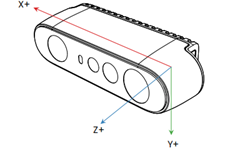 | 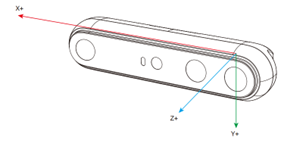 | 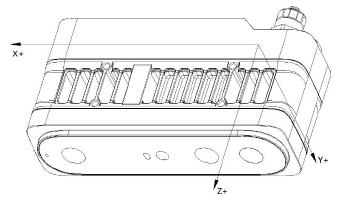 |
| Depth | 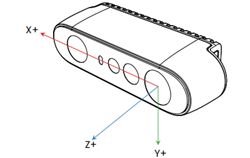 | 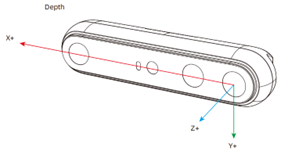 | 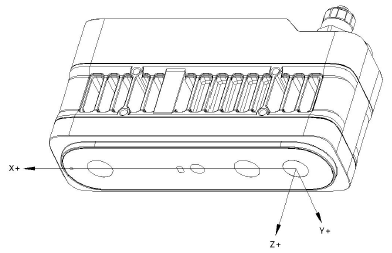 |
| RGB | 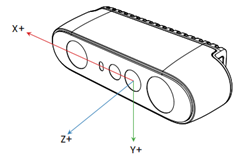 | 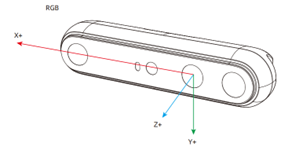 | 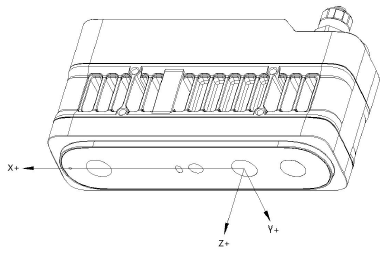 |
Coordinate System Position Reference#
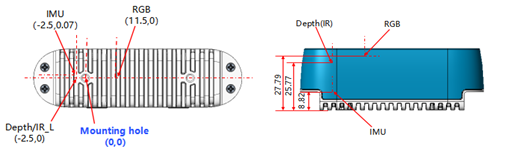
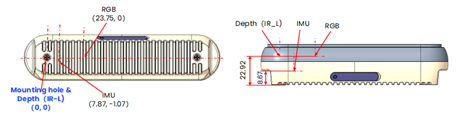
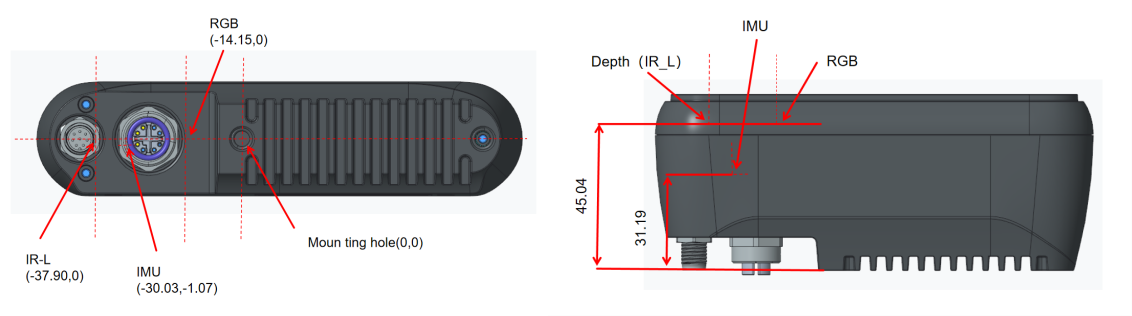
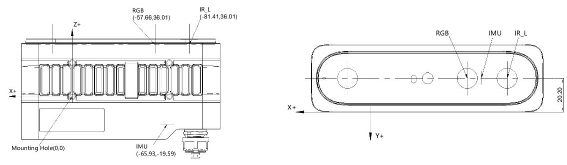
The relative coordinate system relationship between the installation positions and Depth/Color/IMU.
Info
All reference points are at the centers of the components or positions.
STM-501u / STM-502u#
| Position in the 3D Camera Coordinate System (X, Y, Z in mm) | |
|---|---|
| Mounting Hole | 0, 0, 0 |
| Depth | -2.5, 0, 25.77 |
| Color | 11.5, 0, 27.79 |
| IMU | -2.5, 0.07, 8.82 |
STM-951u / STM-952u#
| Position in the 3D Camera Coordinate System (X, Y, Z in mm) | |
|---|---|
| Mounting Hole | 0, 0, 0 |
| Depth | 0, 0, 22.92 |
| Color | 23.75, 0, 22.92 |
| IMU | 7.87, -1.07, 8.67 |
STM-951g#
| Position in the 3D Camera Coordinate System (X, Y, Z in mm) | |
|---|---|
| Mounting Hole | 0, 0, 0 |
| Depth | -37.90, 0, 45.04 |
| Color | -14.15, 0, 45.04 |
| IMU | -30.03, -1.07, 31.19 |
STM-955g#
| Position in the 3D Camera Coordinate System (X, Y, Z in mm) | |
|---|---|
| Mounting Hole | 0, 0, 0 |
| Depth | -81.41, -20.20, 36.01 |
| Color | -57.66, -20.20, 36.01 |
| IMU | -65.93, -20.20, -19.59 |
Camera Start Point Reference#
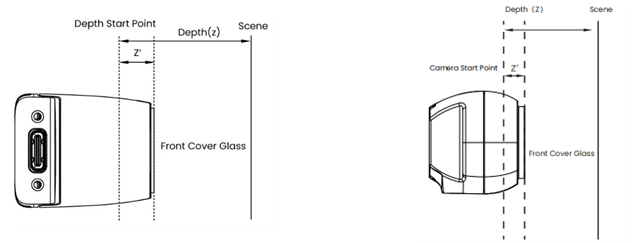
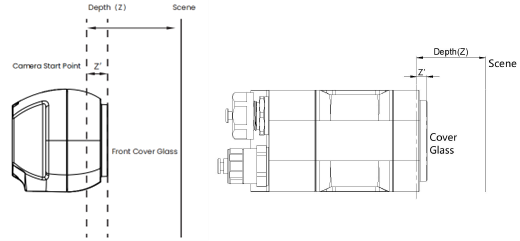
The camera start point, or ground zero datum can be described as a start point or plane with depth = 0. The distances of the depth/RGB/LRM zero point relative to the front cover glass of the camera are listed in the table below.
| STM-501u | STM-502u | STM-951u | STM-952u | STM-951g | STM-955g | |
|---|---|---|---|---|---|---|
| Depth (Z') | 4.230 mm | 4.930 mm | 4.080 mm | 4.780 mm | 4.080 mm | 4.040 mm |
| RGB (Z') | 2.210 mm | 2.910 mm | 4.080 mm | 4.780 mm | 4.080 mm | 4.040 mm |
| LRM (Z') | 0 mm | 0.7 mm | 0 mm | 0.7 mm | 0 mm | 0 mm |
Streaming Mode#
The Stereo mini series offers users flexible methods for acquiring IR, Depth, and RGB image data, with the streaming mode being the most common approach. In this mode, users set a target frame rate, resolution, and image format for each data type before sequentially activating the corresponding data streams. The camera then captures and outputs image data at the user-defined target frame rate, resolution, and image format.
You can select a specific frame rate for the current scene from predefined options (5 fps / 6 fps, 10 fps, 15 fps, 30 fps, 60 fps, 90 fps, and 100 fps) based on the camera's currently configured depth mode and resolution and capture image data at that frame rate.
Triggering Mode#
The Stereo mini series supports image data acquisition methods based on specific frame rates as well as a free-running triggering mode that supports arbitrary frequencies. In this mode, the camera waits for an external input trigger signal and only completes an image data acquisition after receiving a valid external trigger signal, as configured by the camera. The camera then continues to wait for the next external trigger signal. As there is no set time limit between two consecutive triggers, but only a single acquisition time greater than that of the camera, it is possible to control the time interval between two consecutive triggers to achieve any desired frequency. This allows for passive acquisition of image data. Depending on your camera's interface, the camera can be triggered in the following ways:
- USB camera models: Software signal sent by the host computer via USB command or an external device through the 8-pin synchronous interface. This facilitates a passive triggering mode at any frequency.
- STM-951g: Software triggers via network commands (host-initiated) and hardware triggers through M8 A-coded sync interface
- STM-955g: Software triggers via network commands (host-initiated) and hardware triggers through M12 A-coded sync interface
In free triggering mode, the camera's IR, Depth, and RGB fixed frame rates must be set to a uniform value of 5 fps / 6 fps, 10 fps, 15 fps, 30 fps, 60 fps, or 90 fps (depending on the camera model) as required. This is necessary to determine the minimum time interval between two consecutive active triggers. The following tables show the relationship between the fixed frame rate, the minimum time interval, and the upper frequency limit for passive triggering.
In summary, the camera will only respond to trigger signals within the allowed range. This means that the trigger frequency can be any value within the valid frequency range for passive triggering.
USB Camera Models and STM-951g
| Camera's Fixed Frame Rate(fps) | Supportable Passive Trigger Interval (ms) | Supportable Passive Trigger Frequency (Hz) |
|---|---|---|
| 90 | ≥22.3 | 0–45 |
| 60 | ≥33.4 | 0–30 |
| 30 | ≥66.7 | 0–15 |
| 15 | ≥133.4 | 0–7.5 |
| 10 | ≥200 | 0–5 |
| 6 | ≥333.4 | 0–3 |
| 5 | ≥400 | 0–2.5 |
STM-955g
| Camera's Fixed Frame Rate(fps) | Supportable Passive Trigger Interval (ms) | Supportable Passive Trigger Frequency (Hz) |
|---|---|---|
| 20 | ≥100 | 0–10 |
| 15 | ≥133.4 | 0–7.5 |
| 10 | ≥200 | 0–5 |
| 5 | ≥400 | 0–2.5 |
Multi-Camera Synchronization#
For a multi-camera use case, one camera can be initialized as primary, and the rest configured as secondary. Alternatively, an external signal generator can also be used as the primary trigger with all cameras set to secondary mode. When applying an external sync pulse, the HW SYNC input requires a 100-microsecond positive pulse at the nominal camera frame rate, e.g., 33.33 ms for a 30 Hz frame rate. Inputs are high impedance, 1.8 V for USB and 3.3 V for GigE models CMOS voltage levels. However, it's important to make sure to use a high-resolution signal generator. The frequency of the signal generator needs to exactly match the sensor frame rate. For example, if the sensor is set up as 30 fps, the real frame rate may be 30.015 fps. You may need to use an oscilloscope to measure the real frame rate and configure the signal generator to the same frequency. For this reason, it may be better to just use one additional camera as the primary sync signal generator.
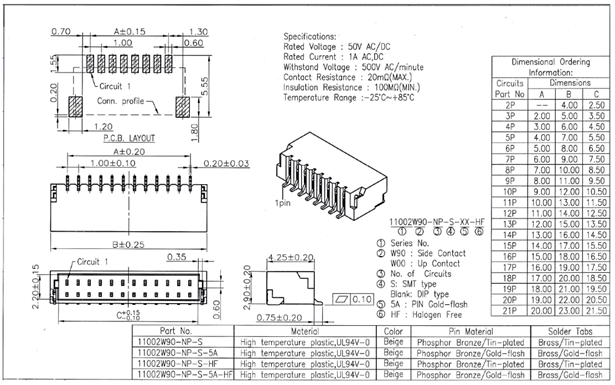
The following figure shows a mechanical diagram of a multi-camera setup.
Advantages of multi-camera setup:
- Increase camera coverage in a given space and fill in the occlusions where a single camera may have blind spots
- Capture multiple images of the same scene and scan objects from different angles
- Increase the effective frame rate to above 30 fps
Using the 8-pin connector and matching cable, a multi-camera and multi-sensor network can be designed. Follow the instructions in the SDK.
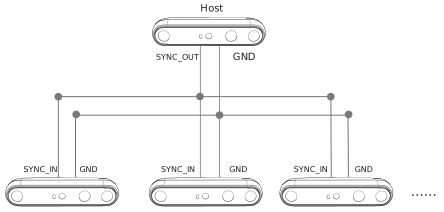
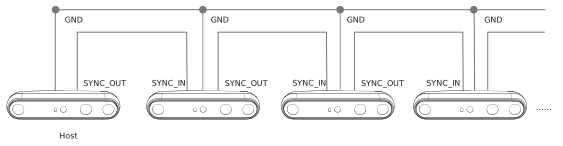
Multi-camera frame synchronization in two topologies is supported, including depth image synchronization and RGB image synchronization (time difference ≤ 5 ms, when auto exposure off), using the multi-camera synchronization function.
Star Topology#
Daisy-Chain Topology#
Synchronization Interfaces#
USB#
| Pin | Definitions | Description |
|---|---|---|
| Pin_1 | VCC | The default electrical level setting is 1.8 V. If 3.3 V or 5 V drive voltage is provided on the VCC interface, the I/O level setting can be adjusted to 3.3 V or 5 V as required. |
| Pin_2 | GPIO_OUT | Synchronization drive signal: Active high. The high-level interval coincides with the IR exposure time. Typical application is to drive external fill light. |
| Pin_3 | VSYNC_OUT | Synchronous trigger signal: Active high. The high level provides the triggering signal for the secondary devices. |
| Pin_4 | TIMER_SYNC_OUT | Pulse signal source, reset hardware timestamp of secondary devices. |
| Pin_5 | RESET_IN | Hardware reset signal: Triggers the camera to power down and automatically power up and reset. Detect the input signal: 20 Hz / 50 % duty cycle / more than 5 consecutive cycles, that is, judged as normal input signal, other signals filtered out; allowed fluctuations for frequency ± 1 Hz, duty cycle ± 2 %. |
| Pin_6 | VSYNC_IN | Synchronous trigger signal: Active high, used for the triggering/sync signal from primary device, with a duration of 1 ms. |
| Pin_7 | TIMER_SYNC_IN | Hardware timestamp reset signal input, hardware timestamp clearing. |
| Pin_8 | GND | Ground |
The synchronization point placements are shown in the following drawings.
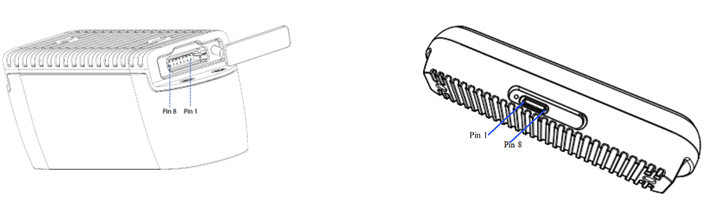
GigE#
| Pin | Definitions | Description |
|---|---|---|
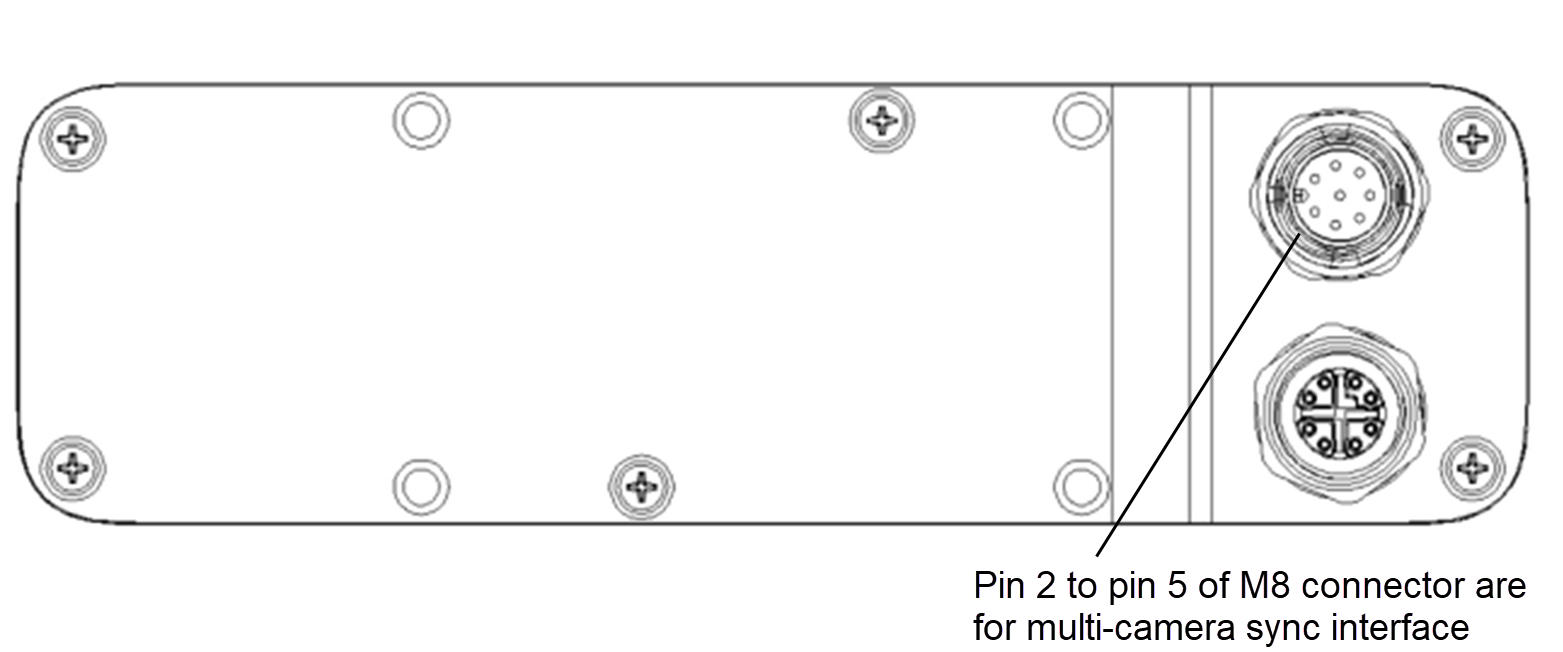
| Pin_2 | Signal VCC | The default electrical level setting is 3.3 V. If 3.3 V, 5 V, or 24 V drive voltage is provided on the VCC interface, the I/O level setting can be adjusted to 3.3 V, 5 V, or 24 V as required. |
| Pin_3 | VSYNC_IN | Synchronous trigger signal: Active high, used for the triggering/sync signal from primary device, with a duration of 1 ms. |
| Pin_4 | VSYNC_OUT | Synchronous trigger signal: Active high. The high level provides the triggering signal for the secondary devices. |
| Pin_5 | Signal GND | Ground |
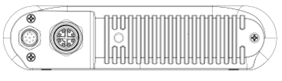
The multi-camera synchronization point pin placements are shown in the following drawings:
STM-951g#
STM-955g#
Pin numbering of the power connector (identical for both camera models):
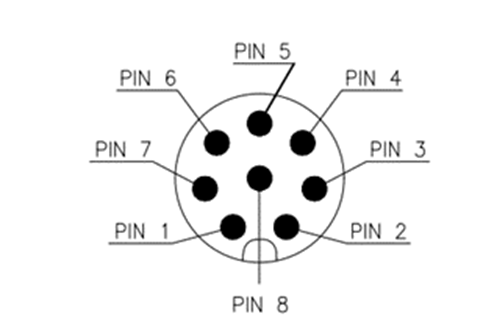
Camera Functions#
Depth Camera Functions#
The Stereo mini series exposes the following depth image settings.
| Node Name | Display Name | Description |
|---|---|---|
| DepthMax | DepthMax | Maximum depth used for depth data (mm) |
| DepthMin | DepthMin | Minimum depth used for depth data (mm) |
| ExposureAuto | Exposure Auto | Sets the automatic exposure mode. |
| ExposureTime | Exposure Time | Sets the Exposure time. This controls the duration where the photosensitive cells are exposed to light. ExposureAuto will be set to Off automatically. |
| Gain | Gain | Controls the selected gain as an absolute physical value. This is an amplification factor applied to the video signal. |
| BslDepthPreset | Depth Preset | Selects a predefined set of algorithm parameters optimized for specific use cases. Possible Values: Default, AMR with IR-Pass, High Accuracy, High Density |
| Pixel Format | Pixel Format | Format of the pixels provided by the device. It represents all the information provided by PixelSize, PixelColorFilter combined in a single feature. Coord3D_C16: 3D coordinate C 16-bit Coord3D_ABC32f: 3D coordinate A-B-C 32-bit floating point |
| BslComponentMappingMode | Component Mapping Mode | How to map depth and color planes. None: Do not map depth and color. ColorOntoDepth: Scale color and map onto depth. DepthOntoColor: Scale depth and map onto color. DepthOntoColor(HW): Scale depth and map onto color (hardware). |
| Scan3dFocalLength | Scan3d Focal Length | Returns the focal length of the camera in pixel. |
| Scan3dBaseline | Scan3d Baseline | Returns the baseline as the physical distance of two cameras in a stereo camera setup. |
| Scan3dPrincipalPointU | Scan3d Principal Point U | Returns the value of the horizontal position of the principal point. |
| Scan3dPrincipalPointV | Scan3d Principal Point V | Returns the value of the vertical position of the principal point. |
Color Camera Functions#
The Stereo mini series exposes the following Color image settings.
| Node Name | Display Name | Description |
|---|---|---|
| ExposureAuto | Exposure Auto | Sets the automatic exposure mode. |
| ExposureTime | Exposure Time | Sets the Exposure time. This controls the duration where the photosensitive cells are exposed to light. ExposureAuto will be set to Off automatically. |
| Gain | Gain | Controls the selected gain as an absolute physical value. This is an amplification factor applied to the video signal. |
| BalanceWhiteAuto | Balance White Auto | Controls the mode for automatic white balancing between the color channels. The white balancing ratios are automatically adjusted. |
| BalanceRatio | Balance Ratio | Controls the white balance of the color image. |
| BslBacklightCompensation | Backlight Compensation | Control the back light compensation. |
| BslBrightness | Brightness | Control the brightness. |
| BslContrast | Contrast | Control the contrast. |
| Gamma | Gamma | Control the gamma. |
| BslHue | BslHue | Control the hue. |
| BslSaturation | Saturation | Control the saturation. |
| BslSharpness | Sharpness | Control the sharpness. |