Hardware Installation (GMSL Cameras)#
Info
If you want to evaluate Basler GMSL cameras together with an NVIDIA Jetson Orin Nano Super Developer Kit in a first step, you can use the Basler GMSL Adapter Board which is part of the Basler GMSL Adapter Kit for Jetson Orin Nano Super Developer Kit.
Before You Start#
Make sure that the following steps have been executed before starting the hardware installation:
- The pylon Software Suite for Linux must be installed.
- The Camera Enablement Package (GMSL Cameras) must be installed.
Make sure that the following items are available before starting the hardware installation:
- One or several Basler ace 2 GMSL cameras. It depends on your host system how many GMSL cameras can be connected.
For a list of supported host systems, see the All Camera Enablement Packages at a glance section on the Basler website. - Depending on the number of ace 2 GMSL cameras you want to install:
Corresponding number of Coaxial Cable with FAKRA Connector. - A lens for each camera you want to install.
If you already know what lens you will be using in your actual application, use this lens during the camera installation and setup. If not, Basler suggests using a zoom lens for the installation and initial setup. Contact Basler technical support if you need assistance in determining the best lens for your application. - Illumination for your application. Contact Basler technical support if you need assistance in determining the best illumination for your application.
Info
Make sure that the host system provides sufficient power. See the camera power requirements in the General Specifications table of the corresponding camera topic.
If the host system doesn't provide sufficient power, the camera may behave in an unexpected way (e.g., the camera may not be found at all or may restart spontaneously).
Installing the Camera#
Info
Basler GMSL cameras: Connecting or disconnecting the camera when the camera is powered on can cause increased stress on the camera. Do not hot-plug the camera.
- Turn off power before connecting or disconnecting the camera.
- Do not disconnect the camera while the camera is capturing and transmitting images or data.
- Make sure that all components are disconnected from the power supply.
- Remove the protective cap from the lens mount.
- Mount a lens on each camera. Be careful not to insert the lens any deeper than specified in the Maximum Allowed Lens Intrusion topic.
- If you want to use any of the camera's I/O lines, carry out the following steps:
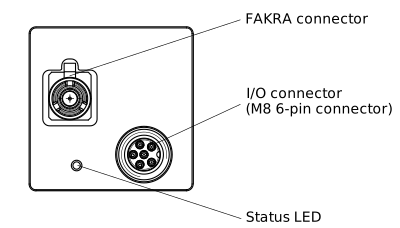
- For each camera, plug the 6-pin connector of the I/O cable into the I/O connector of the camera.
- For each camera, connect the other end of the I/O cable to the device that sends and receives I/O signals.
- Connect the FAKRA coaxial cables:
- For each camera, plug the FAKRA connector of the coaxial cable into the FAKRA connector of the camera.
- For each camera, plug the other end of the FAKRA cable into the FAKRA port of the host system.
Next Steps#
See Configuring GMSL Cameras for information about the next steps.