Temperature State (Stereo ace)#
When the temperature is too high, immediate cooling is required.
Use the Device Temperature feature to determine the camera's current temperature.
Using the Feature#
How It Works#
Information about the internal temperature is provided by the following parameters:
- The
DeviceTemperatureparameter value shows the current temperature at the core board of the camera. For more information, see the Device Temperature topic. - The
BslTemperatureStatusparameter value tells you the camera's current internal temperature state:Ok: The device temperature is within the normal operating temperature range.Critical: The device temperature is close to or at the allowed maximum. Provide cooling.Error: The device temperature is above the allowed maximum. Provide cooling immediately.
The following additional parameters are available:
- The
BslTemperatureStatusErrorCountparameter indicates how often the temperature state changed to Error. - The
BslTemperatureMaxparameter indicates the maximum temperature the camera reached during operation.
When the TemperatureState parameter value is Critical or Error, the camera provides a set of mechanisms that alert the user and help to protect the camera.
The mechanisms take effect at different device temperatures, depending on the alert level and on whether the camera is heating up or cooling down.
Info
Normal camera operation requires that the temperature state stays at Ok and the housing temperature stays within the allowed range. To ensure this, follow the guidelines set out in the "Environmental Requirements" section of your camera topic. You can find your camera topic in the Basler Stereo ace section.
At elevated temperatures, the camera may get damaged, the camera's lifetime is shortened, and image quality can degrade. The lifetime is also shortened by frequent high-temperature incidents.
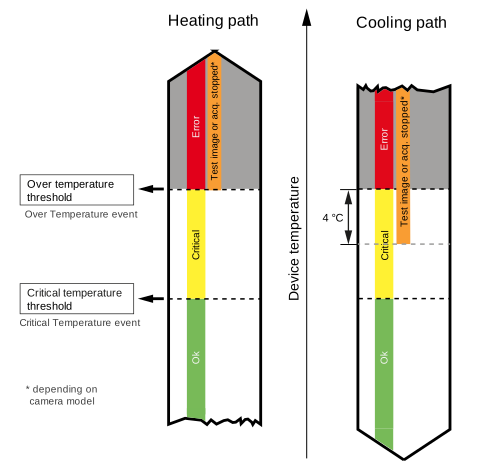
Heating Path#
Critical Temperature Threshold#
When the device temperature reaches the critical temperature threshold (76 °C (168.8 °F)), the camera is close to becoming too hot.
In this situation, the BslTemperatureStatus parameter value changes to Critical.
Info
Another Critical Temperature event can only be sent after the device temperature has fallen to at least 4 °C below the critical temperature threshold.
Over Temperature Threshold#
When the device temperature reaches the over temperature threshold (81 °C (177.8 °F)), the camera is too hot. The camera must be cooled immediately. Otherwise, the camera may get irreversibly damaged.
In this situation, the following happens:
- The
BslTemperatureStatusparameter value changes toError. - The camera's current draw reduces.
- Image acquisition stops and can't be started until the device has cooled down.
- The camera reports an over temperature error code.
- The
BslTemperatureStatusErrorCountparameter increases by 1.
Info
Another Over Temperature event can only be sent after the device temperature has fallen to at least 4 °C below the over temperature threshold.
Cooling Path#
Over Temperature Threshold#
When the device temperature falls below the over temperature threshold (81 °C (177.8 °F)), the following happens:
- The
BslTemperatureStatusparameter value changes fromErrortoCritical.
When the device temperature falls to 4 °C below the over temperature threshold, the following happens:
- Image acquisition can be started again.
Critical Temperature Threshold#
When the device temperature falls below the critical temperature threshold (76 °C (168.8 °F)), the following happens:
- The
BslTemperatureStatusparameter value changes toOk.
The camera's temperature state and internal temperature are normal and therefore allow normal camera operation.
Determining the Temperature State#
- Get the
BslTemperatureStatusparameter value. - If the parameter value is
CriticalorError, you must cool the camera until the parameter value isOk.
To make full use of the Temperature State feature, use the Device Temperature feature to determine the exact core board temperature.