HDR (Stereo ace)#
Using the Feature#
How It Works#
The HDR feature allows you to include the brighter and darker areas of your target scene in your image, i.e., the areas closer to and further away from the camera. This increases the dynamic range of the camera.
To do so, you can configure the camera to take 2, 3, or 4 images (subexposures) which are then combined to form an HDR image. It is important that the objects in the scene don't move between the individual exposures.
The first image should use the shortest exposure time to capture objects close to the camera and allow tighter image spacing. Subsequent images must use progressively longer exposure times to capture more distant areas of the scene. Unused exposure times are ignored if fewer subexposures are configured than available.
The following figure shows the advantages of the HDR feature compared to adjusting the exposure time to suit your measurement range. It shows the exposure times that are most suited for certain measurement ranges, i.e., in which the camera provides valid measurement data for objects with reflectance values between 10 % and 90 %. It also shows that the HDR feature covers more or less the entire spectrum.
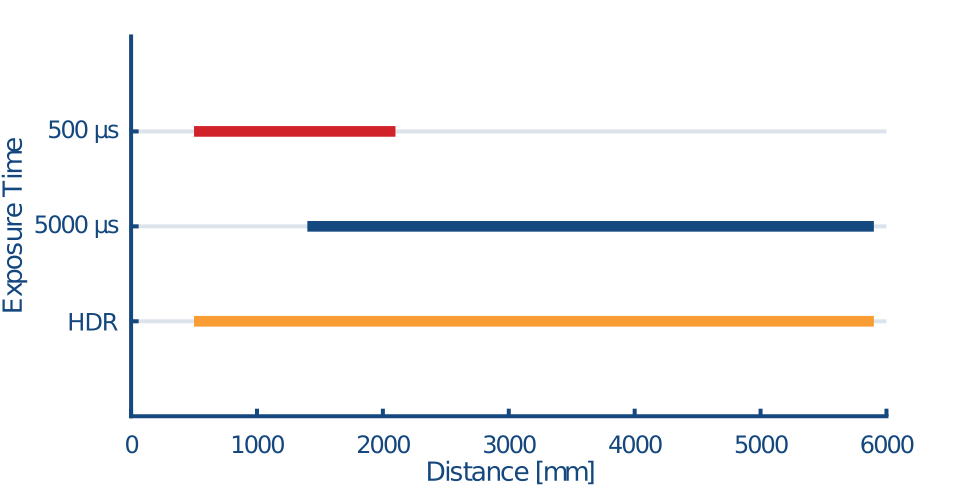
Enabling the HDR feature is useful if you want to capture objects with high reflectance values at close range and objects with low reflectance values at great distances at the same time. This way you will get valid data from the entire measuring range without over- or underexposure.
Info
The HDR feature halves the maximum possible frame rate.
Configuring the HDR Feature#
- Set the
BslHdrEnableparameter toOff. - Set the
BslHdrSubExposuresparameter to the desired number of subexposures. - Specify the exposure times for the individual subexposures.
- Set the
BslHdrExposureTimeSelectorparameter toExposureTime1. - Set the
BslHdrExposureTimeto the desired exposure time. - Repeat steps a) and b) for the remaining subexposures.
- Set the
- Set the
BslHdrEnableparameter toOn.