r2T16416-500cm#
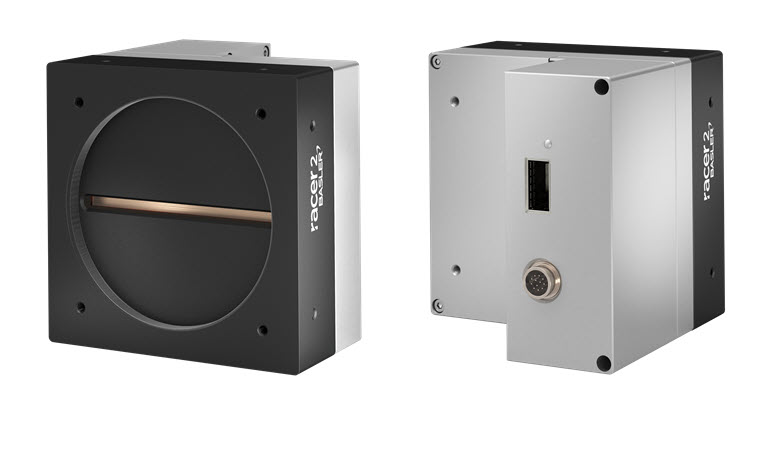
Specifications#
General Specifications#
| r2T16416-500cm | |
|---|---|
| Resolution | 16416 pixels x 256 stages |
| Sensor Type | Gpixel GLT5016BSI, Monochrome BSI CMOS TDI, 1 array Global shutter |
| Sensor Format | 82.08 mm |
| Pixel Size (H x V) | 5 x 5 µm |
| Spectrum | Visible |
| Max. Line Rate | 500 kHz (with pixel format set to Mono 8 or Mono 10 485 kHz (with pixel format set to Mono 12) |
| Product Family | racer 2 XL |
| Mono / Color | Mono |
| Image Data Interface | CoaXPress-over-Fiber, 4x CXP-25 (100 Gbps) |
| Pixel Formats | See Pixel Format. |
| Sensor Bit Depth | 12 bit |
| Synchronization | Via hardware trigger Via software trigger Via free run |
| Camera Power Requirements | 21.6–26.4 VDC supplied via I/O connector ≈21 W (typical) @ 24 VDC |
| I/O Lines | 3 differential general purpose I/O (GPIO) lines |
| Lens Mount | M90x1-mount 12 mm flange focal distance (FFD) |
| Size (L x W x H) | 106 x 110 x 110 mm |
| Weight | ≈1420 g |
| Conformity | CE (includes RoHS), UKCA, FCC, KC, GenICam, CoaXPress-over-Fiber, IP30 Certificates for your camera model For more information, see the Compliance section of the Basler website. |
| Software | Basler Framegrabber SDK Windows (64 bit) (version 5.11 or higher) |
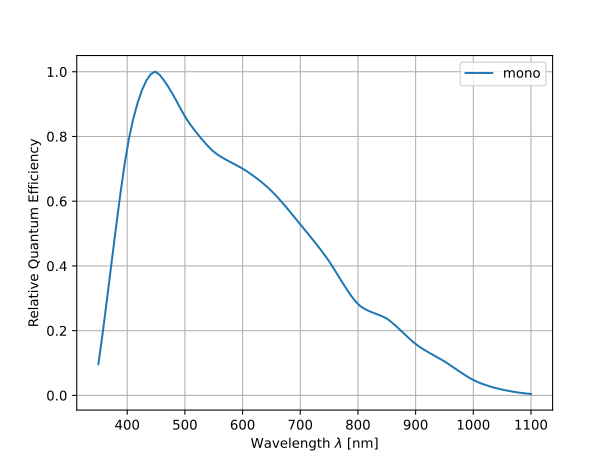
Relative Quantum Efficiency#
Mechanical Specifications#
Camera Dimensions and Mounting Points#
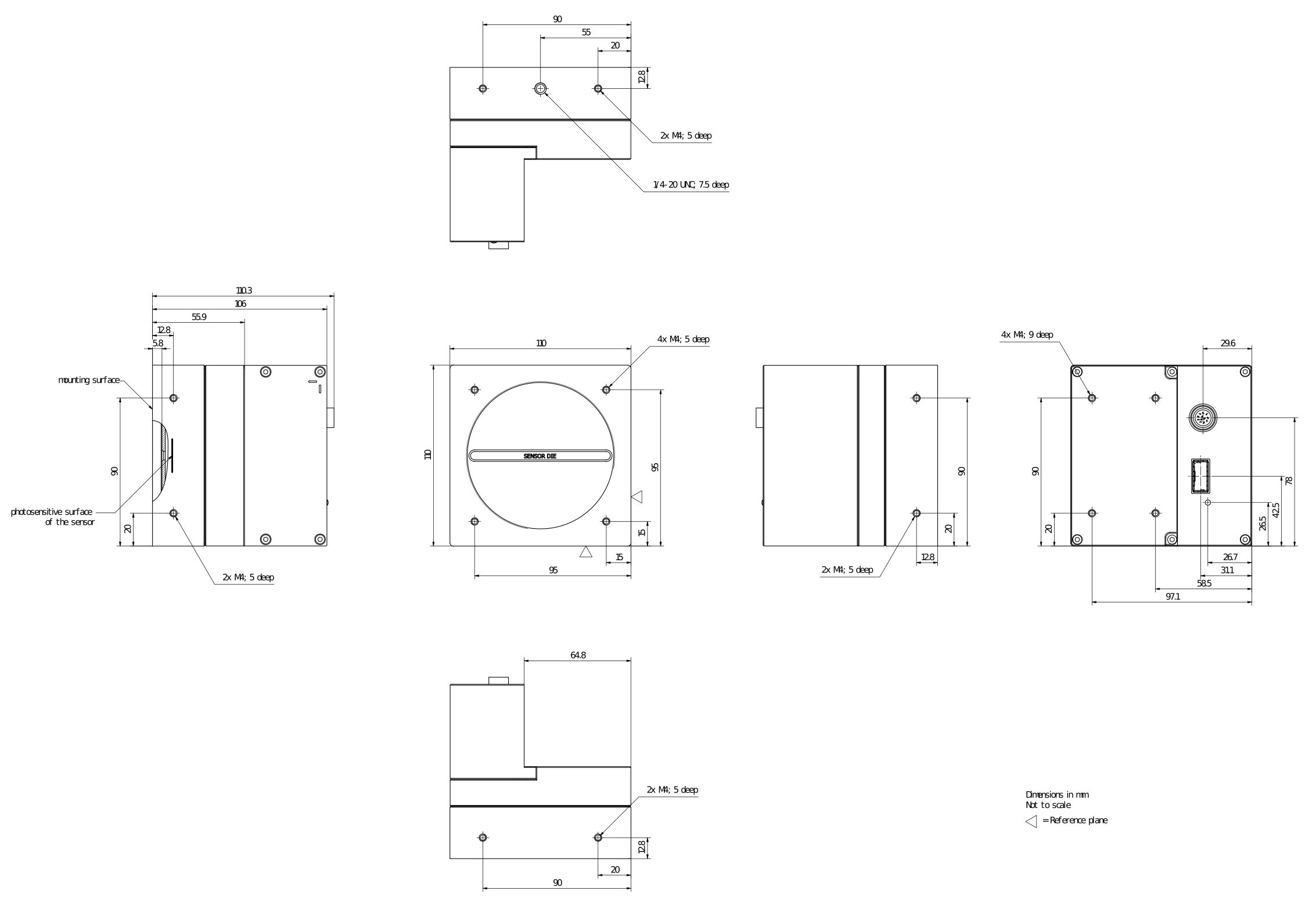
→ Download the CAD/technical drawing for your Basler camera.
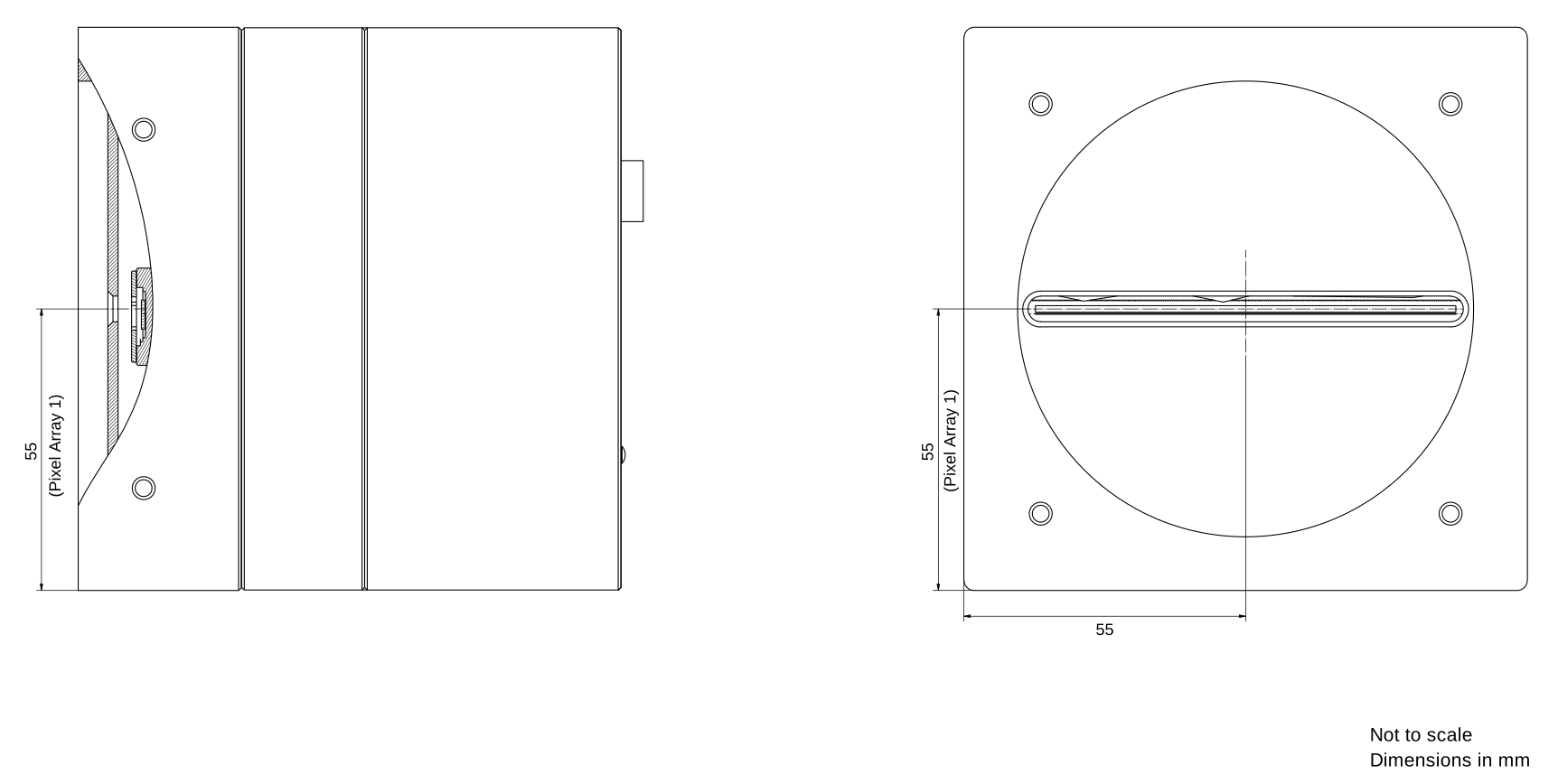
Pixel Array Position#
Requirements#
Environmental Requirements#
Temperature and Humidity#
| Description | Temperature and Humidity |
|---|---|
| Housing temperature during operation | 0–50 °C (32–122 °F) |
| Humidity during operation | <1–80 %, relative, non-condensing |
| Storage temperature | -20–80 °C (-4–176 °F) |
| Storage humidity | <1–80 %, relative, non-condensing |
| Housing temperature according to EN 62368-1 | max. 70 °C (158 °F) |
| Ambient temperature according to EN 62368-1 | max. 30 °C (86 °F) |
Heat Dissipation#
→ See Providing Heat Dissipation.
Electrical Requirements#
WARNING – Electric Shock and Fire Hazard / Risque de choc électrique et d'incendie
Unapproved power supplies may cause electric shock or fire or both. Serious injury or death may occur.
- You must use power supplies that meet the Safety Extra Low Voltage (SELV) and Limited Power Source (LPS) or the Electrical Source 1 (ES1) and Power Source 2 (PS2) requirements.
Les blocs d'alimentation non approuvés peuvent causer des décharges électriques ou des départs de feu, ou les deux. Celles-ci représentent un risque de mort ou de blessure grave.
- Vous devez utiliser un bloc d'alimentation conforme aux exigences Safety Extra Low Voltage (SELV) et Limited Power Source (LPS) ou Electrical Source 1 (ES1) et Power Source 2 (PS2).
NOTICE – Incorrect voltage can damage the camera.
You must supply camera and I/O power within the safe operating voltage ranges specified below.
Do not use negative voltage for an I/O line.
Camera Power#
You must supply camera power via the camera's I/O connector using an external power supply (AUX power).
The operating voltage is 24 VDC ± 10 %. As a minimum, 21.6 VDC must be supplied. To avoid damaging the camera, a maximum of 26.4 VDC must not be exceeded.
I/O Lines#
→ See I/O Control of racer 2 L and racer 2 XL Cameras.
Circuit Diagrams#
→ See I/O Control of racer 2 L and racer 2 XL Cameras.
Cable Requirements#
Fiber Optic Cable#
- Fiber optic cable for CoaXPress‑over‑Fiber data transmission
- For further information, refer to the Basler Cable Optical, MPO, 8x PC/F topic.
WARNING – Laser Safety Instructions 
To avoid injuries, always follow these safety instructions:
Optical fiber connections emit laser radiation in the infrared range. Laser radiation is invisible and can cause eye damage if the eyes are exposed to it directly. Never look into open fiber ends or active optical ports. Before any installation, maintenance, or cleaning, disconnect the connection or shut it down safely. Dispose of fiber remnants with care.
QSFP28 Transceiver Module#
- Fiber optic transceiver module for CoaXPress‑over‑Fiber data transmission
- For further information, refer to the Basler Modul QSFP28 100G SR4 MPO 100m topic.
I/O Cable#
- The I/O cable must be shielded.
- Close proximity to strong magnetic fields should be avoided.
- A maximum cable length of 10 m must not be exceeded.
- Camera-side connector: 12-pin Hirose micro receptacle (part number HR10A-10R-12P)
- Basler recommends using I/O cables from the Basler cable portfolio:
Physical Interface#
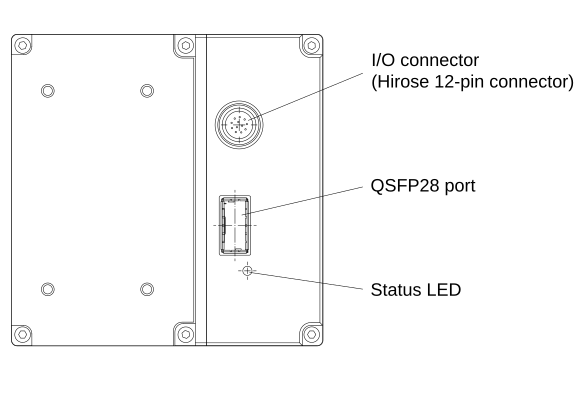
Camera Connectors and Status LEDs#
I/O Connector#
- 12-pin Hirose micro receptacle (part number HR10A-10R-12P)
- Recommended mating connector: 12-pin Hirose micro plug (part number HR10A-10P-12S) or equivalent
QSFP28 Port#
The QSFP28 (Quad Small Form‑Factor Pluggable 28) port is an optical high-speed data network interface.
- Compliant with the Basler Modul QSFP28 100G SR4 MPO 100m
- Compliant with CoaXPress-over-Fiber
- Four independent channels, each of which can transmit data at a speed of 25 Gbps
Info
Basler strongly recommends using the Basler Modul QSFP28 100G SR4 MPO 100m together with the Basler Cable Optical, MPO, 8x PC/F to connect to the QSFP28 port.
Other cables, e.g., DAC (Direct Attach Copper) cables, must not be used. These haven't been tested and may lead to stability issues, e.g., image data loss.
Status LEDs#
The status LEDs indicate the status of their associated CoaXPress connection according to the CoaXPress standard.
LED States#
| LED State | Meaning |
|---|---|
| Off | No power |
| Solid orange | System booting |
| Red flashing at a frequency of 12.5 Hz | System error (e.g., internal error) |
| Red flashing at a frequency of 1 Hz | Powered, but no cable connected |
| Alternating green/orange flashing at a frequency of 0.5 Hz | Connection test packets being sent |
| Solid green | Device/Host connected, but no data being transferred |
| Orange flashing at a frequency of 1 Hz | Device/Host connected, waiting for event (e.g., trigger) |
| Green flashing at a frequency of 12.5 Hz | Device/Host connected, data being transferred |
| Orange flashing at a frequency of 12.5 Hz (shown for a minimum of 1 s even if the connection detection is faster) | Connection detection in progress, PoCXP not in use |
Connector Pinout#

| Pin | Line | Function |
|---|---|---|
| 1 | - | 24 VDC camera power |
| 2 | - | 24 VDC camera power |
| 3 | Line 1 - | General purpose I/O (GPIO) line 1, negative pin |
| 4 | Line 1 + | General purpose I/O (GPIO) line 1, positive pin |
| 5 | - | Ground for general purpose I/O (GPIO) lines |
| 6 | Line 2 - | General purpose I/O (GPIO) line 2, negative pin |
| 7 | Line 2 + | General purpose I/O (GPIO) line 2, positive pin |
| 8 | - | Ground for camera power |
| 9 | - | Ground for camera power |
| 10 | - | Not connected |
| 11 | Line 3 - | General purpose I/O (GPIO) line 3, negative pin |
| 12 | Line 3 + | General purpose I/O (GPIO) line 3, positive pin |
Info
-
Ground for General Purpose I/O (GPIO) lines (pin 5) and ground for camera power (pins 8 and 9) are tied together inside the camera.
-
Always connect both pins for camera power (pins 1 and 2) and ground (pins 8 and 9).
Precautions#
→ See Safety Instructions (boost, racer 2 L, racer 2 XL).
Installation#
→ See Camera Installation.
→ See the Configuring a CoaXPress-over-Fiber System section for information about installing the camera together with the imaFlex 2 Dual 100 frame grabber and the Framegrabber SDK.
Features#
→ See Features.