
Operator Library: Hardware Platform
The GPI operator provides an interface to the digital inputs. Via the Pin_ID / PinID parameter (the name of the parameter depends on the hardware platform), you select the digital input (which is wired to a physical pin on a GPIO unit) you want to use for receiving a signal. The same digital inputs can be used by multiple operators.
For all platforms except the imaFlex platforms: If you use a device with several GPIO units, use the ConnectorType parameter to select the GPIO unit you want to address (Front GPIO or GPIO). On the imaFlex 2 Dual 100, imaFlex CXP-12 Quad and imaFlex CXP-12 Penta platforms, the parameter ConnectorType is not available.
![[Note]](../common/images/admon/note.png) |
Front GPI Port Groups and Signal Modes on the imaFlex 2 Dual 100 Platform |
|---|---|
|
The front GPI ports on the imaFlex 2 Dual 100 platform are divided into two independent groups:
The AppletProperties operator controls whether a front GPI port group operates in single-ended or differential mode. If the FrontGpiPullControl03 / FrontGpiPullControl47 parameter on the AppletProperties operator is set to Differential:
Example: If the FrontGpiType03 parameter is set to Differential in the AppletProperties operator, and the design requires a differential signal on ports 0 and 1:
|
For the mapping of digital inputs and pin connectors, see the GPIO Connectors topic of your frame grabber User Manual. For the imaFlex 2 Dual 100 plaform, see GPIO Connectors (CoF Frame Grabbers).
| Available for Hardware Platforms |
|---|
| imaFlex 2 Dual 100 |
| imaFlex CXP-12 Penta |
| imaFlex CXP-12 Quad |
| mE5 marathon VCLx |
| mE5 marathon VCL |
| mE5 marathon VCX-QP |
| mE5 marathon VF2 |
| LightBridge VCL |
| mE5 ironman VQ8-CXP6D/-CXP6B |
| mE5 ironman VD8-PoCL |
| pixelPlant 100 |
| pixelPlant 200 |
Resources
The FPGA device resources of this operator are equal to value of the PinID / Pin_ID parameter. You can see the FPGA device resources, if you open the dialog from the menu. The device resources are read-only:
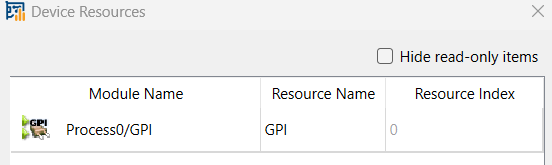
For the imaFlex 2 Dual 100 platform, the resource is of type GPI with index 0 to 7 for Front GPIO connector and 8 to 15 – for the Extension GPIO connector.
| Property | Value |
|---|---|
| Operator Type | M |
| Output Link | O, general purpose input signal to be used inside VisualApplets. |
| Link Parameter | Output Link O |
|---|---|
| Bit Width | 1 |
| Arithmetic | unsigned |
| Parallelism | 1 |
| Kernel Columns | 1 |
| Kernel Rows | 1 |
| Img Protocol | VALT_SIGNAL |
| Color Format | VAF_GRAY |
| Color Flavor | FL_NONE |
| Max. Img Width | any |
| Max. Img Height | any |
| PinID (all imaFlex platforms) | |||||||||||||||||||||||||||||||||||||||||||||||||||||||||||||
|---|---|---|---|---|---|---|---|---|---|---|---|---|---|---|---|---|---|---|---|---|---|---|---|---|---|---|---|---|---|---|---|---|---|---|---|---|---|---|---|---|---|---|---|---|---|---|---|---|---|---|---|---|---|---|---|---|---|---|---|---|---|
| Type | static write parameter | ||||||||||||||||||||||||||||||||||||||||||||||||||||||||||||
| Default | FrontGpi0 | ||||||||||||||||||||||||||||||||||||||||||||||||||||||||||||
| Range |
imaFlex CXP-12 Quad and imaFlex CXP-12 Penta: {FrontGpi0, FrontGpi1, FrontGpi2, FrontGpi3, ExtensionGpi0, ExtensionGpi1, ExtensionGpi2, ExtensionGpi3, ExtensionGpi4, ExtensionGpi5, ExtensionGpi6, ExtensionGpi7}; imaFlex 2 Dual 100: {FrontGpi0, FrontGpi1, FrontGpi2, FrontGpi3, FrontGpi4, FrontGpi5, FrontGpi6, FrontGpi7, ExtensionGpi0, ExtensionGpi1, ExtensionGpi2, ExtensionGpi3, ExtensionGpi4, ExtensionGpi5, ExtensionGpi6, ExtensionGpi7} |
||||||||||||||||||||||||||||||||||||||||||||||||||||||||||||
|
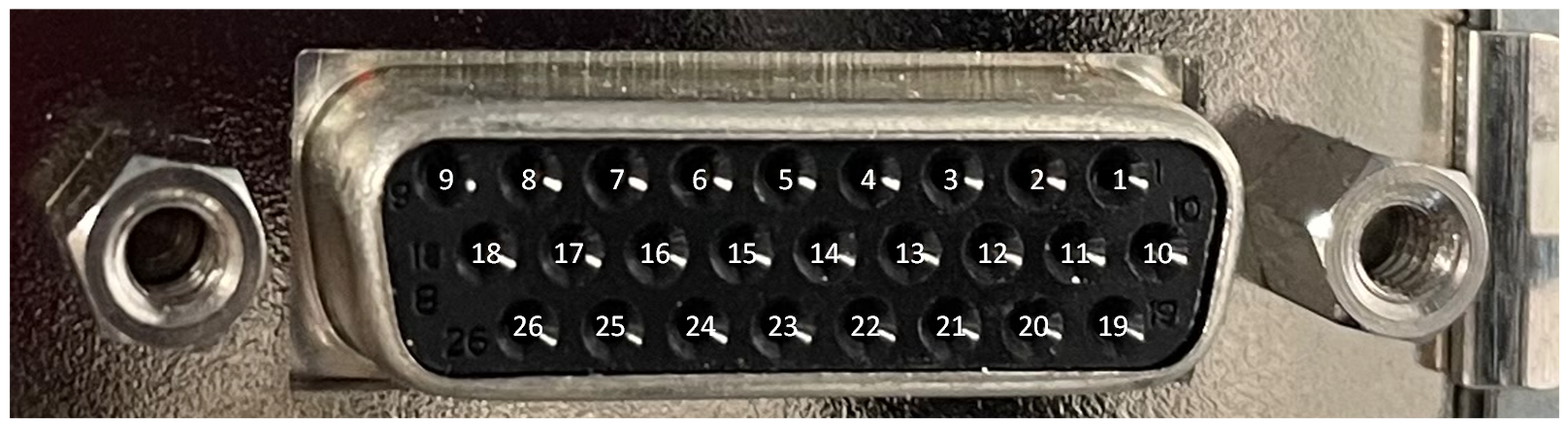
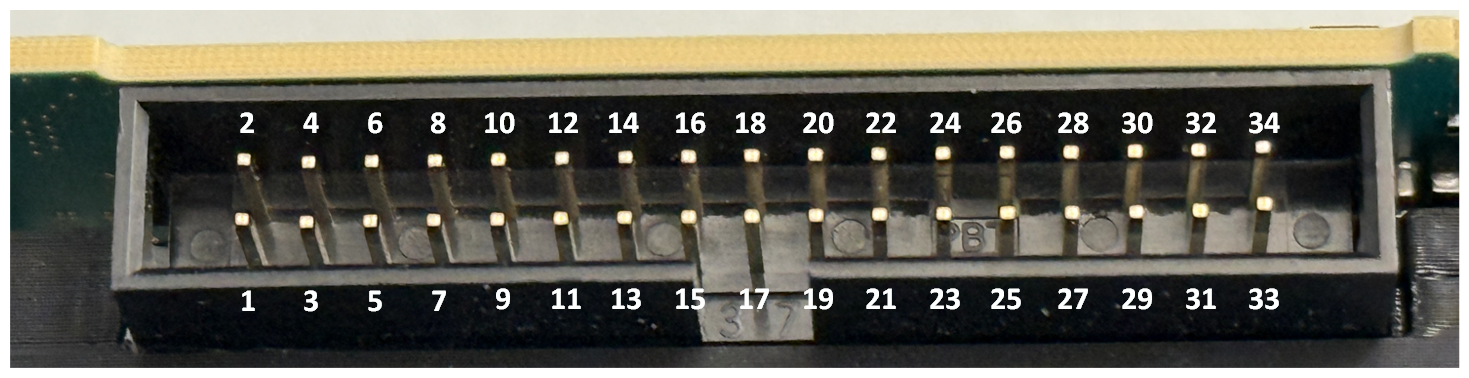
Via the PinID parameter, you define the digital input (which is wired to a physical pin on a GPIO socket) you want to use for receiving a signal. The same digital inputs can be used by multiple operators. FrontGpiN represents the GPI for the Front GPIO connector. ExtensionGpiN represents the GPI for Extension GPIO side connector. For the mapping of digital inputs and pin connectors, see the GPIO Connectors topic of your frame grabber User Manual. For the imaFlex 2 Dual 100 plaform, see GPIO Connectors (CoF Frame Grabbers).
|
|||||||||||||||||||||||||||||||||||||||||||||||||||||||||||||
| Pin_ID (mE5 platforms, pixelPlant and LightBridge VCL) | ||||
|---|---|---|---|---|
| Type | static write parameter | |||
| Default | 0 | |||
| Range | [0;7] or [0;3] | |||
|
Via parameter Pin_ID, you define the digital input (which is wired to a physical pin on a GPIO socket) you want to use for receiving a signal. The same digital inputs can be used by multiple operators. [0;3] The value range is 0-3 for the Front GPIO on marathon, the Front GPIO on LightBridge, and the GPIO on LightBridge. [0;7] For the GPIO on marathon and in all other cases, the value range is 0-7.
|
||||
| ConnectorType (mE5 marathon and LightBridge VCL platforms) | ||||
|---|---|---|---|---|
| Type | static write parameter | |||
| Default | GPIO | |||
| Range | {FrontGPIO, GPIO} | |||
|
Via parameter ConnectorType, you define which GPIO socket (GPIO or Front GPIO) you want to address with the value you enter for parameter Pin_ID.
|
||||
The use of operator GPI is shown in the following examples:
-
An example for hardware self test of DMA, RAM, GPIOs, Trigger and LEDs.
-
'Area Scan Trigger for microEnable 5 marathon'
An area scan trigger is presented. External sources, an internal frequency generator or software trigger pulses can be used for trigger generation.
-
'Area Scan Trigger for microEnable 5 marathon VCX QP'
An area scan trigger for CoaXPress is presented. External sources, an internal frequency generator or software trigger pulses can be used for trigger generation.
-
'Area Scan Trigger for imaFlex CXP-12 Quad'
An area scan trigger for CoaXPress12 is presented. External sources, an internal frequency generator or software trigger pulses can be used for trigger generation.
-
' Line Scan Trigger for microEnable 5 marathon VCL with TrgBoxLine Operator Usage'
A VisualApplets design example showing the usage of operator TrgBoxLine in a simple design.
-
'Line Scan Trigger for microEnable 5 marathon VCX QP Using Signal Operators'
A line scan trigger is presented. The trigger includes an image trigger using a capture gate as well as a multi functional line trigger. External sources, an internal frequency generator or software trigger pulses can be used for trigger generation.
-
'Line Scan Trigger for microEnable 5 marathon VCX QP with TrgBoxLine Operator Usage'
A VisualApplets design example showing the usage of operator TrgBoxLine in a simple design.
-
'Line Scan Trigger for imaFlex CXP-12 Quad Using Signal Operators'
A line scan trigger for CoaXPress12 is presented. The trigger includes an image trigger using a capture gate as well as a multi functional line trigger. External sources, an internal frequency generator or software trigger pulses can be used for trigger generation.
-
'Line Scan Trigger for imaFlex CXP-12 Quad with TrgBoxLine Operator Usage'
A VisualApplets design example showing the usage of operator TrgBoxLine in a simple design.
 Prev
Prev

