a2A5320-29mgc#
Specifications#
General Specifications#
| a2A5320-29mgc | |
|---|---|
| Resolution (H x V Pixels) | 5328 x 3040 (full resolution) 5320 x 3032 (default resolution) |
| Resolution | 16.1 MP |
| Sensor Type | Sony IMX542-AAQJ-C Progressive scan CMOS Global shutter |
| Sensor Format | 1.1" |
| Effective Sensor Diagonal | 16.8 mm |
| Pixel Size (H x V) | 2.74 x 2.74 µm |
| Spectrum | Visible |
| Frame Rate | 29 fps GMSL2 limit for a single camera when feeding one MIPI CSI-2-port with four data lanes operating at 1.5 Gbit/s. The frame rate may be lower if multiple cameras share a MIPI CSI-2-port or if the port is configured for a reduced bandwidth. For other frame rate settings, see the Basler Frame Rate Calculator. |
| Product Family | ace 2 R |
| Mono / Color | Color |
| Image Data Interface | GMSL2 (6 Gbit/s, FAKRA connector) |
| Pixel Formats | See Pixel Format. |
| Synchronization | Via hardware trigger Via software trigger Via free run |
| Exposure Time Control | Via hardware trigger Programmable via the camera API |
| Camera Power Requirements | 4.4 W (typical) @ 12 VDC when using PoC or @ 12–24 VDC when supplied via I/O connector |
| I/O Lines | 1 opto-coupled input line 2 general purpose I/O (GPIO) lines |
| Link Signals (Virtual I/O Lines) | Up to 4 I/O link signals (Number and functions of the link signals depend on the host system setup.) Propagation Delay: < 3 μs (typical), between camera and host deserializer Jitter: < 1 μs (typical) |
| Lens Mount | C-mount |
| Size (L x W x H) | 36.3 x 29 x 29 mm (without lens mount or connectors) 52.5 x 29 x 29 mm (with lens mount and connectors) |
| Weight | <75 g |
| Conformity | CE (includes RoHS), UKCA, UL Listed, FCC, KC, GenICam, IP30 Certificates for your camera model For more information, see the Compliance section of the Basler website. |
| Software | Basler pylon Software Suite (version 25.07.4 or higher) Available for Linux ARM For supported host systems, see here |
| Accessories | Accessories for your camera model If you want to evaluate Basler ace 2 GMSL cameras with an NVIDIA Jetson Orin Nano Super Developer Kit, you can use the GMSL Adapter Kit. |
| Availability and Pricing | See the product page on the Basler website. |
Spectral Response#
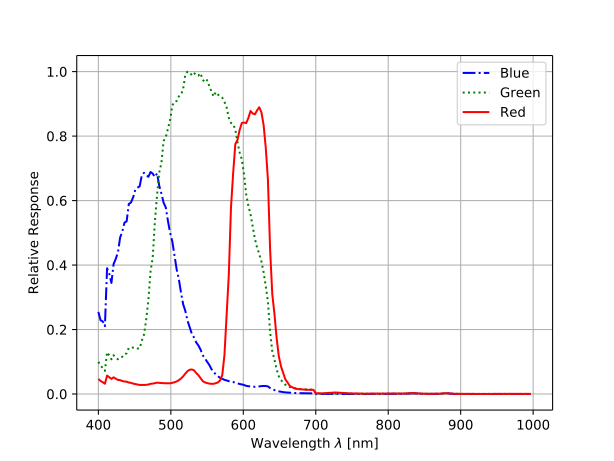
The spectral response curve includes IR cut filter characteristics, but excludes lens characteristics and light source characteristics.
IR Cut Filter#
Color cameras are equipped with an IR cut filter. The filter is mounted in a filter holder inside the lens mount.
The IR cut filter has the following spectral characteristics:
| Wavelength [nm] | Transmittance |
|---|---|
| 450–610 | Tmin > 90 % |
| 450–620 | Tavg > 93 % |
| 645 ± 10 | T = 50 % |
| 700–1070 | Tmax < 4 % |
| 690–1070 | Tavg < 1 % |
The filter holder can be removed. For more information, see the ace IR Cut Filter Holder Removal Procedure application note.
Info
Removing the IR cut filter results in the image sensor capturing infrared radiation in addition to visible light. This can cause significant color distortions and may affect white balance performance.
Mechanical Specifications#
Camera Dimensions and Mounting Points#
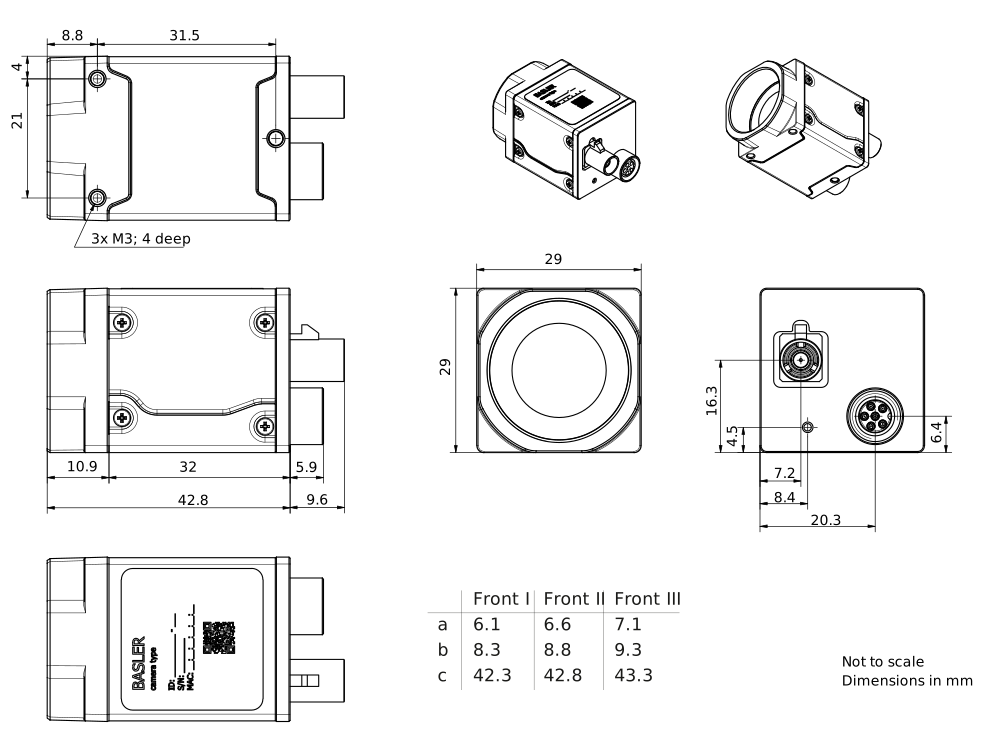
→ Download the CAD/technical drawing for your Basler camera.
Info
This camera is equipped with Front II.
Maximum Allowed Lens Intrusion#
→ See Maximum Allowed Lens Intrusion.
Mounting Instructions#
→ See Mounting Instructions.
Stress Test Results#
→ See Stress Test Results.
Requirements#
Environmental Requirements#
Temperature and Humidity#
| Housing temperature during operation | -10–60 °C (14–140 °F) |
| Humidity during operation | 20–80 %, relative, non-condensing |
| Storage temperature | -30–80 °C (-22–176 °F) |
| Storage humidity | 20–80 %, relative, non-condensing |
| Housing temperature according to UL 62368-1 | max. 70 °C (158 °F) |
| Ambient temperature according to UL 62368-1 | max. 30 °C (86 °F) |
Heat Dissipation#
→ See Providing Heat Dissipation.
Electrical Requirements#
WARNING – Electric Shock and Fire Hazard / Risque de choc électrique et d'incendie
Unapproved power supplies may cause electric shock or fire or both. Serious injury or death may occur.
- You must use power supplies that meet the Safety Extra Low Voltage (SELV) and Limited Power Source (LPS) or the Electrical Source 1 (ES1) and Power Source 2 (PS2) requirements.
Les blocs d'alimentation non approuvés peuvent causer des décharges électriques ou des départs de feu, ou les deux. Celles-ci représentent un risque de mort ou de blessure grave.
- Vous devez utiliser un bloc d'alimentation conforme aux exigences Safety Extra Low Voltage (SELV) et Limited Power Source (LPS) ou Electrical Source 1 (ES1) et Power Source 2 (PS2).
NOTICE – Incorrect voltage can damage the camera.
You must supply camera power within the safe operating voltage ranges specified below.
Do not use negative voltage for an I/O line.
Info
Connecting or disconnecting the camera when the camera is powered on can cause increased stress on the camera. Do not hot-plug the camera.
- Turn off power before connecting or disconnecting the camera.
- Do not disconnect the camera while the camera is capturing and transmitting images or data.
Camera Power#
You can supply camera power via Power over Coax (PoC) and the FAKRA connector, or via the camera's I/O connector using an external power supply (AUX power). If you supply power via both the FAKRA connector (PoC) and the I/O connector, power supply via the external power supply (AUX power) takes precedence.
- Power supply via PoC (FAKRA connector): Power must comply with the GMSL Design Guide specification. Operating voltage is 12 VDC. As a minimum, 10.8 VDC must be supplied. To avoid damaging the camera, a maximum of 15 VDC must not be exceeded.
- Power supply via I/O connector: The operating voltage is 12–24 VDC. As a minimum, 10.8 VDC must be supplied. To avoid damaging the camera, a maximum of 30 VDC must not be exceeded.
Info
If you use PoC:
Make sure that the host system provides sufficient power. See the camera power requirements in the General Specifications table above.
If the host system doesn't provide sufficient power, the camera may behave in an unexpected way (e.g., the camera may not be found at all or may restart spontaneously).
Opto-Coupled I/O Input Line#
| Voltage | Description |
|---|---|
| 30 VDC | Absolute maximum. This voltage must never be exceeded. Doing so may damage the camera and voids the warranty. |
| 0–24 VDC | Safe operating range. |
| 0–1.0 VDC | Indicates a logical 0 (with inverter disabled). |
| >1.0–2.2 VDC | Region where the logic level transition occurs; the logical state is not defined in this region. |
| >2.2 VDC | Indicates a logical 1 (with inverter disabled). |
- Input current (high-level): <15 mA internally limited
- Input current (high-level): >5 mA required to drive the opto-coupler
General Purpose I/O Lines#
NOTICE: Applying incorrect electrical signals to the camera's GPIO line can severely damage the camera.
Before you connect any external circuitry to the GPIO line, use the Line Mode feature to configure the line for input or output.
Make sure to apply appropriate input or output signal voltages as specified below.
Operation as Input#
| Voltage | Description |
|---|---|
| 30 VDC | Absolute maximum. This voltage must never be exceeded. Doing so may damage the camera and voids the warranty. |
| 0–24 VDC | Safe operating range. The minimum external pull-up voltage is 3.3 VDC. |
| 0–0.8 VDC | Indicates a logical 0 (with inverter disabled). |
| >0.8–2.0 VDC | Region where the logic level transition occurs; the logical state is not defined in this region. |
| >2.0 VDC | Indicates a logical 1 (with inverter disabled). |
- Input current (high-level): <100 μA
- Input current (low-level): <5 mA sink current from the GPIO input line without exceeding 0.8 VDC.
Operation as Output#
| Voltage | Description |
|---|---|
| 30 VDC | Absolute maximum. This voltage must never be exceeded. Doing so may damage the camera and voids the warranty. |
| 3.3–24 VDC | Safe operating range. |
| <3.3 VDC | Unreliable GPIO output. |
- Internal pull-up resistor: ≈650 Ω, with open collector. Many applications will have to provide an additional pull-up resistor.
- Residual voltage ("on" state): ≈0.4 VDC at 50 mA and 25 °C (77 °F) housing temperature. Actual residual voltage depends on operating temperature, load current, and production spread of electronic components.
- Leakage current: <60 µA. Actual leakage depends on operating temperature and production spread of electronic components.
- Maximum load current: 50 mA
- Minimum load current: Not specified. Consider the following:
- Leakage current will have a stronger effect when load currents are low.
- Propagation delay of the output increases as load currents decrease.
- Higher-impedance circuits tend to be more susceptible to EMI.
- Higher currents cause higher voltage drops in long cables.
For more information about the I/O lines, see the I/O Control section.
Circuit Diagrams#
→ See Circuit Diagrams.
Cable Requirements#
Coaxial Data Cable With FAKRA Connector#
- A maximum cable length of 30 m must not be exceeded.
- Use a high-quality coaxial cable with FAKRA connector.
- Proximity to strong magnetic fields should be avoided.
- The data cable must comply with the FAKRA standard.
- Coaxial cable, FAKRA Z-coding (Water Blue), according to ISO 20860-1, 50 Ohm impedance
- Basler recommends using coaxial data cable with FAKRA connector from the Basler cable portfolio. There are coaxial data cables of various lengths available.
- If you want to use cables by other manufacturers, make sure to use cables specified for 3 GHz or higher.
I/O Cable#
- The I/O cable must be shielded.
- The I/O cable must have a cross-section of at least 0.14 mm² (close to AWG26).
- Maximum recommended cable length: 10 m
- Camera-side connector: M8 6-pin male, coding A-standard, according to IEC 61076-2-104
- Proximity to strong magnetic fields should be avoided.
- Basler recommends using I/O cables (M8 6 pins) from the Basler cable portfolio:
Physical Interface#
Camera Connectors and Status LED#
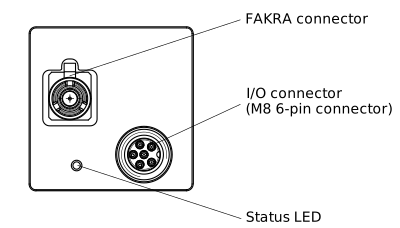
I/O Connector#
- M8 6-pin female connector, coding A-standard, according to IEC 61076-2-104
- Recommended mating connector: M8 6-pin male, coding A-standard, according to IEC 61076-2-104
FAKRA Connector#
- FAKRA Z-coding female connector (Water Blue), according to ISO 20860-1
Status LED#
Indicates camera operation (LED lit = camera operating).
The LED can be turned off permanently by setting the DeviceIndicatorMode parameter to Inactive.
LED States#
| LED State | Meaning |
|---|---|
| Off | No power |
| Solid green | Powered |
| Flashing green repeatedly (3x short – 3x long – 3x short); errors of this type remain active until the system is restarted. | System error (e.g., internal error) |
| Flashing green (3x long) repeatedly until error is corrected | User error (e.g., temperature error) |
Connector Pinout#
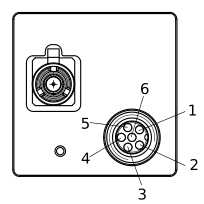
| Pin | Line | Function |
|---|---|---|
| 1 | - | 12–24 VDC camera power |
| 2 | Line 1 | Opto-coupled I/O input line |
| 3 | - | Ground for opto-coupled I/O lines |
| 4 | Line 2 | General purpose I/O (GPIO) line |
| 5 | Line 3 | General purpose I/O (GPIO) line |
| 6 | - | Ground for camera power and General Purpose I/O (GPIO) lines |
Precautions#
→ See Safety Instructions (ace, ace 2, racer 2 S).
Installation#
→ See Camera Installation.
Features#
→ See Features.