Histogram Extractor vTool#
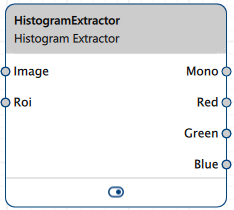
For monochrome images, the distribution is output via the Mono output pin. For color images, the distribution is output via the Red, Green, and Blue output pins.
The brightness values are calculated from the image data and can be used to analyze the image content.
If you only need the histogram for a particular area of your image, use the Roi input pin to limit the area of the image from which the brightness values are calculated. For this, you can either use the Roi Creator vTool or you can connect an output pin of another vTool that outputs RectangleF or Region data.
You can use the outputs of the Histogram Extractor as input for the Histogram Statistics vTool to view statistical data of your histogram.
Download the pylon Software Suite to use the Histogram Extractor vTool.
Configuring the vTool#
This vTool has no configurable settings.
Inputs#
Image#
Accepts images directly from a Camera vTool or from a vTool that outputs images, e.g., the Image Format Converter vTool.
- Data type: Image
- Image format: 8-bit and 16-bit mono or color images (see Supported Pixel Formats)
Roi#
Accepts a region of interest from the ROI Creator vTool or any other vTool that outputs regions or rectangles.
- Data type: RectangleF, Region
Outputs#
Mono#
Returns the histogram for monochrome images.
- Data type: Integer Array
Red#
Returns the histogram of the red color channel for color images.
- Data type: Integer Array
Green#
Returns the histogram of the green color channel for color images.
- Data type: Integer Array
Blue#
Returns the histogram of the blue color channel for color images.
- Data type: Integer Array
Supported Pixel Formats#
The following pixel formats are supported natively:
- Mono 8
- Mono 10
- Mono 12
- Mono 16
- BGR 8
- BGR 10
- BGR 12
- BGR 16
- RGB 8
- RGB 10
- RGB 12
- RGB 16