Basler Vision Connector Licensing#
- pylon License: Required to run the pylon software and create vTools in the pylon Viewer. The pylon license is included with the purchase of a Basler camera (see pylon EULA).
- pylon vTools License: Required to create certain vTools in the pylon Viewer. A free trial license, valid for 180 days, is included with the pylon installation. You can find a list of vTools that require a license in the vTools Licenses section.
For purchasing information, visit: pylon vTools Licenses. - Basler Vision Connector vTools Licenses: Required to instantiate certain vTools in the Basler Vision Connector. You can find a list of vTools that require a license in the vTools Licenses section.
These licenses can be purchased through the Siemens Marketplace vTools Licenses. - Basler Vision Connector Multi-Camera Connection License: Required if you want to connect more than one camera simultaneously to the Basler Vision Connector.
This license can be purchased through the Siemens Marketplace Multi-Camera Connection Licenses. - Siemens Industrial Edge Management License: Required to use the Siemens Industrial Edge Management System and to manage Siemens Industrial Edge Devices.
For more information, see Siemens Xcelerator.
Info
The Basler Vision Connector app itself doesn't require a license. However, the BVC vTools licenses and the BVC Multi-Camera Connection License can be purchased in the Siemens Marketplace - BVC. vTools licenses can be purchased through the Siemens Marketplace - vTools.
vTools Licenses#
The following vTools require licenses: both a pylon vTools license and a Basler Vision Connector license are necessary.
| Category | vTool Name | License Required |
|---|---|---|
| Acquisition | Cameraa | No |
| Image Loadinga | No | |
| Blob Analysis | Absolute Thresholding Basic | Yes |
| Auto Thresholding Basic | Yes | |
| Color Classifier Basic | Yes | |
| Region Feature Extraction | Yes | |
| Region Morphology | Yes | |
| Region Selection | Yes | |
| Relative Thresholding Basic | Yes | |
| Data Management | Data Synchronizer | No |
| Multiplexer | No | |
| Identification | Barcode Reader Starter | No |
| Barcode Reader Basic | Yes | |
| Barcode Reader Pro | Yes | |
| Data Matrix Code Reader Starter | No | |
| Data Matrix Code Reader Basic | Yes | |
| Data Matrix Code Reader Pro | Yes | |
| OCR Basic | Yes | |
| QR Code Reader Starter | No | |
| QR Code Reader Basic | Yes | |
| QR Code Reader Pro | Yes | |
| Image Manipulation | Gray Value Transformer Starter | No |
| Gray Value Transformer Basic | Yes | |
| Image Combiner Starter | No | |
| Image Combiner Basic | Yes | |
| Image Enhancer Basic | Yes | |
| Image Morphology Starter | No | |
| Image Morphology Basic | Yes | |
| Image Sharpening Starter | No | |
| Image Sharpening Basic | Yes | |
| Image Smoothing Starter | No | |
| Image Smoothing Basic | Yes | |
| Matching | Geometric Pattern Matching Basic | Yes |
| Geometric Pattern Matching Pro | Yes | |
| Template Matching Starter | No | |
| Template Matching Basic | Yes | |
| Measuring | Circle Measurements Pro | Yes |
| Ellipse Measurements Pro | Yes | |
| Line Measurements Pro | Yes | |
| Measurements Basic | Yes | |
| Rectangle Measurements Pro | Yes | |
| Supporters | Array Element Selector | No |
| Calibration Basic | Yes | |
| Calibration Pro | Yes | |
| Grid Creator | No | |
| Histogram Extractor | No | |
| Histogram Statistics | No | |
| Image Alignment | No | |
| Image Cropper | No | |
| Image Format Converter | No | |
| Image Stitcher | No | |
| Image Transformer | No | |
| Mini Script | No | |
| ROI Creator | No | |
| Region Combiner | No |
-
Not supported by the Basler Vision Connector. If this vTool is included in the recipe file you want to instantiate in the Basler Vision Connector, it must be deactivated. See Using vTools in the Basler Vision Connector for details.
Assigning Licenses to Your Industrial Edge Device (IED)#
To use the Basler Vision Connector licenses (e.g., Basler Vision Connector vTools licenses and the Basler Vision Connector Multi-Camera Connection license), you must assign them to your Industrial Edge Device (IED).
For detailed instructions, refer to the official Siemens documentation: Managing Licenses: Siemens Industrial Edge.
Info
Basler recommends to assign licenses directly to Industrial Edge Devices, not to the Industrial Edge Management (IEM). This ensures that the correct licenses are reliably allocated to the correct devices.
When you assign one license (e.g., Basler Vision Connector vTools licenses and the Basler Vision Connector Multi-Camera Connection license) to an Edge Device, the device automatically claims all available BVC licenses assigned to its Edge Device or its Industrial Edge Management (IEM).
If you want to reassign a license to a different Edge Device, follow these steps:
-
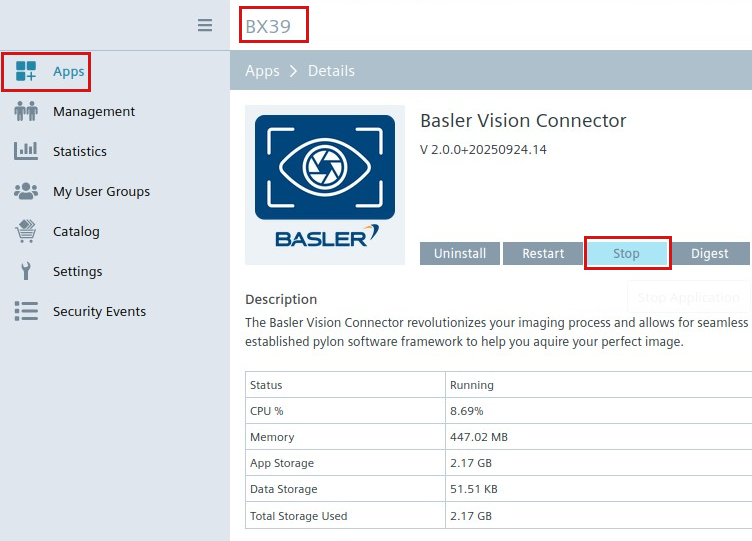
Stop the Basler Vision Connector on the current Edge Device.
-
Wait for 2 hours.
Reason: Licenses are reserved for the device for 2 hours after stopping the Basler Vision Connector. - After 2 hours, change the license assignments in the Industrial Edge Hub.
-
Restart the Vision Connector App on your Edge Device.
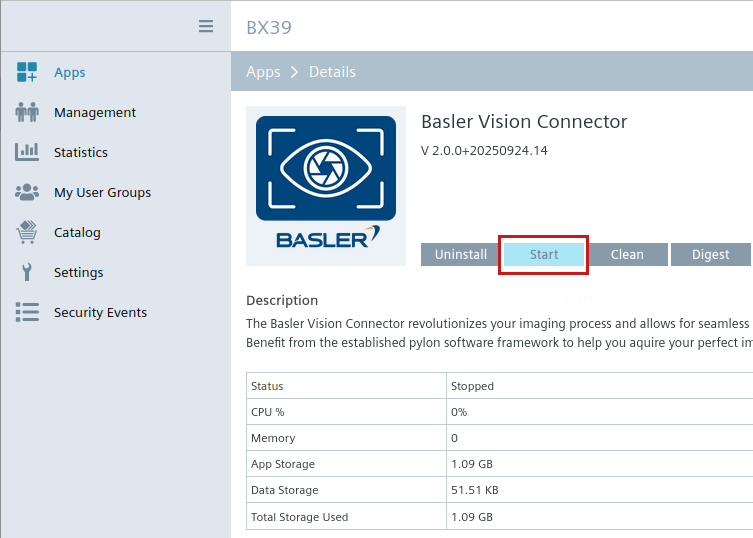
You can stop and start the Basler Vision Connector either from the Industrial Edge Management (IEM) or via your Industrial Edge Device.